Your friend is studying in New York. It’s their birthday, so you pick up your phone and send a quick WhatsApp message: Happy Birthday! Have a great day.
A few moments later, two blue ticks appear. That’s it. The conversation moves on. Most of us never stop to think about what happened between those two moments. That short message didn’t simply jump from one phone to another. It passed through layers of security, traveled across communication networks, relied on internet infrastructure spread across different parts of the world, and eventually found its way to the correct device, all before you had time to think about it.
The remarkable part is not that WhatsApp can deliver a message. The remarkable part is how effortlessly it does so. Whether you’re texting someone in the next room or on another continent, the experience feels almost identical. Understanding how WhatsApp messages work reveals the technology that makes this possible. From the instant you tap the Send button to the moment a blue tick appears, there is a carefully coordinated process taking place that most users never see. Let’s understand that process step by step.
What Happens When You Tap the Send Button?
Curiosity about how WhatsApp sends messages often begins with a simple question: what happens after pressing Send? The moment you tap Send, your birthday message begins its first real task: preparing itself for delivery. At this stage, WhatsApp isn’t focused on moving the message across the internet yet. Before anything can leave your phone, the app needs to organize the information required to reach the right person.
Your text is packaged together with details such as the recipient’s account and other technical information that helps WhatsApp identify where the message belongs. Without this information, the system would have no reliable way to deliver the message to the correct chat.
You can think of it like handing a package to a courier service. Writing the message is only part of the process. The destination matters just as much. A package without an address might exist, but it won’t arrive anywhere useful. This preparation happens so quickly that it feels invisible. From a user’s perspective, pressing the button appears to trigger an immediate response.
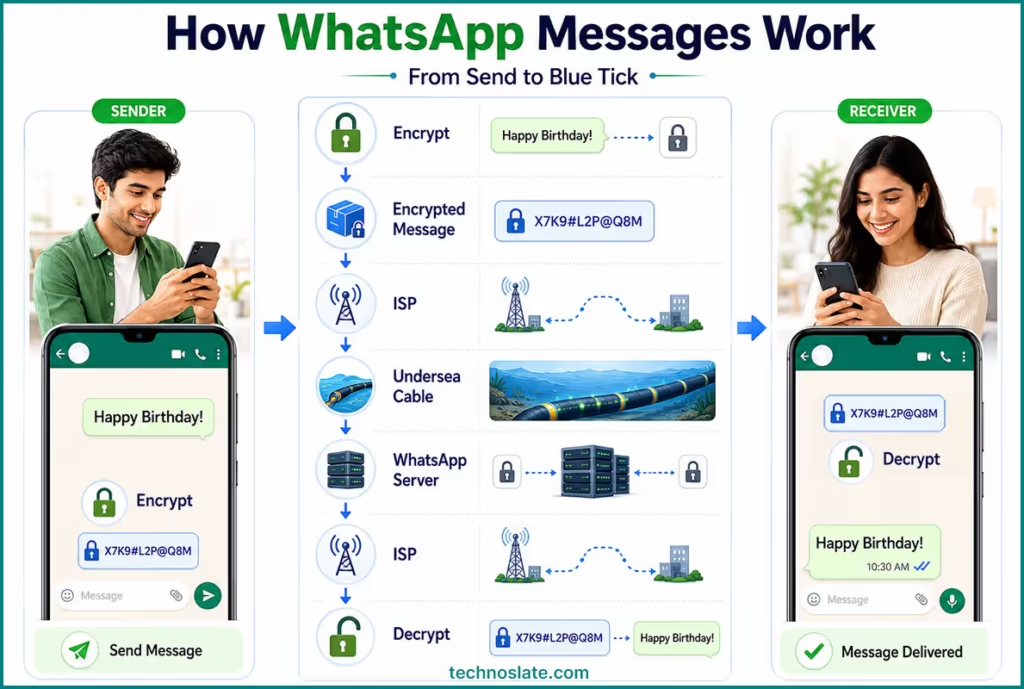
In reality, your phone is performing several small tasks before the message can continue moving forward. For our birthday greeting, this stage lasts only a brief moment. Once everything is ready, WhatsApp can begin the next step in how WhatsApp messages work, protecting the message before it enters the wider internet.
How WhatsApp Encrypts Your Message
At this point, your birthday message knows where it needs to go. But before it can leave your phone, WhatsApp takes an extra step to protect it. Imagine writing a letter and placing it inside a safe that only the recipient can unlock. Anyone who sees the safe can tell that something is being transported, but the contents remain inaccessible.
WhatsApp follows a similar principle through end-to-end encryption. Instead of sending your words in a form that can be easily read, the app converts them into encrypted data. This transformation happens on your device before the message is transmitted anywhere else.
The important detail here is that the protection is designed around the people involved in the conversation. The sender creates the message, and the recipient’s device is responsible for turning it back into readable text. Along the way, other systems help move the information, but they are not meant to view the conversation itself.
For everyday users, this security layer often goes unnoticed. You type a message, press a button, and continue chatting as usual. Yet this step plays a major role in how WhatsApp messages work, helping ensure that personal conversations remain private while they travel through the internet. With the message now secured, it is finally ready to leave your device and connect with the wider network that will carry it toward its destination. Let’s dive deeper into some technical aspects.
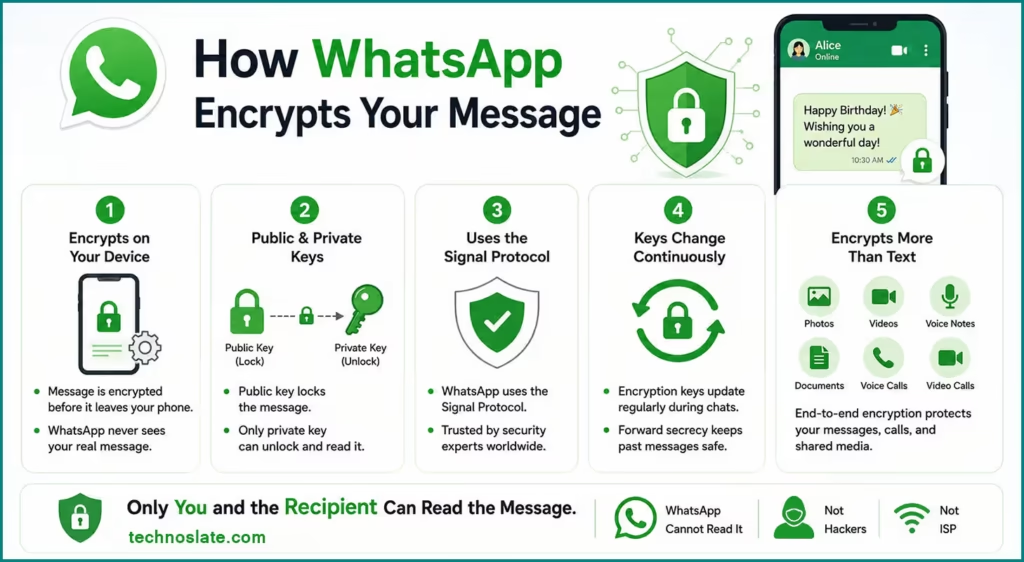
1. Encryption Happens on Your Device
This is one of the most important concepts behind WhatsApp’s security model. Many people assume WhatsApp’s servers encrypt messages. In reality:
- The message is encrypted on the sender’s device.
- It becomes unreadable before it leaves the phone.
- WhatsApp’s servers receive encrypted data, not the original message.
2. Public and Private Keys
A simplified explanation for non technical readers:
- Every WhatsApp user has cryptographic keys.
- The sender uses the recipient’s public key to secure the message.
- Only the recipient’s private key can unlock and read it.
3. WhatsApp Uses the Signal Protocol
Signal Protocol is the security protocol that powers WhatsApp’s end-to-end encryption. Originally developed by the team behind the secure messaging app Signal, it is designed to ensure that only the sender and intended recipient can read a message. The protocol is widely respected in the cybersecurity community and is considered one of the most important technologies behind modern private messaging apps.
4. Encryption Keys Continuously Change
This concept is known as forward secrecy. An interesting technical fact:
- WhatsApp regularly updates encryption keys during conversations.
- This helps limit the impact of a compromised key.
- Even if one key were somehow exposed, it would not automatically reveal an entire conversation history.
5. Encryption Protects More Than Text Messages
Many users think encryption only applies to chat messages. In reality, it also protects Photos, Videos, Voice notes, Documents, Voice calls, Video calls.
How Your Message Leaves Your Phone
With everything prepared and secured, your birthday message is finally ready to step beyond the boundaries of your device. At this stage, your phone needs a connection to the outside world. Without one, the message has nowhere to go, no matter how perfectly it has been prepared.
If you’re connected to Wi-Fi, your phone hands the data to a nearby router. If you’re using mobile data, the information is passed to your cellular provider’s network instead. The path may differ, but the goal remains the same: move the message away from your device and into the systems that power the internet.
Most people never notice this handoff because it happens automatically. There is no loading screen, no confirmation window, and no action required from the user. One tap is enough. A useful comparison is leaving an airport. Before a plane can cross oceans or continents, it first needs permission to leave the terminal and enter the larger transportation network. Your message faces a similar situation. It cannot reach another country, or even another city, until it exits your phone and joins a much bigger system.
For our birthday greeting, this is the moment it stops being information stored on a single device and becomes part of a global flow of digital communication. The next question is what happens once that information enters the internet. To understand that, we need to look at the organizations responsible for carrying data from one place to another.
The Hidden Role of Internet Service Providers
At this point, your birthday message has left your phone. The next part of its journey relies on Internet Service Providers (ISPs). Most people use an ISP every day through a home broadband connection or mobile data plan. Its job is to:
- Connect devices to the internet
- Move data between different networks
When you send a message, your phone passes the information to networks designed to transport data across cities, countries, and continents. As the message moves forward, it passes through systems that direct internet traffic and help data find a path toward its destination. Interestingly, there isn’t always a single route. Depending on network conditions and traffic levels, data may travel through different paths to reach the same destination.
This is one reason internet communication feels reliable. While users simply tap Send, countless network systems work together behind the scenes to keep information moving. Our message is now traveling across the internet. Next, we’ll look at something many people don’t realize: a large portion of global internet traffic moves through cables beneath the ocean.
Most WhatsApp Messages Travel Under the Ocean
If someone asked how a message travels from India to the United States, many people would probably assume it involves satellites. The reality is different. A large portion of global internet traffic moves through fiber optic cables laid across the ocean floor. These cables connect continents and form a major part of the internet’s infrastructure. As your birthday message travels to New York, it may pass through:
- Fiber-optic cables beneath the ocean
- Network infrastructure spread across multiple countries
Inside these cables, information travels as pulses of light through extremely thin strands of glass. This allows huge amounts of data to move across vast distances efficiently. Many everyday services depend on these connections, including Video calls, Social media platforms, Online payments, Cloud storage, Messaging apps. A simple message between two people can travel through infrastructure that spans entire oceans. Once the journey reaches WhatsApp’s infrastructure, another system takes over to deliver the message to the correct recipient.
How WhatsApp Servers Handle Messages
One reason people are curious about how WhatsApp sends messages is the app’s ability to connect users across different countries with minimal effort. By now, your birthday message has traveled far beyond the phone where it was written. The next stop is WhatsApp’s infrastructure.
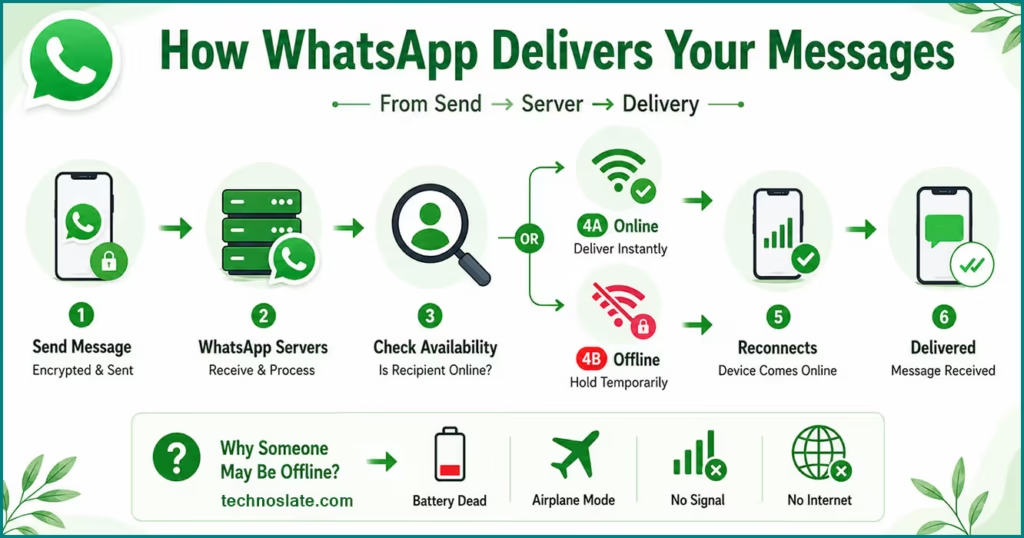
It’s easy to imagine a message moving directly from one device to another, like a walkie-talkie conversation. Modern messaging platforms don’t usually work that way. Instead, they rely on systems designed to coordinate communication between millions of users at the same time. When WhatsApp receives a message, it checks whether the recipient’s device is available. If your friend is connected to the internet, delivery can continue almost immediately. However, people aren’t always online. For example:
- Phones run out of battery.
- Airplane mode gets enabled during flights.
- Mobile signals disappear in elevators or underground parking areas.
- Internet connections can drop unexpectedly.
To handle situations like these, WhatsApp doesn’t abandon a message when someone becomes temporarily unavailable. Instead, it can hold the message for a limited period and wait for the recipient’s device to reconnect. Let’s assume your friend still hasn’t opened WhatsApp. The message is now waiting for the moment their phone becomes reachable again. As soon as that happens, the final handoff can take place.
How a Message Appears on the Recipient’s Phone
Let’s go back to our example. Your friend in New York picks up their phone during a lunch break and sees a WhatsApp notification waiting for them. They tap it, and your birthday message appears instantly. What they don’t see is the coordination required to make that experience feel effortless.
As soon as the recipient’s device becomes available, WhatsApp communicates with the app installed on that phone. The app detects that a new message is waiting and updates the conversation. At this stage, the protected information is converted back into the text you originally wrote. Your friend sees exactly what you typed without needing to:
- Download anything manually
- Request the message again
- Refresh the conversation repeatedly
The app handles these steps automatically. For most people, this moment feels ordinary because it happens countless times every day. Yet it marks the end of a journey involving devices, software, communication infrastructure, and security systems working together. Your message has reached its destination.
The only thing left to understand is the set of check marks that show what happened next. The familiar check marks in WhatsApp do more than indicate activity. They help users track a message’s status and are an important part of how WhatsApp messages work. A single tick means the message was sent, a double tick means it reached the recipient’s device, and blue ticks indicate that the message has been read.
Why WhatsApp Messages Arrive So Quickly
After following a message from one phone to another, it’s worth pausing for a moment and appreciating what just happened. A birthday greeting sent from India reached New York in less time than it takes most people to finish reading a sentence. That level of responsiveness can feel ordinary today, but it represents decades of technological progress.
One reason communication feels so smooth is that modern internet infrastructure was built specifically to move information efficiently. Around the world, data centers, fiber optic connections, networking equipment, and software systems work together continuously to keep digital services running. Scale is another important factor. Every day, billions of messages, photos, videos, and voice notes are exchanged through WhatsApp.
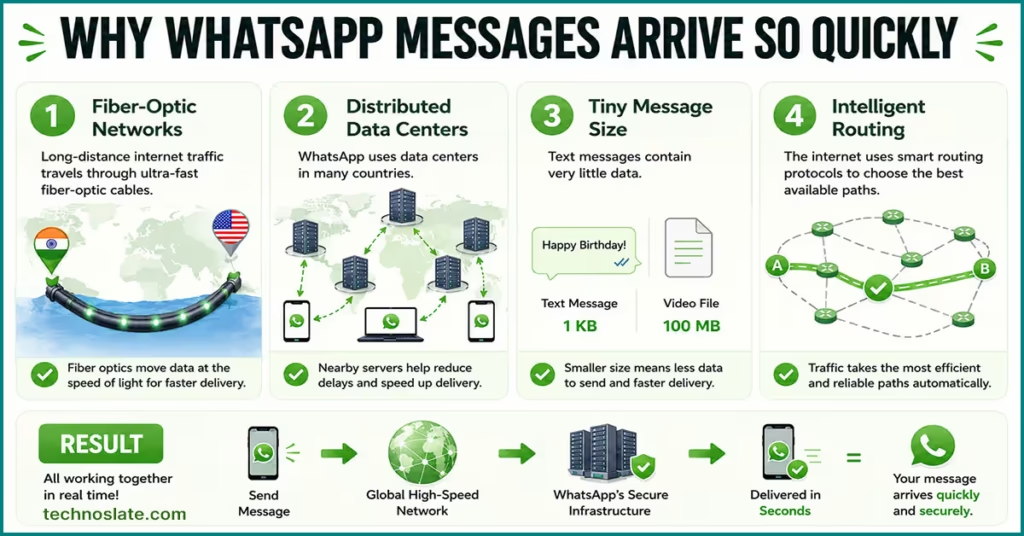
Handling that volume requires enormous computing resources and carefully designed systems capable of serving people across different countries, time zones, and network conditions. There is also a good chance that your message is not the only thing traveling at that moment. While you’re sending a birthday greeting, millions of other users may be sharing family photos, discussing work projects, joining group chats, or making voice calls. Yet most of these interactions feel effortless.
And perhaps that’s the greatest success of all. The systems involved are incredibly sophisticated, but the experience is simple enough that most people never need to think about them. Before we wrap up, let’s summarize the key ideas from everything we’ve explored so far.
- Fiber Optic Networks Carry Data at Extremely High Speeds
- Most WhatsApp messages travel through fiber optic cables, where information is transmitted as pulses of light. Because light travels incredibly fast, messages can cover thousands of kilometers in a very short time. This is one of the biggest reasons a message sent from India can reach someone in the United States so quickly.
- WhatsApp Uses Distributed Infrastructure
- WhatsApp does not rely on a single server in one location. Instead, its infrastructure is spread across multiple data centers. This allows users to connect to systems that are geographically closer to them, reducing the time required to process and forward messages. For example, if every WhatsApp message had to travel to a single server on the other side of the world first, communication would feel noticeably slower.
- Text Messages Are Extremely Small
- A typical WhatsApp text message contains very little data. Compared to photos, videos, or voice notes, a text message is tiny. Because there is so little information to transfer, networks can move it very efficiently. A simple “Happy Birthday!” message may contain only a few bytes of actual text data.
- Modern Networks Optimize Routes Automatically
- The internet is made up of thousands of interconnected networks. Routers continuously exchange information and determine efficient paths for moving data. If one route becomes congested, traffic can often be redirected through alternative paths. This helps maintain performance even when millions of people are online simultaneously.
- Persistent Connections Reduce Delays
- WhatsApp does not create a completely new connection every time you send a message. The app typically maintains ongoing communication with its infrastructure while it is active. Because a connection is already established, messages can be transmitted without repeating the entire setup process each time. This reduces latency and helps conversations feel responsive.
- Highly Optimized Message Processing
- WhatsApp is designed primarily for real time communication. Its systems are optimized to process, route, and deliver messages efficiently rather than performing heavy computations for every message. This allows billions of messages to be handled daily while keeping delays low.
Key Takeaways
Let’s return to where this article began. You wanted to wish a friend in New York a happy birthday. A few words were typed, a button was pressed, and shortly afterward a blue tick appeared on your screen. On the surface, it felt like an ordinary conversation.
Looking closer, however, that small interaction depended on far more than two smartphones. It involved security mechanisms that protected the message, communication infrastructure connecting different regions of the world, underwater cables linking continents, and systems capable of coordinating billions of daily conversations.
What makes all of this remarkable is not any single technology. It’s the way countless components work together so seamlessly that most users never notice them. Understanding how WhatsApp messages work changes the way you look at a simple chat.
The next time you send a message to someone across town, or across the world, you’ll know that an extremely large amount of engineering helps make that exchange feel effortless. And perhaps that’s the most impressive part. The greatest technologies are often the ones we stop thinking about because they fit so naturally into everyday life.
FAQ
- Why do WhatsApp messages sometimes arrive out of order?
- In group chats or unstable network conditions, messages can occasionally appear in a different sequence because devices may receive data at slightly different times.
- What happens if a message is sent while both users are offline?
- The message cannot be exchanged immediately. Communication resumes once connectivity becomes available again.
- Why are voice notes usually larger than text messages?
- Text contains very little data, while voice recordings include audio information that naturally requires more storage and bandwidth.
- Can a WhatsApp message travel through different countries before reaching its destination?
- Yes. Internet traffic does not always follow the shortest geographic route. Depending on network conditions and infrastructure, data may pass through multiple regions before reaching the recipient.
- Why do some messages show a clock icon?
- A clock icon usually indicates that the message is still waiting to leave the sender’s device, often because of connectivity issues.
- Does distance affect WhatsApp message delivery speed?
- Not as much as most people think. Network quality and infrastructure generally have a greater impact than physical distance alone.
- Why do group messages sometimes take longer than personal messages?
- A one to one message has a single recipient. Group conversations require delivery to multiple participants, which can make the process more complex.
- Are WhatsApp messages stored forever if the recipient is offline?
- No. Messaging platforms typically maintain undelivered messages for a limited period rather than indefinitely.
I hope you enjoyed this post about how WhatsApp sends messages and how whatsapp messages work. If you found this post helpful, please share this post with your friends and family. If you have any question in your mind or you are facing any problem then feel free to ask your question in the comment section. We will try our best to help you. You can read more such interesting articles here.