Opera Browser – Have you ever heard about this? If Yes, have you ever used it? If not, then maybe your default browser is Google Chrome or Mozilla Firefox. When most people think about web/internet browsers, Google Chrome and Mozilla Firefox automatically come to mind first. They are popular, familiar, and widely recommended.
However, over the past few years, Opera Browser has slowly but steadily emerged as one of the most innovative and user-centric browsers in the market. While Chrome dominates with sheer popularity and Firefox remains the classic open-source favorite. However, popularity does not always mean a better experience. Many users install dozens of extensions on Chrome or Firefox just to make the browser usable for daily work, privacy, or productivity.
Opera Browser’s Incredible 15+ Features
Opera browser takes a very different approach. Instead of asking users to customize everything through extensions, Opera includes many powerful tools directly inside the browser. These features are not only useful for casual users but also incredibly valuable for advanced users, professionals, and multitaskers. Opera feels less like a basic browser and more like a complete browsing platform. Opera offers a unique combination of features that make the browsing experience faster, more private, more customizable, and significantly more resource-friendly. In this article, we’ll explore why Opera Browser is better than Google Chrome and Mozilla Firefox across performance, privacy, features, and user experience.
Opera Performs Better Than Chrome and Firefox on Low RAM Devices
One of Opera’s biggest strengths is its exceptional performance on low-end and mid-range devices. Chrome is known for consuming a large amount of RAM because each tab runs as a separate process, which often slows down the entire system. Firefox performs better than Chrome but still can become heavy with multiple open tabs.
Opera, on the other hand, is engineered to use memory efficiently. Its lightweight structure allows it to handle multiple tabs without significantly impacting system speed. This makes Opera browser particularly useful for students, professionals with older laptops, and anyone who wants a smooth browsing experience without upgrading their hardware.
Built in Social Apps – Social App Integration
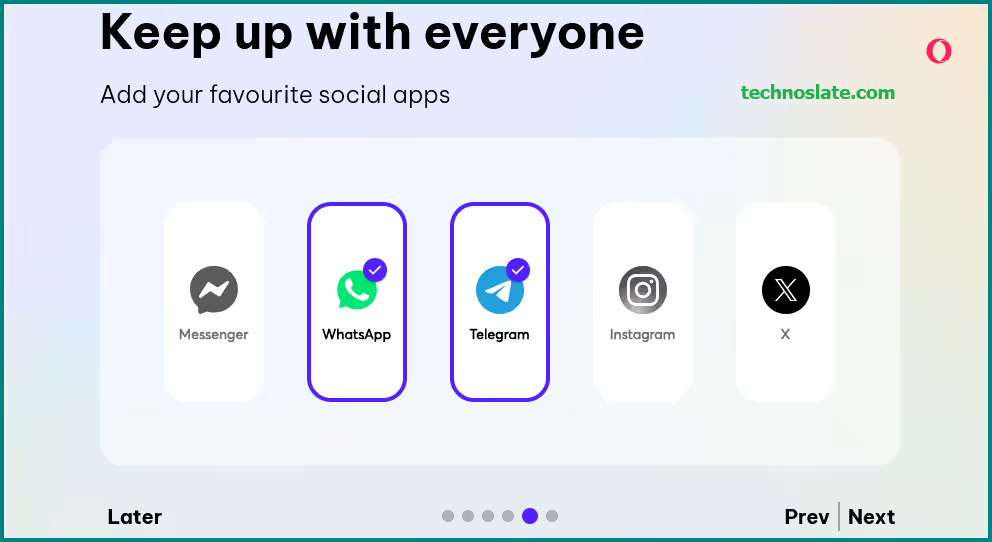
Opera Browser’s Social App Integration feels like it’s made for people who hate switching between tabs and apps all day. It lets you keep your favourite social and messaging apps right inside the browser’s sidebar, so chatting becomes effortless while you browse. Apps like WhatsApp, Facebook Messenger, Telegram, Instagram DMs, and X (Twitter) are always just one click away – no need to open new tabs or grab your phone. Once you log in, you can continue your conversations naturally while doing your regular online work.
What really makes this feature stand out is how well it supports multitasking. You can study, work, or research and reply to messages at the same time without breaking your flow. Real-time notifications make sure you don’t miss anything important. On the privacy side, Opera relies on the official web versions of these apps, so protections like end-to-end encryption (on platforms such as WhatsApp and Telegram) stay intact. It’s also lightweight, so your browser stays fast. Overall, this feature makes browsing more comfortable, efficient, and user-friendly – especially for people who stay active on social and messaging apps.
Opera’s Built-In VPN Gives It a Huge Privacy Advantage
Privacy is one of the most important aspects of browsing today, and this is a category where Opera browser clearly beats both Chrome and Firefox. Chrome does not offer any built-in VPN solution at all, and users have to rely on third-party extensions that may not be fully secure. Firefox also requires add-ons for VPN features. Opera offers a completely free, unlimited built-in VPN that protects users’ online identity by encrypting their traffic.
Opera’s VPN is easy to activate, fast enough for everyday browsing, and eliminates the need for additional software installations. For users who travel frequently, access geo-blocked content, or simply prefer enhanced privacy, Opera provides a massive advantage here. Opera allows users to turn on a VPN with a single click. There is no sign-up process, no credit card requirement, and no additional software to install.
This feature is especially useful for improving privacy, securing connections on public Wi-Fi, and hiding your IP address from basic trackers. While it is not a replacement for premium VPN services, it is more than enough for everyday browsing and casual privacy needs. The fact that Chrome and Firefox completely lack this feature makes Opera browser stand out immediately. You can read an article here about How to Use Free VPN in Opera. To know more about – how to activate and use Free VPN services in opera, click here.
Built-in Snapshot Tool for Professionals
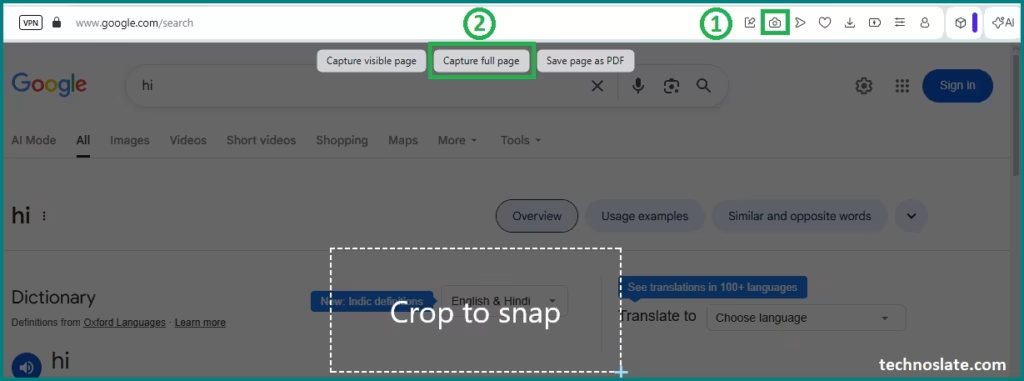
Opera browser includes a built-in snapshot tool that allows you to capture full-page screenshots, specific sections, or visible content instantly. You can also annotate images directly before saving or sharing them. Chrome and Firefox technically support screenshots, but their tools are hidden and limited. Opera’s snapshot feature is clearly designed for educators, designers, writers, and professionals who regularly work with visual information.
To click full-page screenshot, open the webpage or site that you want to take a screenshot of. Then click on the camera icon on the right side of the address bar. Click on Capture full page. The screenshot will be downloaded automatically, you just need to click the Save image button to save it. This feature captures the entire height of the page, no matter how much scrolling there is.
Built-In Ad Blocker and Tracker Blocker Improve Speed and Security
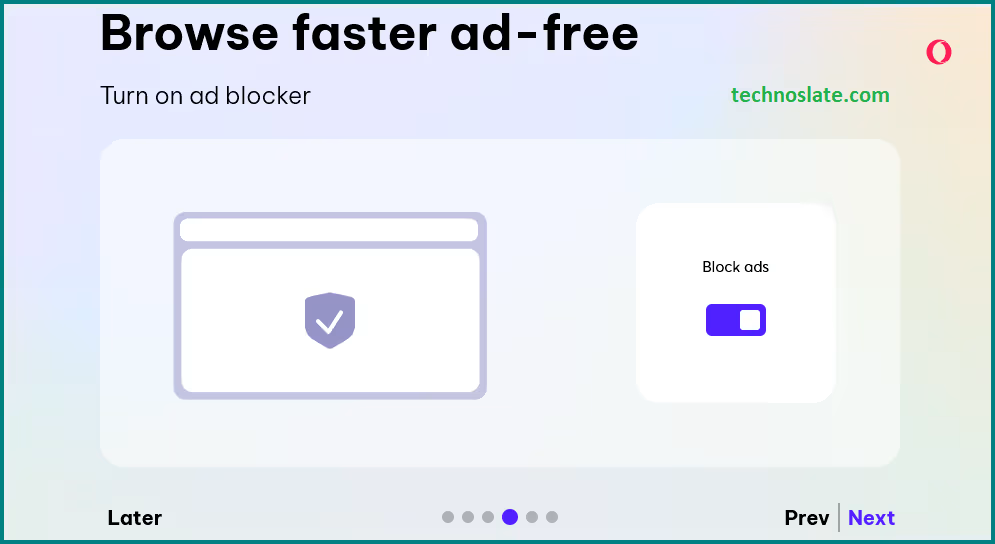
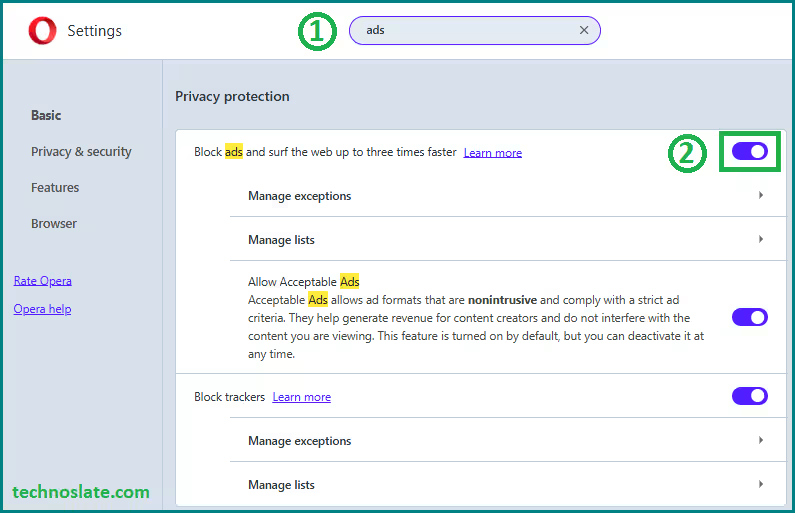
Ads slow down websites, consume data, and track user behavior. Opera solves this problem by including a built-in ad blocker that works at the browser level. Pages load noticeably faster, use fewer resources, and feel cleaner without intrusive ads. Opera’s native ad blocker is optimized for compatibility and efficiency, offering a smoother and more reliable experience without any setup. While installing Opera browser, you are asked whether you want to turn on the ad blocker, which can be enabled right from the start (as shown in the image).
Chrome allows ads by default because Google generates revenue through advertising, and users must manually install extensions to block ads. These extensions can sometimes conflict with websites or reduce performance. Firefox does offer enhanced tracking protection, but its ad-blocking capabilities still require add-ons. Opera’s native blocking capabilities work immediately after installation, improving both security and speed by reducing unnecessary scripts from loading.
Battery Saver Mode Extends Laptop Battery Life Significantly
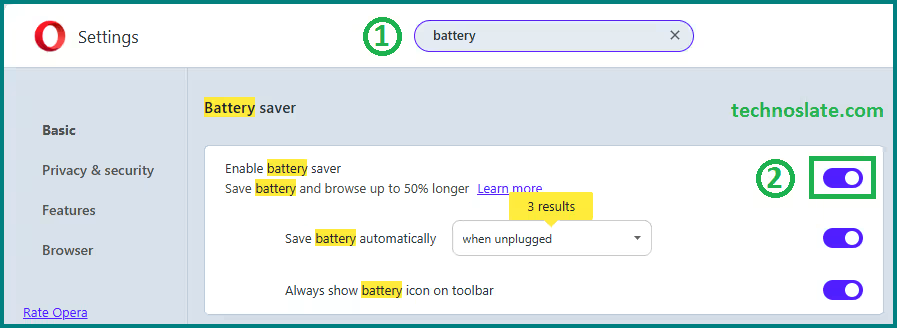
Opera includes a powerful battery saver mode, which optimizes background processes, reduces CPU usage, and limits unnecessary animations without affecting performance. This can extend laptop battery life by up to an hour or more during heavy browsing. This feature is designed for users who work on laptops for long hours. Google Chrome has recently introduced a battery saver-type feature (officially called Energy Saver / Battery Saver mode) that helps extend battery life while browsing, but Firefox is still behind in this area. This feature also makes Opera a superior choice for students, travellers, and professionals who work unplugged.
Smart Built-in Tools That Save Time and Enhance Productivity
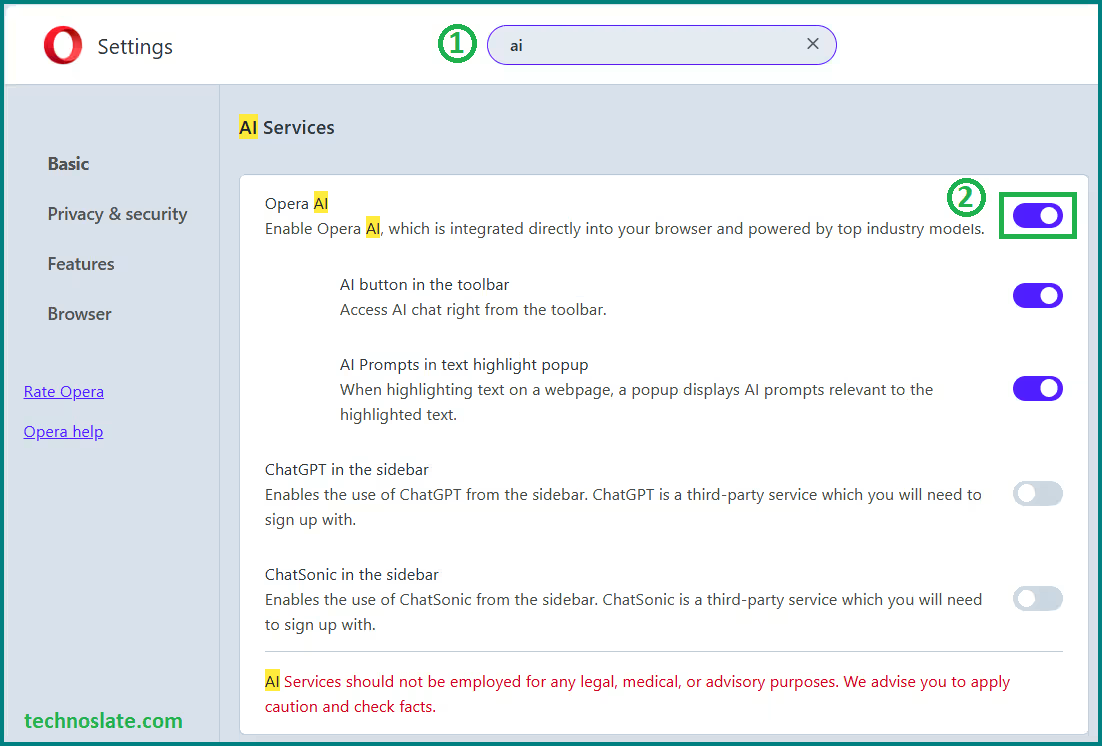
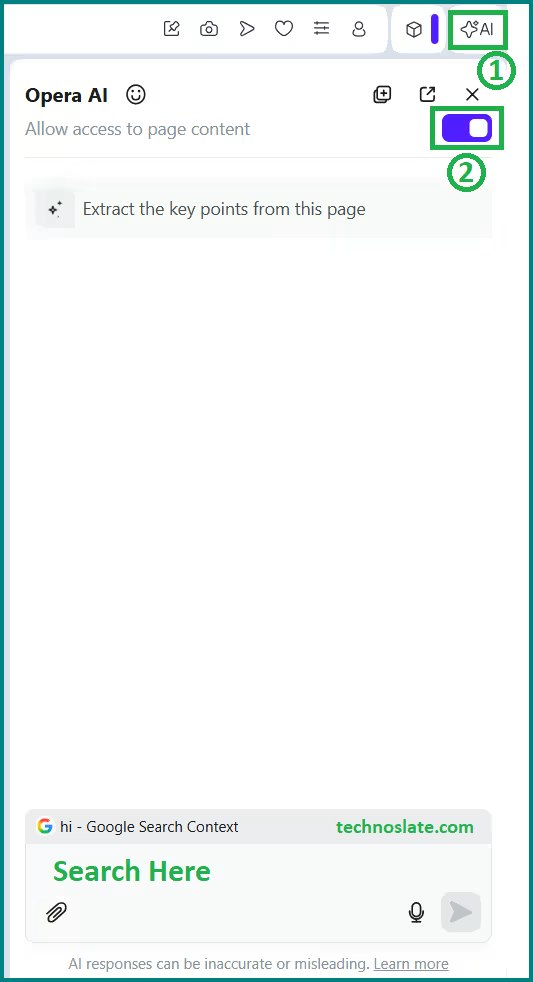
- Opera has invested heavily in AI, and the browser now includes features like Aria (Opera browser AI assistant), which is directly built into the browser. This is a game-changer because users can ask questions, generate content, summarize articles, and even get coding help without leaving their browser tab. Chrome does offer some AI features, but they are usually tied to Google services and are not integrated directly into the browser interface. Firefox remains largely focused on privacy and has fewer AI-based productivity tools. Opera’s AI integration is especially useful for bloggers, students, developers, and anyone who works online for long hours.
- Opera includes intelligent tools such as currency conversion, unit conversion, and time-zone detection that activate automatically when you select text on a webpage. These small features reduce friction and save time during research or work. Chrome and Firefox do not provide these tools natively, forcing users to rely on external websites or extensions.
Opera’s Sidebar Saves Time and Boosts Multitasking
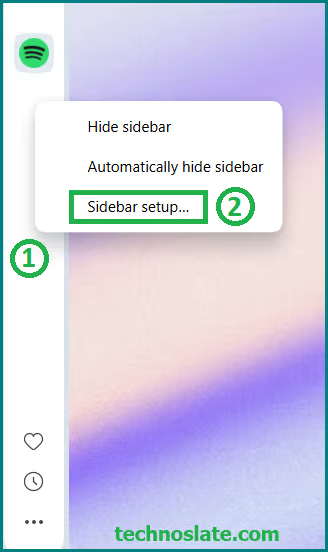
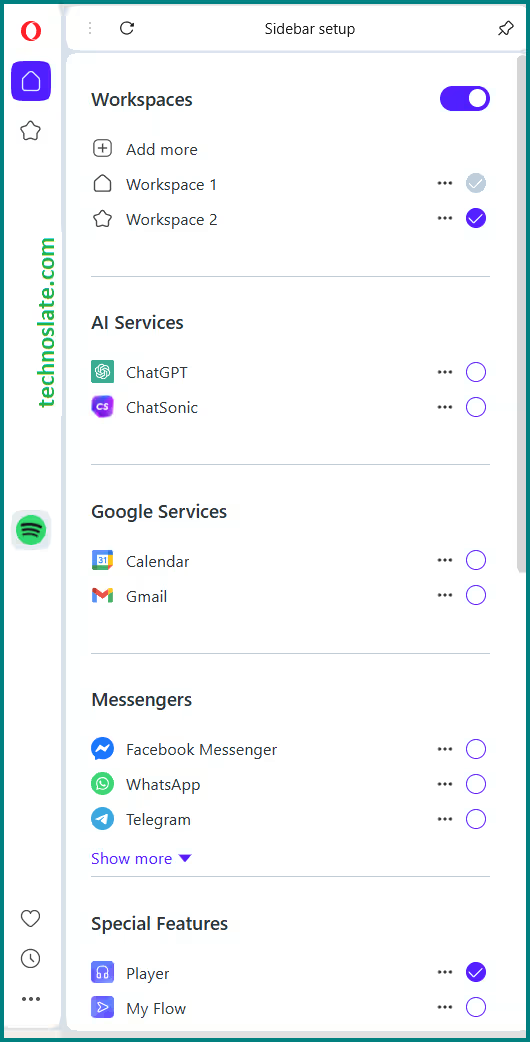
Opera understands how modern users browse the web and so Opera offers most unique features – customizable sidebar. People constantly switch between websites and messaging apps. To solve this, Opera browser integrates popular messengers like WhatsApp, Telegram, Facebook Messenger, and Instagram directly into the browser sidebar. This means you can reply to messages while researching, working, or watching content without opening new tabs or apps. Opera allows users to choose these apps during the installation itself. Even ChatGPT is pinned by default.
- Chrome and Firefox offer no such built-in functionality, making Opera browser far more practical for multitasking and remote work. Opera’s sidebar also allows users to pin tools like bookmarks, history, downloads, and AI assistants – all in one place, creating a seamless multi-app workflow. Chrome and Firefox have no such built-in feature.
Opera browser GX Is a Special Edition Browser for Gamers
Opera stands out even more with its unique Opera GX browser version, built specifically for gamers. It allows users to control CPU, RAM, and network bandwidth usage directly from the browser. This is particularly useful for users running heavy applications alongside the browser. No other major browser – neither Chrome nor Firefox – offers anything close to this level of performance control.
Opera GX also comes with gaming themes, sound effects, and integration with platforms like Discord and Twitch, making it a favorite among modern gamers and streamers. Chrome is often criticized for high memory usage, and Firefox offers limited manual control.
Faster Downloading and Better Media Handling
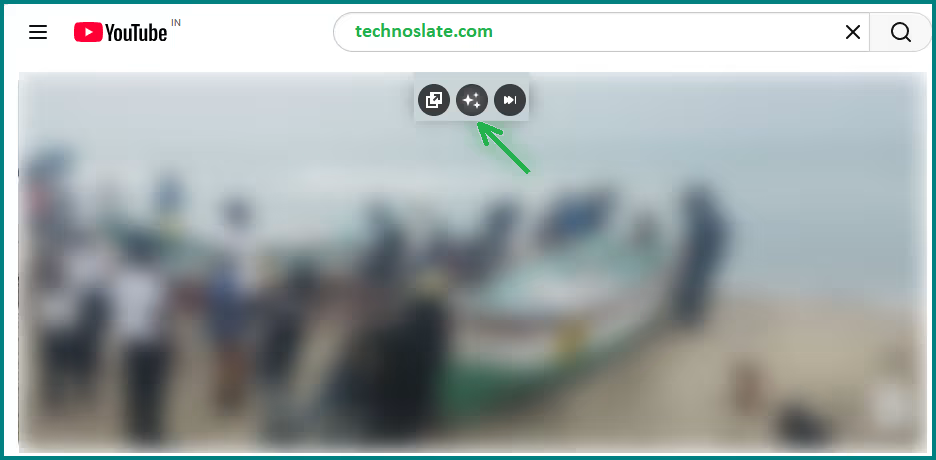
Opera includes an advanced download manager, which shows clearer progress indicators and allows users to pause, resume, or accelerate downloads easily. Opera’s video pop-out feature allows videos to float above other windows while you continue browsing or working. This is perfect for tutorials, online courses, and entertainment. Its built-in video pop-out feature lets users watch videos in a floating window while working on other tasks, something that requires extensions in Chrome and Firefox.
Lucid Mode for Clearer and Better Visuals
Opera’s Lucid Mode is a simple feature that makes web content look cleaner and more pleasant. With one click, it sharpens images, improves colors, and reduces visual noise on videos and photos. Everything looks clearer without feeling over-edited. It works automatically in the background, so you don’t need to adjust settings. Lucid Mode is great for users who want better visuals while browsing, watching videos, or reading online – making the overall experience easier on the eyes and more enjoyable, especially during long screen time sessions or low-quality video streaming.
My Flow: A Smarter Way to Share Between Devices
My Flow is one of those features you don’t realize you need until you use it. It allows you to instantly send links, notes, images, and files between your phone and computer. Everything appears in one private space inside the browser. My Flow is one of the smartest opera browser features.
Instead of emailing yourself links or using third-party cloud services, My Flow keeps everything simple and fast. Chrome and Firefox syncing focuses mainly on bookmarks and history, while My Flow is designed for real-time sharing and productivity.
Workspaces That Keep Your Life Organized
If you often have too many tabs open, Opera’s Workspaces can completely change how you browse. A Workspace is a completely separate tab environment with its own set of tabs and tab islands, designed to keep different activities – such as work, study, or personal browsing – fully separated so you can switch contexts using the sidebar instead of mixing everything together. Each workspace keeps its own tabs, helping you stay focused and organized. Chrome and Firefox require extensions or multiple browser profiles for this, which feels clunky compared to Opera’s smooth native experience.
Tab Islands for Advanced Tab Management
Opera takes tab management even further with Tab Islands. Tab Islands are Opera’s way of automatically grouping related tabs together. When you open several tabs from the same website or topic, Opera stacks them into one “island.” You can collapse or expand an island to keep your tab bar clean. They’re created automatically, so you don’t have to manage them yourself. For users who keep dozens of tabs open, this is a game changer. While Chrome offers basic tab grouping, it requires manual effort and lacks the intelligent grouping Opera browser provides.
Confused between Workspaces and Tab Islands? Don’t worry about it. Tab Islands organize tabs automatically inside one workspace, while Workspaces separate tabs into different spaces that you control however you want. Think of Tab Islands as piles of papers on one desk, and Workspaces as having multiple desks for different jobs.
Mouse Gestures That Feel Natural
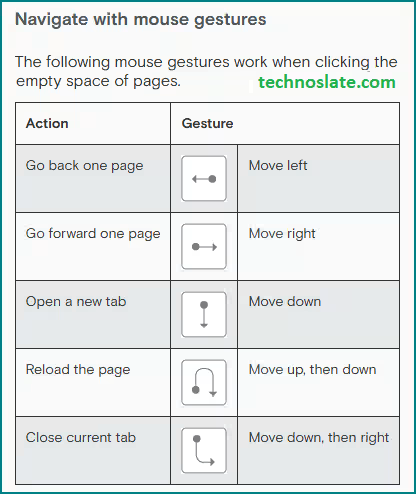
For advanced users, mouse gestures are one of the fastest ways to browse. Opera browser includes native mouse gesture support that allows you to navigate pages, close tabs, and open new ones using simple mouse movements. This eliminates unnecessary clicks and improves efficiency. Chrome and Firefox require extensions for mouse gestures, which rarely feel as smooth or reliable as Opera’s built-in solution.
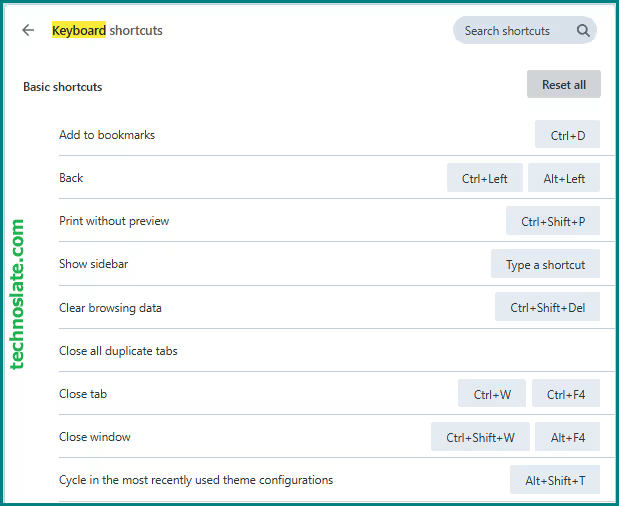
Deep Keyboard Shortcut Customization
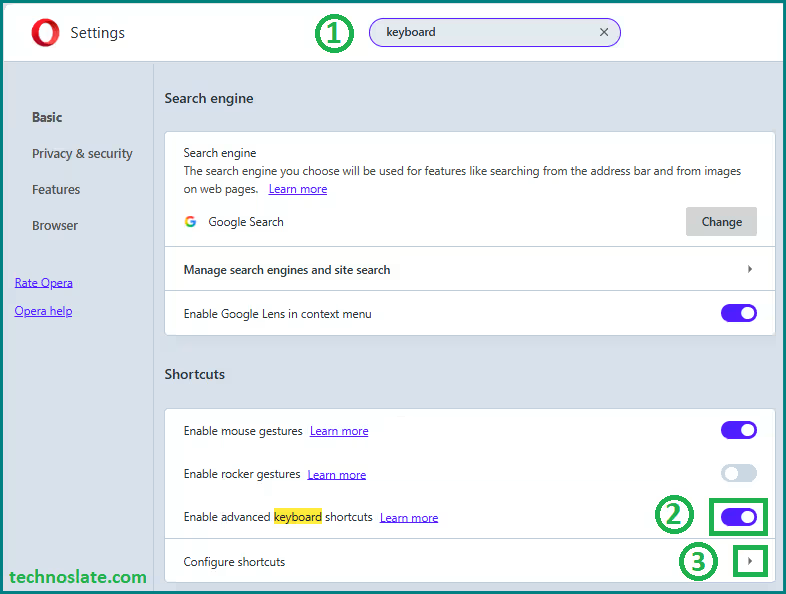
- Opera gives users real control over keyboard shortcuts. Almost every browser action can be customized to match personal workflow preferences. This is especially valuable for developers and power users who rely heavily on keyboard navigation. Chrome offers very limited customization, and Firefox only partially supports it. Opera clearly prioritizes flexibility and user control.
Built-in Crypto Wallet and Web3 Support
Opera is one of the few mainstream browsers with a built-in crypto wallet. It allows users to interact with blockchain applications and Web3 platforms without installing third-party wallet extensions. As Web3 adoption grows, this feature makes Opera feel future-ready. Chrome and Firefox users usually depend on external wallets, which adds complexity and security risks.
Frequently Asked Questions (FAQ)
Does Opera browser really have a free VPN?
Yes, Opera browser provides a completely free built-in VPN that does not require registration or payment. It can be enabled directly from the browser settings and is useful for basic privacy protection, hiding your IP address, and securing connections on public Wi-Fi. While it is not a replacement for premium VPN services, it is more than enough for everyday browsing needs.
Does Opera browser collect user data?
Like most modern browsers, Opera collects limited data to improve services, but it offers more built-in privacy controls than Chrome. Features such as tracker blocking, VPN, and ad blocking help reduce data exposure. Users also have clear control over privacy settings within the browser.
- Is Opera browser safe to use in 2026?
- Yes, Opera is safe to use in 2026 and is regularly updated with security patches and privacy improvements. It is based on Chromium, the same engine used by Chrome, which means it benefits from strong security standards. In addition, Opera browser includes built-in features like a VPN, ad blocker, and tracker protection, which further enhance user safety while browsing.
- Is Opera browser features are better than Chrome’s Extensions for productivity?
- For many users, Opera is better than Chrome when it comes to productivity. Features like Workspaces, Tab Islands, sidebar messengers, My Flow, mouse gestures, and built-in tools reduce the need for extensions and make multitasking easier. Chrome is fast and popular, but Opera browser offers more productivity-focused features out of the box.
- Can I use Chrome extensions in Opera?
- Yes, Opera browser supports Chrome extensions because it is based on Chromium. You can install extensions directly from the Chrome Web Store and use them alongside Opera’s built-in features. This gives users the flexibility of Chrome’s extension ecosystem without giving up Opera’s unique tools.
- Is Opera good for advanced and power users?
- Yes, Opera is an excellent choice for advanced users and power users. Features like mouse gestures, deep keyboard shortcut customization, advanced tab management, Workspaces, built-in snapshot tools, and resource optimization make Opera highly suitable for developers, researchers, and heavy multitaskers.
- Does Opera browser collect user data?
- Like most modern browsers, Opera collects limited data to improve services, but it offers more built-in privacy controls than Chrome. Features such as tracker blocking, VPN, and ad blocking help reduce data exposure. Users also have clear control over privacy settings within the browser.
Conclusion
Opera Browser stands out as a modern, feature-packed, privacy-friendly, and performance-optimized browser that delivers more value than Google Chrome and Mozilla Firefox in many key areas. Its combination of built-in VPN, AI assistant, ad blocker, battery saver, sidebar apps, and low memory consumption makes it one of the most advanced browsers available in 2026. Although Chrome remains the industry giant and Firefox holds its open-source legacy, Opera offers a practical, user-focused alternative that is not just fast – but also intelligent, secure, and perfectly tuned for today’s multitasking digital lifestyle. For users who want more control, better organization, and built-in productivity without sacrificing performance, Opera browser is an excellent and often overlooked choice.
Now, you know very well about these underrated but powerful features of Opera browser. If this post helped you then please share it with your friends and family to know about it. If you have any questions then feel free to ask in comment section. We will try our best to help you. You can read more such interesting articles here.