Imagine waking up one morning and realizing your phone is gone. Maybe it slipped out of your pocket while traveling, or perhaps it was stolen in a crowded place. At first, you feel annoyed because you lost a device. But within a few minutes, a much bigger realization hits you. Your photos, personal documents, work files, passwords, banking information, and years of memories were all stored on that device.
For many people today, their phone or laptop contains a significant part of their digital life. It stores family photos, personal conversations, work documents, creative projects, and sensitive account information. Losing that data can feel like losing a part of your identity. Using a Digital Life Backup System is one of the smartest ways to secure your personal and professional files.
Unfortunately, most people only think about backups after something goes wrong. By then, it is already too late. A Digital Life Backup System is a simple but powerful strategy that ensures your entire digital life can be recovered quickly if your phone or laptop is lost, stolen, or damaged. With the right system in place, you can restore your data in less than an hour instead of spending days trying to recover lost files. In this guide, you will learn how to build a reliable backup system that protects your data, your memories, and your work.
Why Everyone Needs a Digital Life Backup System
Modern life is deeply connected to digital devices. Our phones store thousands of photos, our laptops contain years of documents, and our online accounts manage everything from banking to communication. A few years ago, losing a device was mostly about replacing hardware. Today, the real loss is the data inside it. People rely on their devices to store important files such as contracts, academic notes, design projects, financial spreadsheets, and personal documents. Even casual users accumulate massive amounts of data through photos, videos, and messages over time. A Digital Life Backup System helps you keep your important files safe even if your device crashes.
The problem is that devices themselves are fragile. Hard drives fail unexpectedly, phones get lost during travel, and accidents like water damage or system crashes can instantly erase valuable data. Without a backup system, recovering that information can be nearly impossible. A well-planned Digital Life Backup System ensures that your information exists in multiple places so that even if one device disappears, your digital life remains safe and recoverable.
The 3 Most Common Ways People Lose Their Data
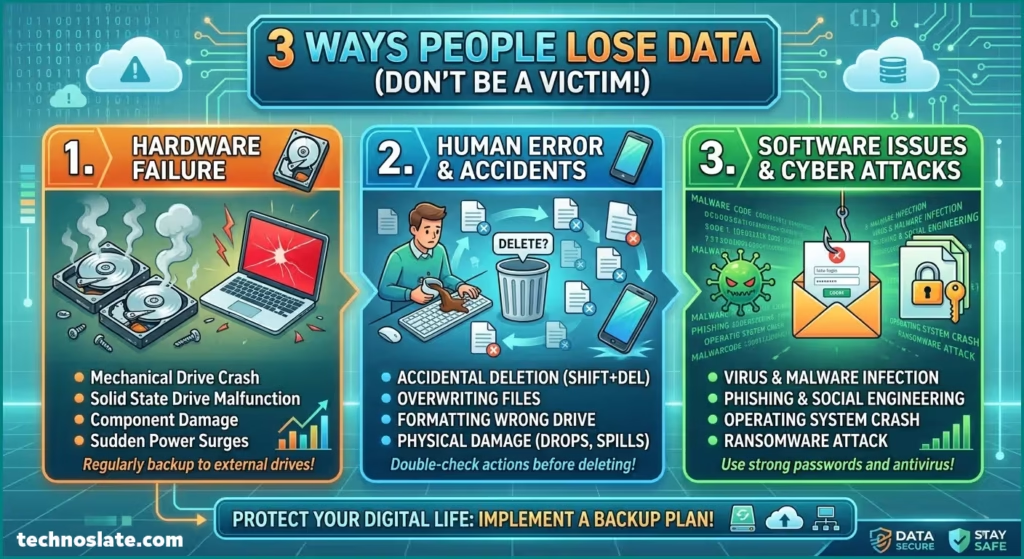
Understanding how data loss usually happens helps you design a better backup strategy. Most digital disasters occur because of three very common situations.
- Device Theft
- Phones and laptops are among the most frequently stolen personal devices. In busy cities, airports, cafes, or public transportation, it takes only a moment for a device to disappear. When theft happens, the problem is not just the loss of the hardware. The bigger concern is the data stored inside the device. Without proper backups, users lose photos, contacts, notes, passwords, and sometimes even access to their online accounts. Even if the device cannot be recovered, having a backup system allows you to restore everything on a new device quickly.
- Hardware Failure
- Hard drives and solid-state drives are not designed to last forever. Even the most reliable hardware eventually fails due to wear and tear, overheating, or unexpected electrical issues. A laptop that suddenly refuses to start can trap years of files inside a damaged drive. Many users experience this type of failure without warning. Regular backups prevent a hardware failure from turning into a digital disaster.
- Accidental Deletion
- Human error is another common cause of data loss. People sometimes delete folders by mistake, format the wrong storage drive, or overwrite important files without realizing it. Cloud storage and automated backups can protect against these mistakes by keeping earlier versions of files that can be restored later.
The 7 Step Digital Life Backup System
Building a strong backup system does not require advanced technical skills. It simply requires organizing your data into multiple layers of protection so that nothing important exists in only one place.
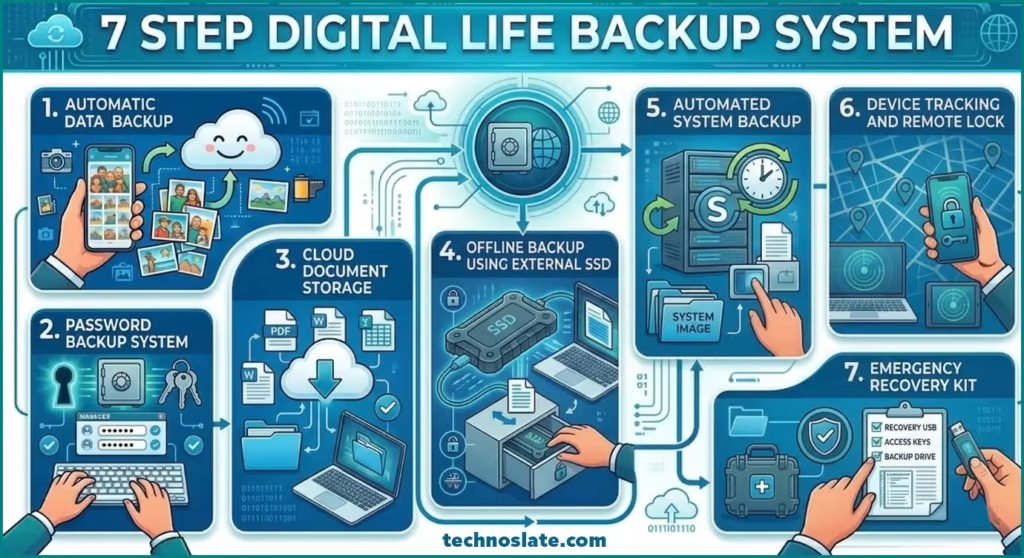
Automatic Photo Backup
Photos and videos often represent the most emotionally valuable data people store. Many users keep thousands of memories on their phones without realizing how vulnerable those files are. Automatic photo backup ensures that every image you capture is instantly uploaded to a secure cloud storage service. Once uploaded, those files remain accessible even if your device is lost or damaged. Photographers trust a Digital Life Backup System to keep their creative work safe.
Modern families are now using a Digital Life Backup System to keep their digital memories safe for years. Cloud platforms such as Google Drive and Dropbox make this process extremely simple. When automatic sync is enabled, your photos are uploaded in the background without requiring any manual effort. This means your memories are protected continuously without needing to remember to back them up. In addition, Businesses also often depend on a Digital Life Backup System to avoid costly data loss.
Password Backup System
Passwords protect access to your entire digital identity. If you lose your device but cannot remember important account passwords, regaining control of your online services becomes very difficult. A password manager securely stores all login credentials in an encrypted vault. This allows you to access your accounts from any device while keeping sensitive information protected.
Tools like NordPass and Bitwarden provide secure password storage along with recovery options that allow you to regain access if your primary device is unavailable. Using a password manager ensures that you never lose access to important accounts such as email, banking platforms, or work tools. If your Digital Life Backup System isn’t protected with strong passwords or encryption, hackers could access your data.
Cloud Document Storage
Important documents should never exist only on a single device. Contracts, tax files, identification documents, resumes, and project files should always be stored in a cloud location. Cloud storage platforms automatically sync files across devices and maintain backup copies in secure servers. Even if your laptop stops working, you can immediately access those files from another computer. Modern cloud services have made the Digital Life Backup System more efficient than ever.
Setting up a Digital Life Backup System is easier today thanks to modern cloud technologies. Services such as Google Drive and Dropbox are widely used because they combine convenience with reliability. People who work remotely often depend on a Digital Life Backup System every day. By keeping critical documents in the cloud, you create a layer of protection that makes data recovery extremely fast.
Offline Backup Using External SSD
Cloud storage is powerful, but relying solely on online backups is not always ideal. An offline backup stored on a physical drive provides an additional safety layer that protects against cloud account issues or accidental deletions. External solid-state drives are fast, portable, and reliable for storing backup copies of your files.
If you value your digital memories, investing in a Digital Life Backup System is a great decision. Devices such as the Samsung T7 Portable SSD allow users to store complete copies of their digital data. Performing a full backup once a week ensures that you always have a recent snapshot of your files. If something goes wrong, you can restore your data directly from the external drive.
Automated System Backup
Some users rely heavily on their laptops for work, development, or creative projects. In these cases, backing up individual files is not enough. A full system backup captures the entire operating system, applications, and settings. Software like Acronis True Image creates a complete image of your system so that it can be restored exactly as it was before a crash or device failure. This type of backup is extremely valuable for professionals who want to resume work immediately after replacing hardware. A powerful Digital Life Backup System helps prevent stress caused by accidental file deletion.
Device Tracking and Remote Lock
Modern devices often include built-in tracking features that help locate lost or stolen hardware. These systems allow users to track the location of their devices, lock them remotely, or erase sensitive data if necessary. Activating these features in advance ensures that you can protect your information even if the device itself cannot be recovered.
Emergency Recovery Kit
An emergency recovery kit contains essential information required to regain control of your digital accounts. This kit typically includes backup codes for two-factor authentication, account recovery instructions, and important contact details. Storing this information securely allows you to recover access to your digital life even during stressful situations. With a proper Digital Life Backup System, you never have to worry about losing your photos, documents, or memories.
Use Your Digital Life Backup System to Recover Data in 1 Hour
When a phone or laptop is lost, panic is a common reaction. However, a well-designed backup system turns a stressful situation into a manageable process. The first step is securing your accounts. Logging into your primary email and changing passwords prevents unauthorized access to important services. Next, you access your cloud storage accounts where photos, documents, and files are already stored. These platforms allow you to download everything onto a new device almost instantly. After restoring documents and media files, the next step is reinstalling your password manager so that all login credentials become available again.
If you created a full system backup using tools like Acronis True Image, restoring your laptop environment becomes even faster because the entire system image can be loaded onto a replacement device. Finally, connecting your external backup drive such as the Samsung T7 Portable SSD allows you to restore any files that may not have been synced to the cloud. When these systems work together, recovering your digital life becomes a straightforward process rather than a complicated disaster.
A reliable backup system does not require constant manual work. The right tools automate most of the process so that your files remain protected without daily effort. Cloud storage platforms like Google Drive and Dropbox handle document synchronization automatically. Password managers such as NordPass ensure that login credentials remain accessible across devices. A well maintained Digital Life Backup System gives you peace of mind knowing your data is always backed up.
System backup software like Acronis True Image protects entire operating systems, while external drives such as the Samsung T7 Portable SSD provide reliable offline storage. When these tools work together, they create a layered protection system that safeguards your digital life against almost any type of data loss.
Common Backup Mistakes That Can Destroy Your Data
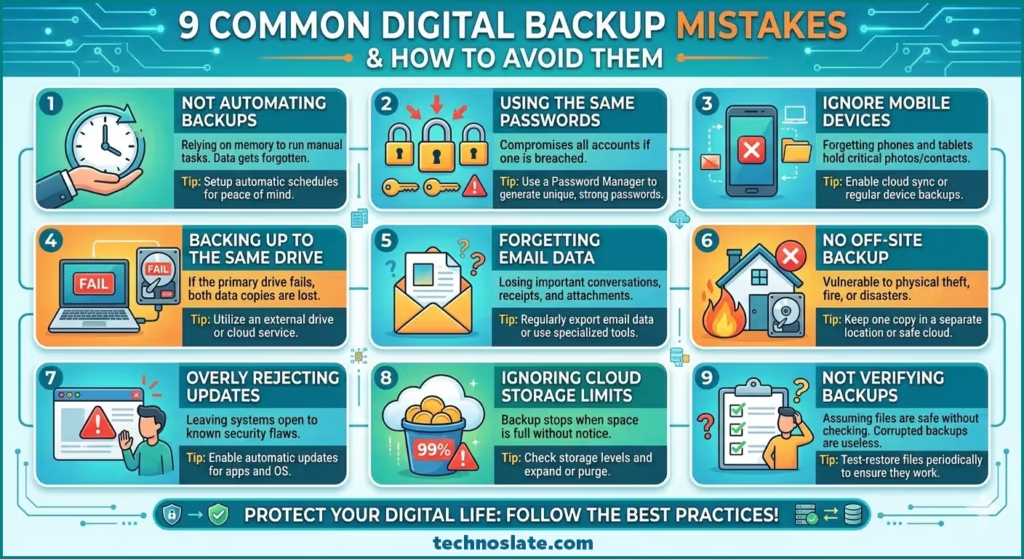
Many people set up a Digital Life Backup System once and then forget about it. But their systems fail when they need them the most. One common mistake is storing all files on a single device without any cloud synchronization.
Another frequent error is relying entirely on cloud storage without maintaining an offline copy. If a cloud account becomes inaccessible or files are accidentally deleted, having a physical backup becomes extremely valuable.
Some users also forget to test their backups. A backup system that has never been tested may not work properly when needed. The best digital life backup system strategy is to maintain multiple layers of backup and occasionally verify that files can be restored successfully.
The 3 Layer Backup Strategy Used by Experts
Professionals often follow a simple principle known as the three-layer backup strategy. The first layer is the primary working device where files are created and used daily. The second layer is a cloud storage platform that automatically syncs important data. The third layer is an offline backup stored on an external drive. This system ensures that even if one or two layers fail, the third layer still protects the data.
Frequently Asked Questions
- What is the best digital life backup system strategy for personal data?
- The most reliable approach is the three-layer backup strategy, which combines local storage, cloud storage, and an offline backup device.
- How often should you backup your phone?
- Photos and documents should be backed up automatically through cloud synchronization, while full device backups can be performed weekly.
- Is cloud backup enough to protect your files?
- Cloud backup is extremely useful but should not be the only layer of protection. Maintaining an offline backup ensures additional safety.
- What should you do if your laptop gets stolen?
- Immediately change your passwords, secure your online accounts, activate device tracking if available, and restore your files from cloud or offline backups.
Final Thoughts
Your digital life contains far more than simple files. But your digital lifestyle becomes safer when you start using a Digital Life Backup System. It stores memories, personal information, work achievements, and pieces of your identity. Losing that information can be devastating, but it is also completely preventable. A well-designed Digital Life Backup System transforms data protection into an automated process. Once the system is in place, your files remain protected in multiple locations, allowing you to recover quickly even after device loss or hardware failure. Taking the time to set up this system today ensures that your digital life remains safe tomorrow.
I hope you loved this article about Digital Life Backup System. If this post helped you then please share it with your friends and family to know about it. If you have any questions then feel free to ask in comment section. We will try our best to help you. You can read more such interesting articles here.