Think about how many digital files you currently have on your devices. Your laptop or computer probably contains thousands of documents, downloads, screenshots, photos, videos, and notes. Many people also have folders named things like “New Folder,” “Important Files,” or “Final Version 2.” Over time, files keep stacking until it becomes surprisingly difficult to find anything quickly. This kind of digital clutter has quietly become one of the biggest productivity challenges today. As our lives move more and more online, our laptops, phones, and cloud storage accounts start filling up with files from every direction. Photos come from our phones, documents arrive through email, and screenshots accumulate almost without us noticing.
Eventually, everything starts to feel messy. Important files get buried inside the downloads folder, photos end up scattered across different devices, and passwords are stored in random places where they are difficult to locate when needed. The result is wasted time and constant frustration. Many people spend several minutes every day searching for files they know exist but simply cannot find. A well planned digital file organization system can save you hours of searching for lost documents every week.
A digital file organization system helps solve this problem by creating a clear and consistent structure for storing your files, documents, photos, notes, and passwords. Instead of trying to remember where everything is saved, you create a simple system that organizes your digital life in a logical way. Once this system is in place, your devices feel cleaner, files become easier to locate, and your daily workflow becomes much smoother. In this guide, you will learn how to organize your entire digital life using a practical and easy to maintain digital file organization system designed for modern devices.
Why Digital Clutter Is Becoming a Serious Problem
Digital clutter tends to grow quietly in the background. Unlike physical clutter, which takes up visible space in a room, digital clutter hides inside your devices and cloud accounts. Every time you download a document, save a screenshot, or receive a file from someone, your storage becomes slightly more crowded. Individually, these small actions don’t seem like a problem. But over months and years, they add up to thousands of files scattered across different locations.
Remote work has made this situation even more common. Many people now manage files across laptops, smartphones, tablets, and cloud services. Each device has its own storage environment, which can quickly become confusing. Cloud services such as Google Drive and Dropbox have made it incredibly easy to store and share large amounts of data. While this convenience is helpful, it also means that files can end up spread across multiple platforms. Without a clear system, people eventually lose track of where their files actually live.
The Hidden Cost of a Messy Digital Life
At first, digital clutter may seem like a small inconvenience. But over time, the hidden costs start to become noticeable. One of the biggest problems is wasted time. Searching through folders, checking different locations, and trying to remember where a document was saved interrupts your workflow and reduces productivity. Even a few minutes of searching each day can add up to many hours over the course of a year. Another issue is lost information. When files are scattered across devices or cloud accounts, it becomes easy to forget where something important was stored.
In some cases, files are accidentally deleted or overwritten simply because they were not organized properly. Digital clutter can also affect how you feel when working. Opening a computer and seeing a desktop full of random icons or an overflowing downloads folder creates a subtle sense of chaos. A well structured digital file organization system removes this stress by giving every file a logical home.
The 9 Step Digital File Organization System
Creating a reliable organization system does not require complicated software or technical expertise. Instead, it involves a few simple habits that keep your digital environment structured and easy to manage. Professionals often boost productivity after implementing a structured digital file organization system.
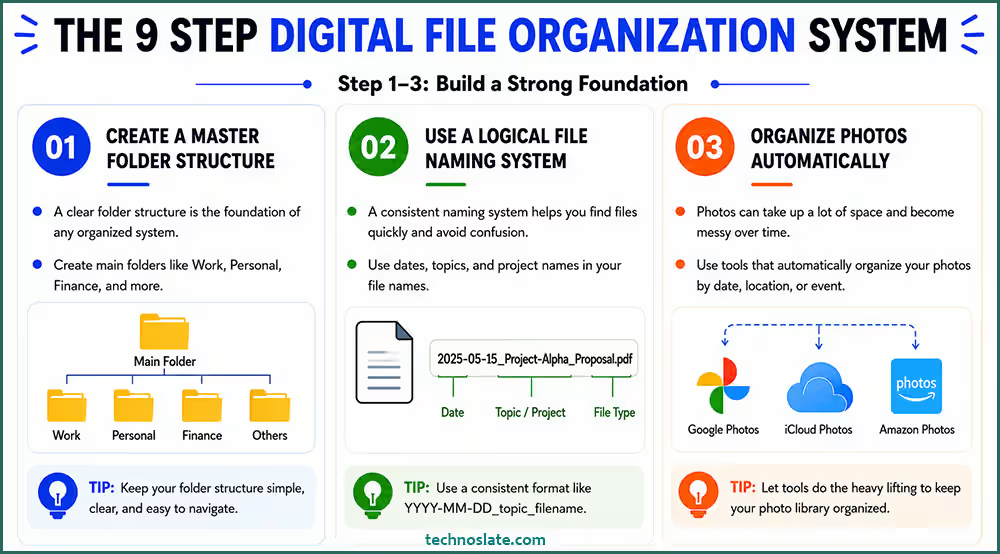
(1) Create a Master Folder Structure
The first step toward digital organization is creating a master folder structure. Rather than storing files randomly across your computer, you begin by defining a small set of main folders that represent the key areas of your life. These primary folders might include categories such as Work, Personal, Finance, Learning, and Projects. Any new file you create should eventually belong inside one of these main folders.
Keeping the number of top level folders limited makes the system easier to maintain. Instead of wondering where a file should go, you simply choose the appropriate category and store it there. Over time, this approach keeps your entire digital environment organized. The foundation of every efficient digital file organization system is a clean and well planned master folder structure.
(2) Use a Logical File Naming System
File names are more important than many people realize. When documents have vague names such as “Document1” or “Final Version,” it becomes extremely difficult to recognize them later. A better approach is to use clear and descriptive file names that include useful information such as the topic, project name, or date.
A logical naming method is one of the most powerful elements of a digital file organization system. For example, a file named “Marketing_Report_March_2026” is much easier to identify than a generic file called “Report_Final.” Using consistent naming patterns also makes search tools far more effective. When every document follows the same naming pattern, your digital file organization system becomes far more searchable.
(3) Organize Photos Automatically
Large photo collections can feel overwhelming, especially when images are stored across multiple devices. Modern smartphones and cameras generate thousands of images every year. Trying to organize these images manually can quickly become overwhelming. Cloud storage platforms such as Google Drive and Dropbox make this process much easier by automatically uploading photos from your devices.
The first step is bringing all photos into one central location. Cloud platforms such as Google Drive make it possible to upload and store large photo libraries safely. Once uploaded, many cloud services organize images by date (time periods), travel locations, or event. This allows you to browse large photo collections more easily. Automatic backups also ensure that your memories remain safe even if a device is lost or damaged. When your images are arranged by date or event, your digital file organization system becomes much easier to navigate.
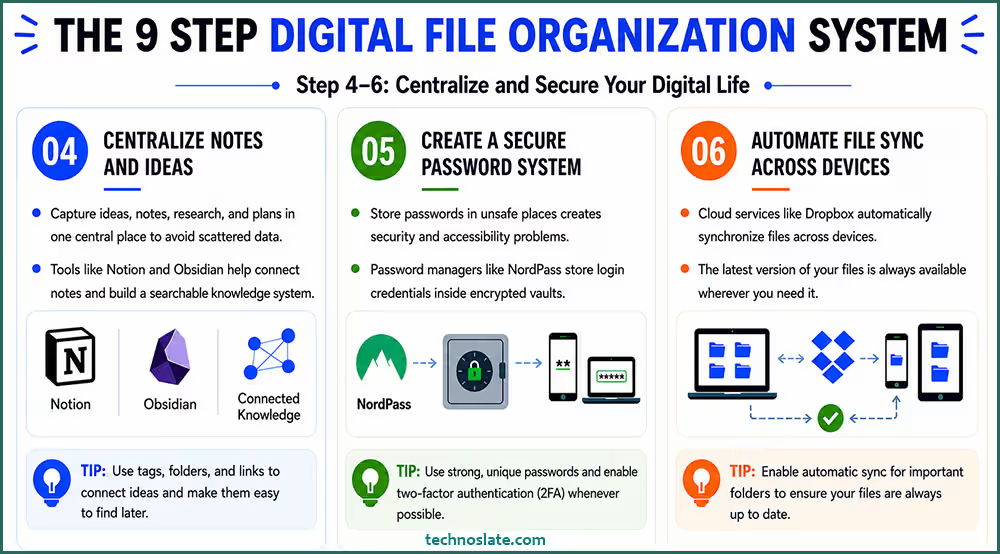
(4) Centralize Notes and Ideas
Many people capture ideas throughout the day. These might include meeting notes, research findings, article ideas, or project plans. Without a central place to store them, these notes quickly become scattered across multiple apps or documents.
Knowledge management tools such as Notion and Obsidian help bring all these ideas into one organized workspace. These platforms allow you to connect notes together, making it easier to build a searchable personal knowledge system. When your research, plans, and thoughts live in one place, your digital file organization system becomes far more powerful.
(5) Create a Secure Password System
Passwords are another important part of digital organization. Unfortunately, many people still store passwords in unsafe places such as text documents or browser notes. This creates both security risks and accessibility problems.
Password managers like NordPass store login credentials inside encrypted vaults. This allows you to access your accounts securely from any device. Keeping passwords in one secure location also eliminates the frustration of forgetting login details. Strong authentication tools help keep your digital file organization system safe from cyber threats.
(6) Automate File Sync Across Devices
Most people now work across multiple devices. Files created on a laptop may later need to be accessed on a smartphone or tablet. Cloud services such as Dropbox automatically synchronize files across devices. This ensures that the latest version of a document is always available wherever you need it. When files update across devices instantly, your digital file organization system becomes incredibly convenient. Automation removes the need to manually transfer files between devices.
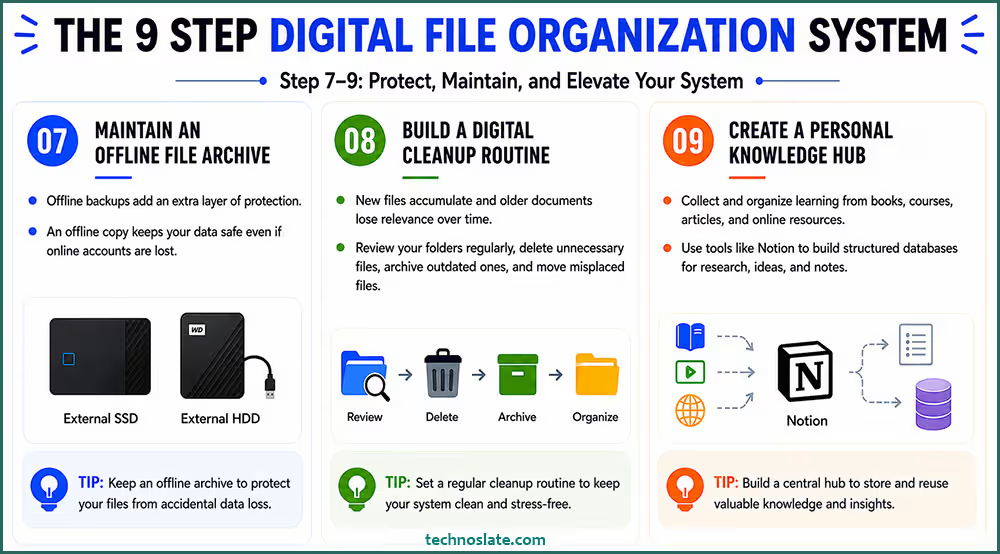
(7) Maintain an Offline File Archive
While cloud storage is extremely useful, having an offline backup adds another layer of protection. External storage devices allow you to store important files outside your primary computer. A reliable drive such as the Samsung T7 Portable SSD or WD My Passport HDD can hold large archives of documents, photos, and backups. Keeping an offline copy ensures that your data remains safe even if something happens to your online accounts. Maintaining an offline archive protects your digital file organization system from accidental data loss.
(8) Build a Digital Cleanup Routine
Even the best organization system requires occasional maintenance. Over time, new files accumulate and older documents lose their relevance. Setting aside a small amount of time each week or month to review your folders helps keep your system clean. During these sessions, unnecessary files can be deleted, outdated documents archived, and misplaced files moved to the correct folders. A weekly cleanup habit keeps your digital file organization system from becoming chaotic again.
(9) Create a Personal Knowledge Hub
The final step in building a digital file organization system is creating a central hub for learning and knowledge. Most professionals constantly consume information through books, courses, and online resources. Organizing this information properly allows you to revisit and reuse valuable insights.
Platforms such as Notion make it easy to build structured databases that store research, ideas, and notes. Over time, this hub becomes a personal library that supports continuous learning. Turning your files into a knowledge hub can elevate your digital file organization system to the next level.
The Ideal Folder Structure for Your Computer
An ideal folder structure is the backbone of an effective Digital File Organization system. Without a clear structure, even the best tools and storage platforms can quickly become messy and difficult to manage. The goal is to create a system that is simple, scalable, and easy to navigate.
Start by organizing your files into broad main folders based on key areas of your life or work. For example: Work, Personal, Projects, Finance, Learning, and Archive. These top level folders act as the foundation of your Digital File Organization, making it easy to quickly locate where a file should belong.
Within each main folder, create sub folders that break down information into more specific categories. For instance, inside the Work folder, you might have Clients, Reports, Meetings, and Resources. If needed, you can go one level deeper. For example, under Clients, create individual folders for each client. This layered approach ensures clarity without overcomplicating the system.
Naming conventions are equally important in maintaining a clean digital file organization. Use clear, consistent, and descriptive file names. A good format could be: ProjectName_Version_YYYY-MM-DD. This makes files searchable and instantly understandable, even months later. Another key principle is to avoid overloading folders. If a folder has too many files, it becomes difficult to manage. In such cases, break it down into smaller subfolders. At the same time, avoid going too deep with too many nested levels, as that can slow down navigation.
Finally, maintain an Archive folder where you move old or inactive files instead of deleting them. This keeps your main workspace clean while still preserving important data.
In conclusion, a well planned Digital File Organization system is not about complexity but clarity. A good folder structure balances simplicity and flexibility. A simple, logical, and consistent folder structure will save time, reduce stress, and make your digital life far more efficient.
Best Tools for Digital File Organization
The success of a digital file organization system often depends on the tools you choose. Cloud storage services such as Dropbox and Google Drive simplify file synchronization across devices. Knowledge management platforms like Notion provide flexible environments for organizing notes and research. Password managers such as NordPass help keep login credentials secure and accessible.
Offline storage devices like the Samsung T7 Portable SSD add another layer of protection by storing backup copies of your data. Together, these tools create a balanced ecosystem for managing your digital life.
- Cloud Storage Tools (Files store + access anywhere)
- Google Drive – Easy, Very popular, Strong sharing system, Free plan
- Dropbox – Clean interface, Fast sync
- Microsoft OneDrive – Best for Windows users, Integration with MS Office
- File Naming & Structure Tools
- Total Commander – Bulk rename, Advanced file control
- Directory Opus – Pro level tool for power users
- Knowledge + Document Organization
- Notion – All in one (notes + database + files), Best for system build
- Evernote – Notes, Best for organized PDF
- Search & Fast Access Tools
- Everything – Lightning fast file search (Windows)
- Alfred – Super fast search and automation in Mac
- Backup & Security Tools
- Backblaze – Automatic backup (set and forget)
- Google Photos – Images auto organize and Backup
Common Digital Organization Mistakes
Many people start organizing their files but eventually give up because their system becomes too complicated. One common mistake is creating too many folders. When the structure becomes overly detailed, it becomes difficult to remember where files belong. Another mistake is inconsistent file naming, which makes searching for documents much harder.
Ignoring backups is also risky, since devices can fail or files can be accidentally deleted. Keeping your system simple and consistent is the best way to avoid these problems. Ignoring regular maintenance is one of the most common failures in a digital file organization system.
FAQ
- What is the best way to organize digital files?
- The best approach is creating a structured folder system combined with consistent file naming and cloud synchronization.
- What is the best folder structure for a computer?
- A simple hierarchy with main folders such as Work, Personal, Finance, and Learning usually works well for most users.
- How do professionals organize digital files?
- Professionals often use cloud storage, knowledge management tools, and password managers to centralize information and maintain structured workflows.
- How do you organize thousands of photos?
- Uploading photos to a cloud platform and grouping them into albums by date or event makes large collections easier to manage.
Final Thoughts
Digital organization is no longer optional. As more aspects of our lives move online, maintaining a clean and structured digital environment becomes essential. A well designed digital file organization system transforms digital chaos into clarity. Files become easier to find, devices feel less cluttered, and your workflow becomes smoother. The key is building a system that is simple enough to maintain but strong enough to protect your information. Once you establish this structure, managing your digital life becomes significantly easier.
I hope this post can help you to get understanding about how to use Digital File Organization System. If you found this post helpful, please share this post with your friends and family. If you have any question in your mind or you are facing any problem then feel free to ask your question in the comment section. We will try our best to help you. You can read more such interesting articles here.