You’ve probably seen that annoying “Update Available” notification and ignored it more than once. But what if skipping that update is quietly putting your device, data, and performance at risk? Whether you’re using Windows or Android, software updates are far more than just minor tweaks, they are essential for security, speed, and stability.
The topic of software updates importance often gets overlooked until something goes wrong. Many users delay updates because they seem unnecessary or time consuming, but these updates are actually critical to keeping your device running smoothly. Whether it’s a Windows laptop or an Android smartphone, updates play a vital role in maintaining security, improving performance, and introducing new features.
Why Should You Update Your Android Device?
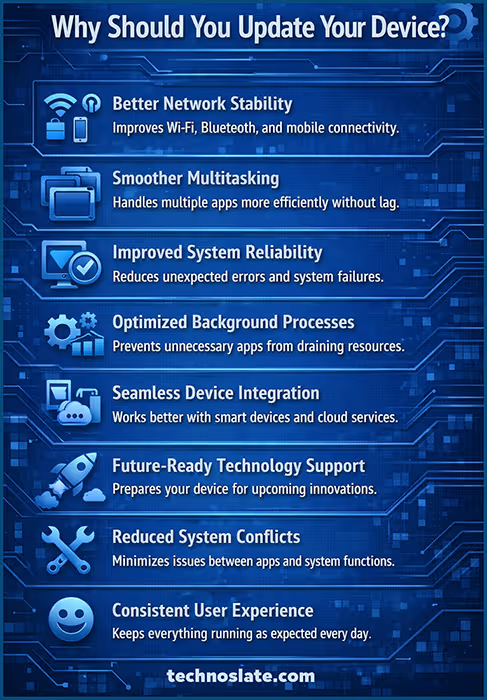
Software updates are designed to fix vulnerabilities, improve functionality, and enhance the overall user experience. On Windows systems, updates often include security patches that protect against malware and cyber threats.
Similarly, Android updates ensure that your phone remains compatible with new apps and services while also improving battery life and performance. Ignoring updates is like leaving your front door unlocked in a busy neighbourhood. Over time, outdated software becomes an easy target for hackers, bugs, and system failures.
For security updates, it is recommended to install them as soon as they are available. These updates are critical and protect your device from emerging threats. Feature updates, on the other hand, can be installed after a short delay if you want to ensure stability.
Security Patches
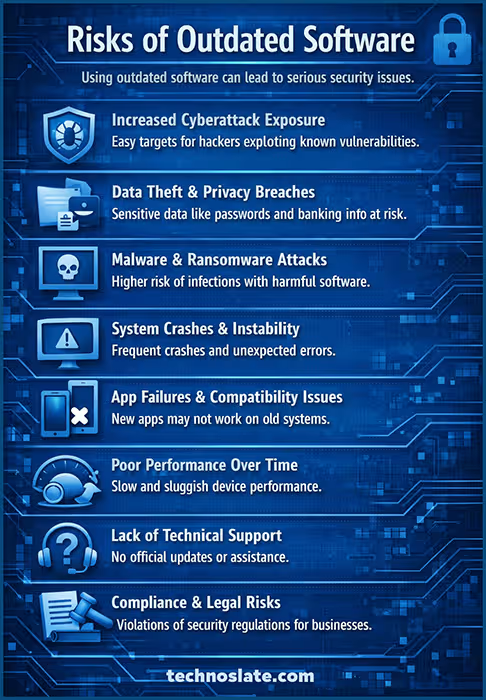
Security patches are one of the most critical aspects of software updates, yet they are often the most ignored. Every day, developers and cybersecurity experts discover new vulnerabilities in android system. These vulnerabilities can be exploited by hackers to steal personal data, install malware, or even take control of your device. Security patches are designed to fix these weak points before they can be misused.
Think of security patches as locks on your digital doors. Without them, your system becomes increasingly exposed to threats. When you delay installing updates, you are essentially leaving those doors open for attackers who actively look for outdated systems. What makes security patches even more important is that cyber threats are constantly evolving. Hackers use automated tools to scan for devices that haven’t been updated. This means even an ordinary user can become a target without realizing it.
Installing updates regularly ensures that your device stays protected against the latest threats. It’s not just about protecting your files but also your identity, financial information, and online privacy. Software updates also enhance encryption standards and privacy frameworks. For example, newer updates may upgrade data encryption protocols, strengthen app permission controls, and introduce sandboxing techniques to isolate apps – reducing the risk of cross-app data leaks.
Compatibility and Feature Enhancements
As technology evolves, new apps, tools, and services are constantly being developed. Compatibility and feature enhancements in software updates ensure that your device can keep up with these changes. Without updates, you may find that certain apps no longer work properly or cannot be installed at all. Compatibility updates allow your system to communicate effectively with new software, websites, and hardware. For instance, an updated Android device is more likely to support the latest apps on the Play Store.
Feature enhancements, on the other hand, focus on improving user experience. These can include new settings, improved interfaces, better customization options, or entirely new functionalities. Sometimes these features may seem small, but they can make a big difference in how you use your device daily.
What makes these updates valuable is that they extend the lifespan of your device. Instead of becoming outdated quickly, your system evolves with changing technology. In a fast-moving digital world, staying compatible and up-to-date with features ensures that your device remains useful, efficient, and enjoyable to use.
Importance for Mobile Devices
Mobile devices like smartphones have become an essential part of everyday life. From banking and communication to shopping and entertainment, we rely heavily on them. This makes software updates even more important for mobile devices, especially Android.
Unlike desktop systems, mobile devices are constantly connected to the internet and often carry sensitive personal information. This makes them a prime target for cyber threats. Regular updates ensure that your phone stays protected against malware, phishing attacks, and data breaches.
Updates also improve mobile-specific features such as battery life, camera performance, and app efficiency. For example, an update might optimize how apps run in the background, helping your phone last longer on a single charge.
Another key factor is app compatibility. Many apps require the latest version of the operating system to function properly. Without updates, you may miss out on important app features or lose access entirely. In simple terms, keeping your mobile device updated is not just about performance, it’s about security, usability, and staying connected in a safe and efficient way.
Bug Fixes
No software is perfect, no matter how advanced it is. Bugs are small errors or glitches that can affect how a system or app works. Sometimes they are minor annoyances, like an app freezing for a moment, but other times they can cause serious problems like crashes or data loss. This is where bug fixes come into play. Developers continuously monitor user feedback and system performance to identify these issues. Once detected, they release updates that fix these bugs and improve overall stability. For users, this means fewer crashes, smoother performance, and a more reliable experience.
Imagine using your phone or computer daily and encountering random issues like apps not opening, screens lagging, or features not working properly. Over time, these small problems can become frustrating. Bug fixes ensure that these issues are resolved, often without you even noticing the change directly.
Another important aspect is that bug fixes can also improve security. Some bugs can create loopholes that hackers may exploit. By fixing them, updates make your device safer as well as more stable. In simple terms, bug fixes are like routine maintenance. They keep your system running smoothly and prevent small issues from turning into major problems.
Performance Improvements
Performance improvements are one of the most noticeable benefits of software updates. Over time, devices can start to feel slower due to increased usage, outdated processes, or inefficient resource management. Updates are designed to optimize how the system uses memory, battery, and processing power. For example, after an update, you might notice that apps open faster, multitasking becomes smoother, and your device responds more quickly to commands. On Android devices, updates often include battery optimization features that help your phone last longer throughout the day. On android systems, updates can improve boot time and overall system responsiveness.
These improvements are not always dramatic but can significantly enhance your daily experience. Developers refine the code behind the scenes, removing inefficiencies and improving how different components interact with each other. Another advanced benefit of software updates is AI-based performance optimization. Updates can refine how your device allocates CPU, RAM, and battery resources based on your usage patterns. Over time, this leads to smarter background process management and improved multitasking efficiency without manual intervention.
Another key aspect is that performance updates help your device handle newer applications more effectively. As apps become more advanced, they require better system support. Updates ensure that your device can keep up with these demands. In essence, performance improvements make your device feel fresh and more capable, even if the hardware remains the same. It’s like giving your system a tune-up without replacing any parts.
Corporate and Enterprise Relevance
In corporate and enterprise environments, software updates are not just important, they are critical. Businesses rely on computers, servers, and mobile devices to store sensitive data, manage operations, and communicate with clients. Any vulnerability in these systems can lead to serious consequences, including data breaches and financial loss.
Regular updates help organizations maintain strong security by patching vulnerabilities that could be exploited by cybercriminals. In many industries, staying updated is also a compliance requirement, meaning companies must follow certain security standards to protect user data. Beyond security, updates improve system performance and reliability, ensuring that business operations run smoothly without unexpected downtime. For employees, this means fewer disruptions and better productivity.
Another important aspect is compatibility with enterprise tools and software. Businesses often use specialized applications that require updated systems to function properly. Ignoring updates in a corporate setting can be costly, both financially and reputationally. A single outdated system can become a weak link in the entire network. For organizations, staying updated is not just a technical task, it is a strategic necessity for long-term success and security.
Benefits of Software Updates
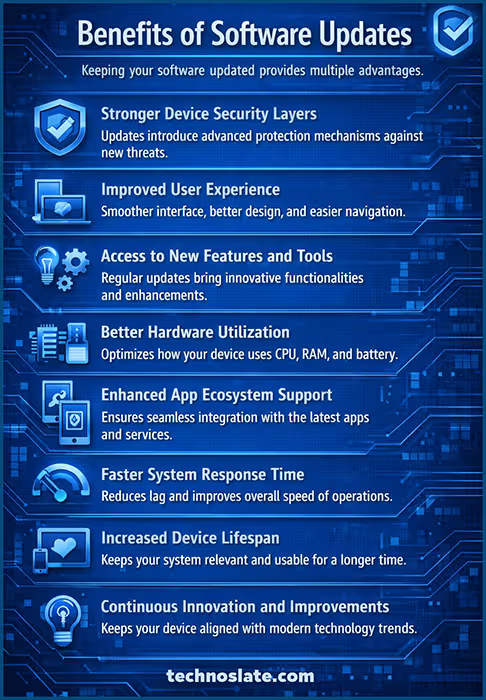
One of the biggest advantages of software updates is improved security. Developers constantly identify and fix vulnerabilities, which means every update strengthens your defense against cyberattacks. Without these updates, your personal data can become exposed to threats.
Another major benefit is enhanced performance. Updates often optimize system processes, making your device faster and more efficient. Many users notice smoother app performance and better battery life after updating their Android devices.
New features are also a key reason updates matter. Companies regularly introduce tools, design improvements, and usability enhancements that make your device more enjoyable and productive to use. These features can significantly improve your daily workflow.
Compatibility is another important factor. Updated software ensures that your device works seamlessly with the latest apps, websites, and technologies.
Without updates, you may face issues like apps crashing or not installing at all. Lastly, bug fixes are an essential part of updates. Small glitches and errors can disrupt your experience, and updates are designed to resolve these issues and improve system stability.
Disadvantages of Software Updates
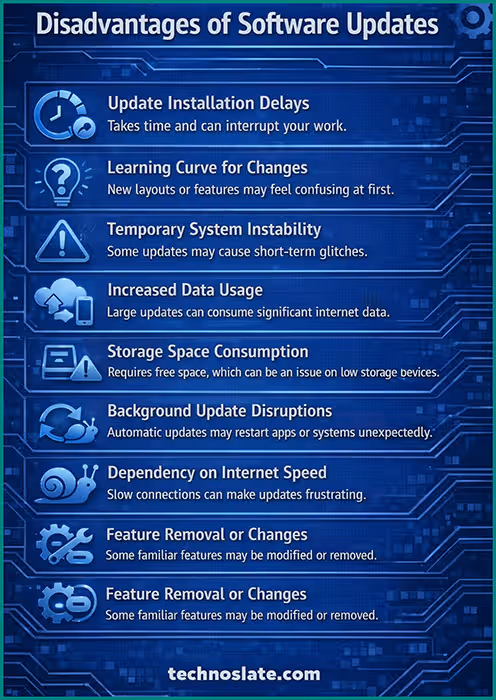
Despite their benefits, software updates are not always perfect. One common drawback is that updates can sometimes slow down older devices. As software becomes more advanced, it may require more resources than older hardware can provide. Another issue is unexpected bugs.
While updates aim to fix problems, they can occasionally introduce new ones. This can lead to temporary issues such as app crashes or system instability.
Storage space is another concern, especially for Android users. Updates can take up significant space, leaving less room for apps, photos, and files. Updates can also be time-consuming. Installing a major update on Android may take several minutes or even longer, which can interrupt your work or routine.
In some cases, users may not like the changes introduced in updates. A redesigned interface or removed feature can affect user experience, especially if you were comfortable with the previous version.
Best Practices for Installing Software Updates
Keeping your device updated doesn’t mean you have to install every update immediately without thought. It’s important to ensure that your data is backed up before installing major updates. Using a stable internet connection is also essential to avoid incomplete or corrupted updates.
Scheduling updates during non-working hours can help you avoid interruptions. It’s also wise to check user feedback for major updates. This can help you identify potential issues before installing them on your device.
Misconceptions About Software Updates
There are many misconceptions about software updates that lead people to ignore them. One common belief is that updates are unnecessary or only meant for adding new features. In reality, most updates focus on security and stability rather than visible changes. Another misconception is that updates always slow down devices. While this can sometimes happen on older hardware, most updates are designed to improve performance and efficiency. Avoiding updates out of fear can actually cause more harm than good.

Some users also believe that updates are risky and may break their system. While no update is completely risk-free, developers thoroughly test updates before releasing them. The benefits usually far outweigh the risks. There is also a perception that updates consume too much time and data. While this can be true for major updates, smaller updates are often quick and lightweight.
Understanding these misconceptions is important because they influence user behavior. By clearing these doubts, users can make informed decisions and avoid unnecessary risks. In the end, avoiding updates based on myths can leave your device vulnerable and outdated.
The Role of User Awareness
User awareness plays a crucial role in the effectiveness of software updates. Even the best updates cannot protect a device if users choose to ignore or delay them. Understanding why updates matter helps users take proactive steps to maintain their devices. Many people are unaware of the risks associated with outdated software. They may not realize that skipping updates can expose their personal data to cyber threats. Educating users about these risks encourages responsible behavior.
Awareness also helps users follow best practices, such as backing up data before updates and installing them from trusted sources. This reduces the chances of issues during the update process. Another important aspect is recognizing the difference between critical and optional updates. Security updates should always be prioritized, while feature updates can be installed based on preference.
In a world where technology is deeply integrated into daily life, user awareness is the first line of defense. It empowers individuals to make better decisions and ensures that their devices remain secure, efficient, and reliable. Ultimately, staying informed is just as important as staying updated.
FAQ about Software Updates
- Why are software updates important for Android?
- Software updates improve security, fix bugs, and enhance performance, ensuring your device runs efficiently.
- Are Android updates necessary?
- Yes, Android updates are crucial for protecting your system from security threats and improving system stability.
- Can software updates slow down my device?
- In some cases, updates may affect older devices, but they generally improve overall performance.
- What happens if I don’t update my device?
- Your device may become vulnerable to security threats, experience bugs, and lose compatibility with new apps.
- How can I safely update my device?
- Always back up your data, use a stable internet connection, and install updates from official sources.
Conclusion
Finally, software updates contribute to long-term sustainability. By extending device lifespan and maintaining performance standards, they reduce the need for frequent hardware upgrades, saving cost and minimizing electronic waste. Software updates should never be ignored, but they also don’t need to be rushed blindly. The smartest approach is to prioritize security updates immediately while evaluating major updates before installing them. By staying consistent with updates, you ensure that your Android devices remain secure, efficient, and future-ready.
Understanding the software updates importance can help you make smarter decisions about your devices. While updates may sometimes feel inconvenient, they are essential for maintaining security, improving performance, and ensuring compatibility. Ignoring them can lead to bigger problems in the long run.
I hope this post will help you to understand importance of software updates in android devices. If you found this post helpful, please share this post with your friends and family. If you have any question in your mind or you are facing any problem then feel free to ask your question in the comment section. We will try our best to help you. You can read more such interesting articles here.