Charging your phone in public places feels convenient, but not every USB port is safe. Airports, railway stations, cafes, hotels, and shopping malls often provide charging stations that users connect to without thinking twice. The problem is that some USB ports can potentially be modified to interact with connected devices beyond charging.
This is where a USB Data Blocker becomes useful. It is a small accessory designed to allow charging while preventing data communication between your device and the charging source. For frequent travelers, remote workers, or anyone concerned about digital privacy, this simple gadget can add an extra layer of protection.
What Is a USB Data Blocker?
A USB Data Blocker is a compact adapter placed between a charging cable and a USB port. Its primary purpose is to allow electrical power to pass through while blocking data transfer.
Normally, when a phone connects to a USB port, both charging and data communication become possible. A data blocker removes the data connection completely. This makes it especially useful when charging from an unknown or untrusted source.
How Does a USB Data Blocker Work?
A standard USB connection contains separate pins for power delivery and data transmission. A USB Data Blocker internally disconnects the data pins while keeping the power pins active. As a result, the connected device only receives electrical power. Because of this:
- File transfer becomes almost impossible
- Computers cannot detect the phone as a storage device
- Data synchronization remains disabled
- Unauthorized communication cannot be established
Some advanced models also support fast charging standards such as Power Delivery (PD) and Quick Charge. Budget models may not include these features.
Why Public USB Charging Became a Security Concern
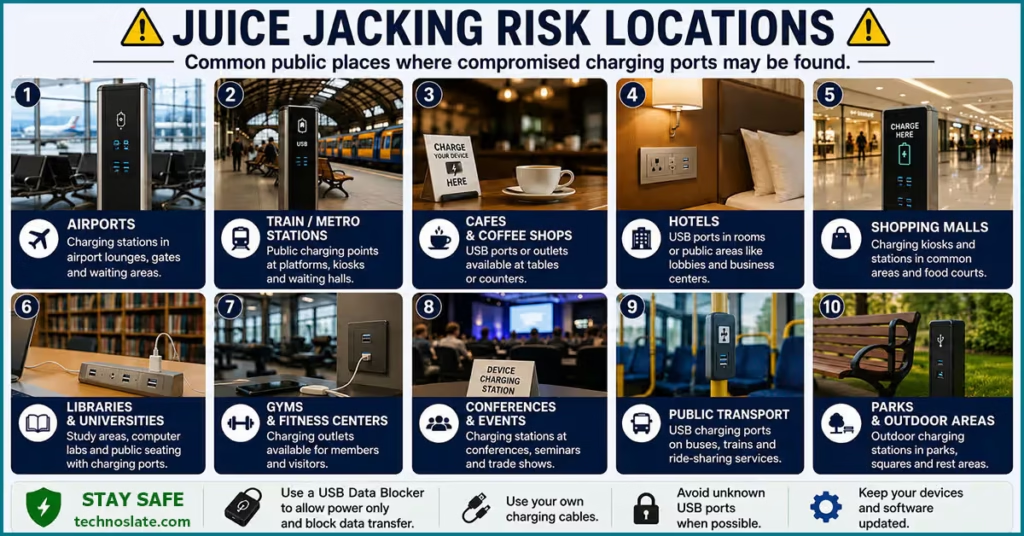
Public charging stations became popular because people increasingly depend on smartphones for navigation, payments, communication, and work. In places like airports and railway stations, low battery situations are common, so USB charging ports are now available almost everywhere. The convenience of these charging stations also created a security concern. Unlike a traditional wall charger, a USB connection is capable of both charging and exchanging data.
Most users simply connect their phones without checking whether the charging source is trustworthy. Since smartphones contain banking apps, passwords, personal photos, emails, and office documents, cybersecurity experts often recommend avoiding unknown USB ports whenever possible. This growing concern is one of the main reasons USB Data Blockers became popular among travelers and privacy focused users.
What Is Juice Jacking?
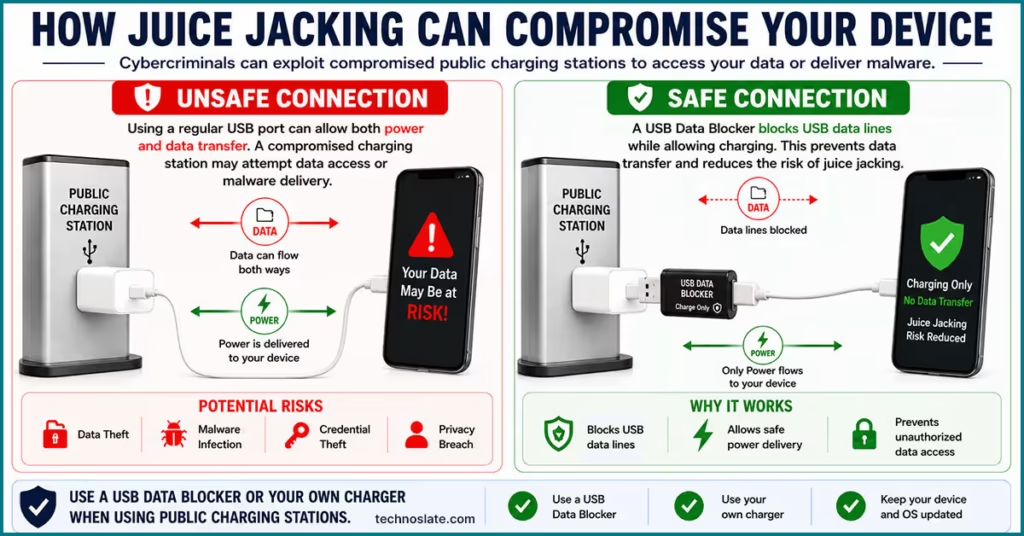
JJuice jacking is a cybersecurity threat associated with public USB charging ports. The term is used when a compromised charging station or USB connection attempts to interact with a connected device beyond simply supplying power. Since a standard USB connection can transfer both electricity and data, an unsafe charging source may create opportunities for unauthorized communication with a smartphone, tablet, or laptop (like modern laptop with USB-C type charger).
A malicious charging setup could theoretically try to access device information, trigger unwanted data connections, or install harmful software on vulnerable devices. Modern smartphones now include stronger security protections, and many devices ask for permission before allowing file access, but cybersecurity experts still recommend avoiding unknown USB ports whenever possible.
Many people connect their phones immediately when the battery gets low, especially while traveling. During these situations, security checks are often ignored. Using your own charger or carrying a USB Data Blocker is generally a safer approach. Public USB charging ports are commonly found in Airports, Railway stations, Hotels, Cafes, Shopping malls, Conference venues, Co working spaces, Bus terminals.
Juice jacking is not considered an everyday occurrence, but it remains a recognized security concern because smartphones now store highly sensitive information such as banking apps, passwords, personal photos, emails, office files, and digital payment data. Even a small security risk becomes more important when so much personal information exists on a single device.
This is why many travelers and privacy conscious users prefer carrying a USB Data Blocker, personal charger, or power bank instead of directly connecting their phones to unknown charging stations.
Can Public USB Ports Really Access Your Phone?
Modern smartphones include multiple security protections, and many devices now ask for permission before allowing file access. However, charging through an unknown USB port still creates unnecessary exposure.
Some risks may involve:
- Unauthorized device communication attempts
- Fake charging kiosks
- Modified charging cables
- Malware delivery attempts
- Data extraction on unsecured devices
Even if an attack does not happen frequently, cybersecurity recommendations usually focus on reducing avoidable risks. A USB Data Blocker works as a preventive measure because it removes the data connection entirely.
Who Should Consider Using a USB Data Blocker?
- Frequent Travelers
- People who spend time in airports, hotels, and public transport hubs often rely on public charging stations. Carrying a small security accessory can be more practical than searching for trusted wall outlets.
- Business Professionals
- Office workers and business travelers usually store sensitive emails, work files, meeting documents, and client information on their phones.
- Remote Workers
- Many remote workers spend hours in cafes and co working spaces where shared charging points are common.
- Students
- Students regularly charge devices inside libraries, campuses, and public study areas where shared charging stations may be available.
- Privacy Focused Users
- Some users prefer taking preventive measures even for low probability risks. A USB Data Blocker fits well into that approach.
Types of USB Data Blockers
USB Data Blockers are available in different forms depending on the type of device, charging speed requirements, and connector compatibility. While all of them are designed to block data transfer, their practical use can vary based on how and where they are used.
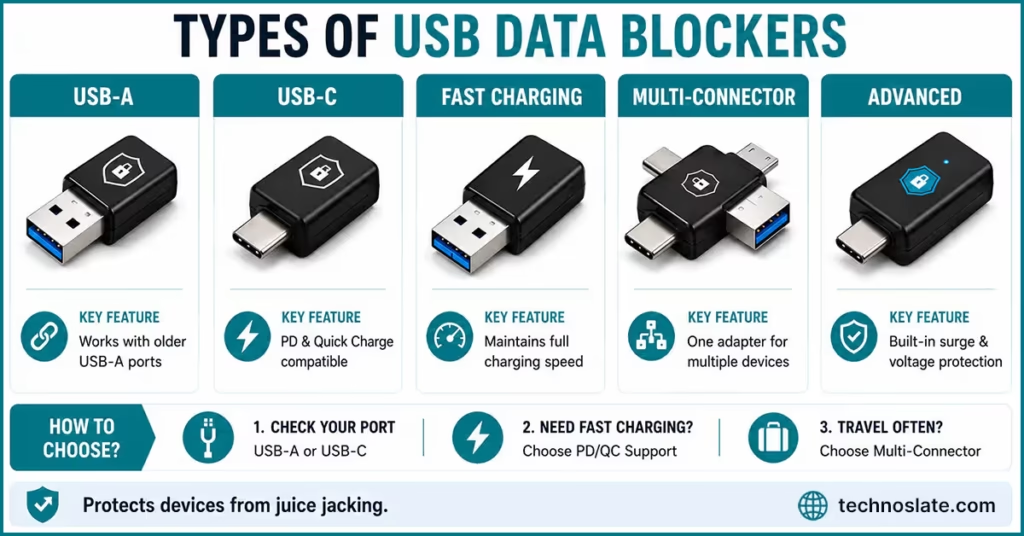
USB-C Data Blockers
USB-C Data Blockers are built for modern smartphones, tablets, laptops, and accessories that use USB-C connections. Since USB-C has become the standard for many newer devices, these blockers are increasingly popular among Android users, laptop owners, and people carrying multiple USB-C gadgets.
One advantage of USB-C models is better compatibility with modern charging technologies. Higher quality versions often support faster power delivery, making them more practical for devices with larger batteries or higher power requirements. Get it from here.
USB-A Data Blockers
USB-A models are designed for traditional rectangular USB ports that are still commonly found in airports, older wall chargers, public charging kiosks, and desktop computers. These blockers are useful for users who still carry devices with standard USB-A charging cables or frequently encounter older charging infrastructure while traveling.
Because USB-A ports have existed for many years, this type of blocker is widely available and usually more affordable than newer variants. However, some older models may not support modern fast charging standards, which can result in slower charging speeds on newer smartphones. You can find it here.
Fast Charging Compatible Models
Not every USB Data Blocker handles charging speeds in the same way. Some basic models only support standard charging, while advanced versions are designed to work with technologies such as Quick Charge or USB Power Delivery (PD).
This difference becomes important for users who rely on fast charging during travel or work. A low quality blocker may charge a phone slowly, while a properly designed fast charging model can maintain charging performance much more effectively. Users with power hungry devices such as tablets, gaming phones, or lightweight laptops usually benefit more from these higher capacity versions. It is available here.
Multi Connector Data Blockers
Some USB Data Blockers include multiple connector options within a single device. These models are useful for people who carry different gadgets with different charging standards.
For example, a traveler might use a USB-C phone, a USB-A power bank, and another accessory with a different connector type. Instead of carrying separate adapters, a multi connector blocker offers more flexibility in one compact accessory. Check It Out here.
Integrated Security Charging Adapters
Certain premium products combine data blocking with additional charging features. These adapters may include voltage regulation, overheating protection, or dedicated fast charging circuitry.
Although they are more expensive than basic blockers, they are often marketed toward business travelers, remote workers, and users who regularly depend on public charging stations. Choosing the right type usually depends on the devices you use daily, the charging speed you expect, and how often you rely on public USB ports.
USB Data Blocker vs Charge Only USB Cable
Some people use charge only USB cables instead of a separate data blocker. Both products are designed to prevent data transfer, but they work differently.
A USB Data Blocker is a small adapter that can work with different charging cables. A charge only cable permanently removes the data transfer functionality from the cable itself. People who frequently switch cables often prefer a dedicated data blocker.
Advantages of a USB Data Blocker
- Works with multiple cables
- Easy to carry
- Useful during travel
- Can be attached only when needed
Advantages of a Charge Only Cable
- Cleaner setup
- No additional adapter required
- Simple plug and use experience
What Should You Check Before Buying One?
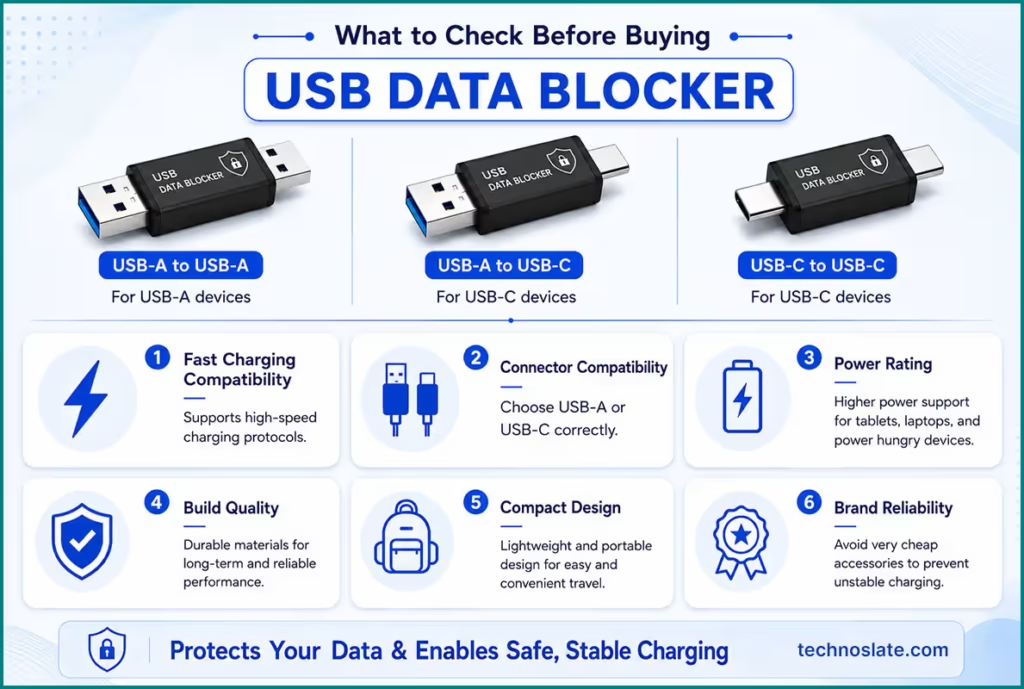
- Fast Charging Compatibility
- If the adapter does not support high speed charging protocols, charging performance may feel slow.
- Connector Type
- Always confirm whether you need a USB-A or USB-C version.
- Power Rating
- Higher power support is useful for tablets, laptops, and power hungry devices.
- Build Quality
- Strong connectors and durable materials improve long term reliability.
- Compact Design
- A lightweight and portable design makes travel easier.
- Brand Reliability
- Very cheap accessories may cause unstable charging behavior.
Limitations of USB Data Blockers
Since the device blocks data communication intentionally, some normal USB features stop working. If data access is required, the blocker must be removed. Examples include:
- Android Auto support
- Apple CarPlay connectivity
- File transfer
- USB tethering
- Device debugging
Is a USB Data Blocker Actually Useful?
Not every user needs one. If you mostly charge your phone at home or use trusted adapters, its practical use may be limited. However, for travelers, remote workers, and privacy conscious users, this small gadget can provide additional security with almost no setup required. Its biggest advantage is simplicity. There is no software installation, configuration process, or technical setup involved.
Common Myths About USB Data Blockers
Many people assume that USB Data Blockers are only useful for hackers, cybersecurity professionals, or highly technical users, but that is not true. These devices are mainly designed for ordinary users who frequently charge their phones in public places and want an extra layer of protection. Another common misconception is that modern smartphone permission popups make data blockers unnecessary.
While permission systems do improve security, completely disabling the data connection is still considered a safer approach when using unknown charging ports. Some users also believe that USB Data Blockers always slow down charging speeds, although good quality models with fast charging support usually maintain normal charging performance. There is also a perception that these accessories are expensive, but most models are relatively affordable and cost much less than many other digital security gadgets.
FAQs
- Does a USB Data Blocker support fast charging?
- Some models do, but not all. Always check charging specifications before purchasing.
- Can it be used with laptops?
- Yes, provided the device supports the required power rating.
- Does it completely stop malware attacks?
- It blocks USB data communication, which significantly reduces USB based attack risks.
- Can it reduce charging speed?
- Low quality models without fast charging support may charge devices more slowly.
- Should public charging stations be avoided completely?
- Using trusted chargers and personal charging accessories is generally considered safer.
Final Thoughts
A USB Data Blocker is a niche accessory with a very specific purpose. It helps balance charging convenience and digital security when using public USB ports. Blindly trusting unknown charging sources is not always the best idea. If you frequently use public charging stations, carrying a USB Data Blocker can be a simple and practical precaution.
We hope this article provided valuable insights and answered your questions. If you enjoyed reading it, don’t forget to share it with others who might find it useful. Have any thoughts, suggestions, or queries? Drop them in the comments below, and we’ll be happy to assist you. Stay connected for more informative and engaging content. You can read more such interesting articles here.