I think the best part is that there is no setup involved, and you don’t have to put in any effort to learn something new. You just install it, and it starts working – it’s great.
One day, while I had some spare time, I reflected on how we customize our mobile phones with wallpapers, themes, and widgets to enhance the user experience. But, in desktop/laptop a new browser tab displays nothing more than a search bar, frequently used shortcuts, and a few bookmarks – at least, that is the standard experience for most people. I wondered if a similar approach could be applied to the browser window; surely, there had to be a way to improve it. After doing some research, I discovered this option and decided to try it out to see what it was really like.
Personally, I really enjoyed the experience of MYNT: Material You New Tab. The best part is that it doesn’t alter the browser in a way that disrupts your workflow. Instead of seeing a plain, ordinary screen every time you open a new tab, you are greeted by a clean, visually appealing, and personalized dashboard. While a standard new tab offers little more than empty space and a few shortcuts, this setup provides so much more – adding a touch of novelty and a genuine sense of personal connection.
What is MYNT? Material You New Tab
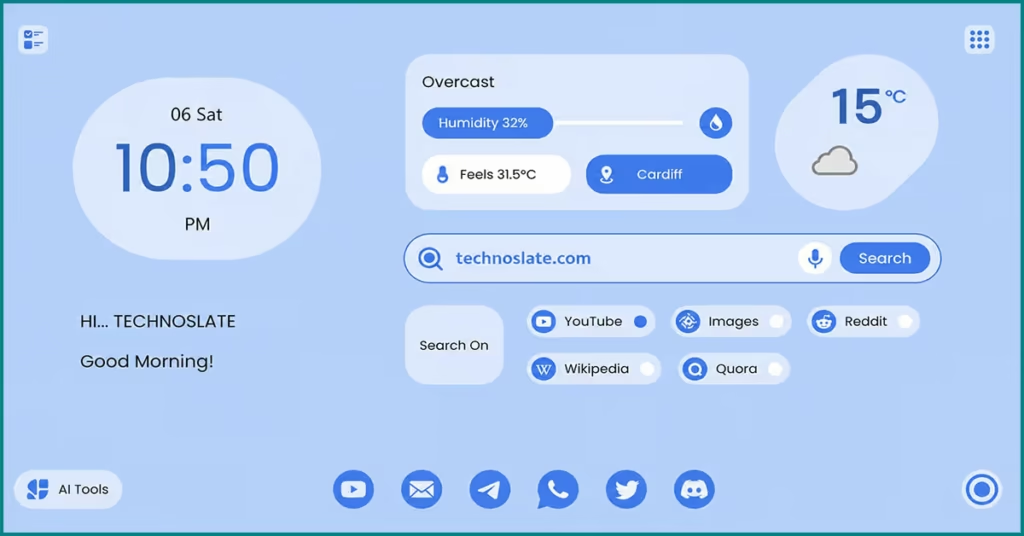
At its core, MYNT: Material You New Tab is a browser extension that replaces your default new tab page with something far more thoughtful and cuztomized. Instead of opening a plain, forgettable screen every time, MYNT turns that space into a kind of mini dashboard, one that’s designed around you.
You don’t have to “open” it separately, it just becomes part of your everyday browsing flow. Instead of throwing a bunch of widgets and features at you, it focuses on simplicity and visual harmony. It’s inspired by modern design systems that prioritize clarity and personalization, so the interface doesn’t feel cluttered or overwhelming. It doesn’t try to completely change how you use your browser. It just brush up one of the most repeated moments in your day, opening a new tab, and makes it feel a little more useful, and a lot more yours.
This design style comes from Android 12, where the whole focus shifted from “one size fits all” to “made just for you”. Most tools focus either on looks or utility. Material You tries to balance both. The goal isn’t to overwhelm you with flashy design, but to create something that feels calm, intuitive, and personal. The colors are soft, the layout is nice, and nothing screams for attention, yet everything feels right.
Key Features Breakdown
At first glance, MYNT might look simple, and that’s actually the point. It doesn’t offer dozens of flashy tools to overwhelm you. Instead, it focuses on a handful of features that makes better your everyday browsing experience. Let’s walk through them the way a user actually feels them.
- Dynamic Themes & Wallpapers
- This is probably the first thing you’ll notice. Instead of a static background, MYNT lets your new tab feel alive. The colors adapt, the wallpaper sets the mood, and everything just fits together. It’s not for showing off, it’s about creating a space that feels comfortable every time you open a tab. Some days you might want something minimal and calm. Other days, something vibrant. MYNT gives you that flexibility without making it complicated.
- Clock, Date & Weather Widgets
- We see the time on the taskbar, but we’ve been looking at it for years – always in the same style and the same fixed spot. However, when you open a new MYNT tab and instantly see the time, day, and even the outdoor weather displayed in a new way and new style, it looks visually appealing. These are small touches, but they matter more than you’d expect. More importantly, it makes the page feel alive and aware, not just static.
- We see the time on the taskbar, but we’ve been looking at it for years – always in the same style and the same fixed spot. However, when you open a new MYNT tab and instantly see the time, day, and even the outdoor weather displayed in a new way and new style, it looks visually appealing. These are small touches, but they matter more than you’d expect. More importantly, it makes the page feel alive and aware, not just static.
- Search, Right Where You Need It
- MYNT keeps search front and center, so you’re never more than a second away from finding what you need. It makes sure it’s simple but beautiful, fast, and always accessible. Mynt keeps browser performance unhung by using minimal system resources. And personally, I didn’t notice a significant slowdown.
- MYNT keeps search front and center, so you’re never more than a second away from finding what you need. It makes sure it’s simple but beautiful, fast, and always accessible. Mynt keeps browser performance unhung by using minimal system resources. And personally, I didn’t notice a significant slowdown.
- Shortcuts That Actually Help
- We all have those few websites we open again and again, YouTube, Gmail, Notion or anything you use daily. You can also pin those as shortcuts in a way that feels organized, not cluttered. It’s like having your most used tools neatly placed on your desk instead of scattered around.
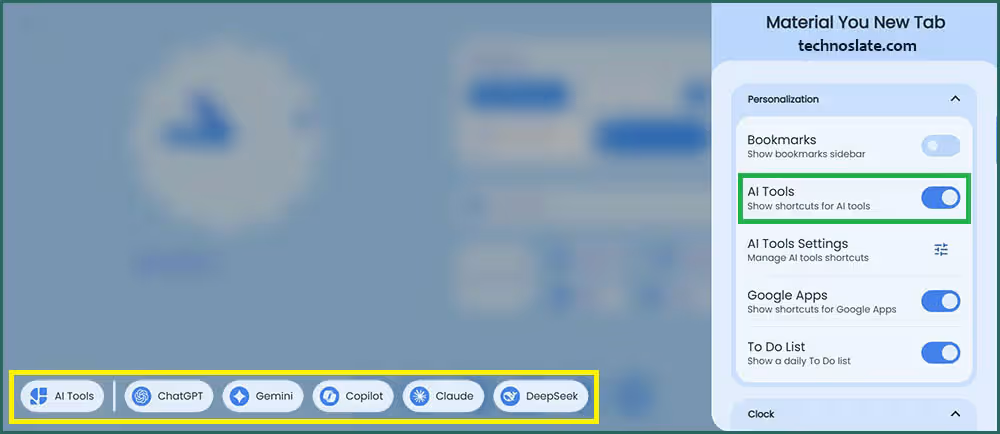
- Google Apps & AI Tools
- Quick access to popular productivity and AI platforms from one place. You can open Google services like Gmail, Google Drive, and Google Docs, along with AI tools such as ChatGPT, Google Gemini, and Claude – making it easy to work, create, and stay productive without switching between multiple tabs.
- Quick access to popular productivity and AI platforms from one place. You can open Google services like Gmail, Google Drive, and Google Docs, along with AI tools such as ChatGPT, Google Gemini, and Claude – making it easy to work, create, and stay productive without switching between multiple tabs.
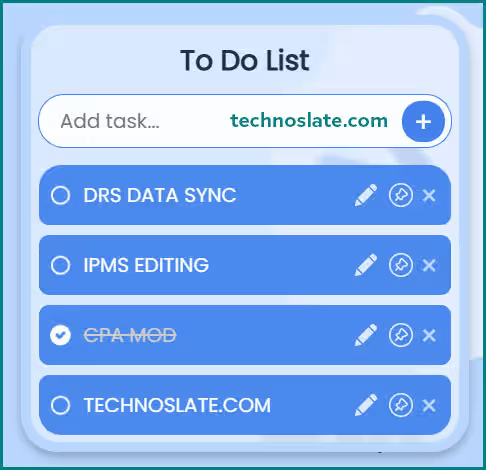
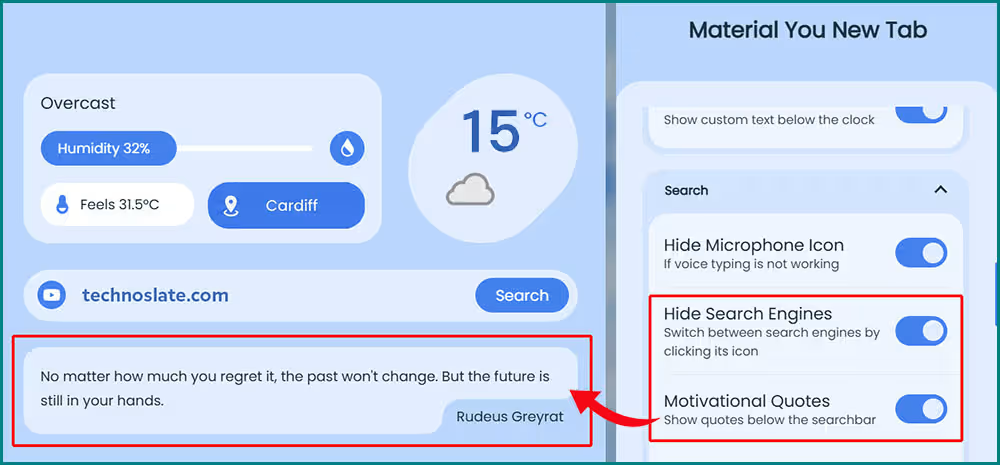
- To Do List & Display Motivational Quotes
- Organize your daily tasks right on your new tab page. Add, track, and manage your to-do’s without switching between apps.
- You can also display motivational quotes on your blank new tab. But, to display motivational quotes you have to choose the option Hide Search Engines in MYNT settings under Search settings. See below.
- Lightweight & Smooth Performance
- The thought must have crossed your mind too: “Will it slow down my browser?” Let me tell you, it loads quickly, transitions feel flawless, and it doesn’t feel heavy. You get the visual upgrade without sacrificing speed, which is honestly where many similar tools fail.
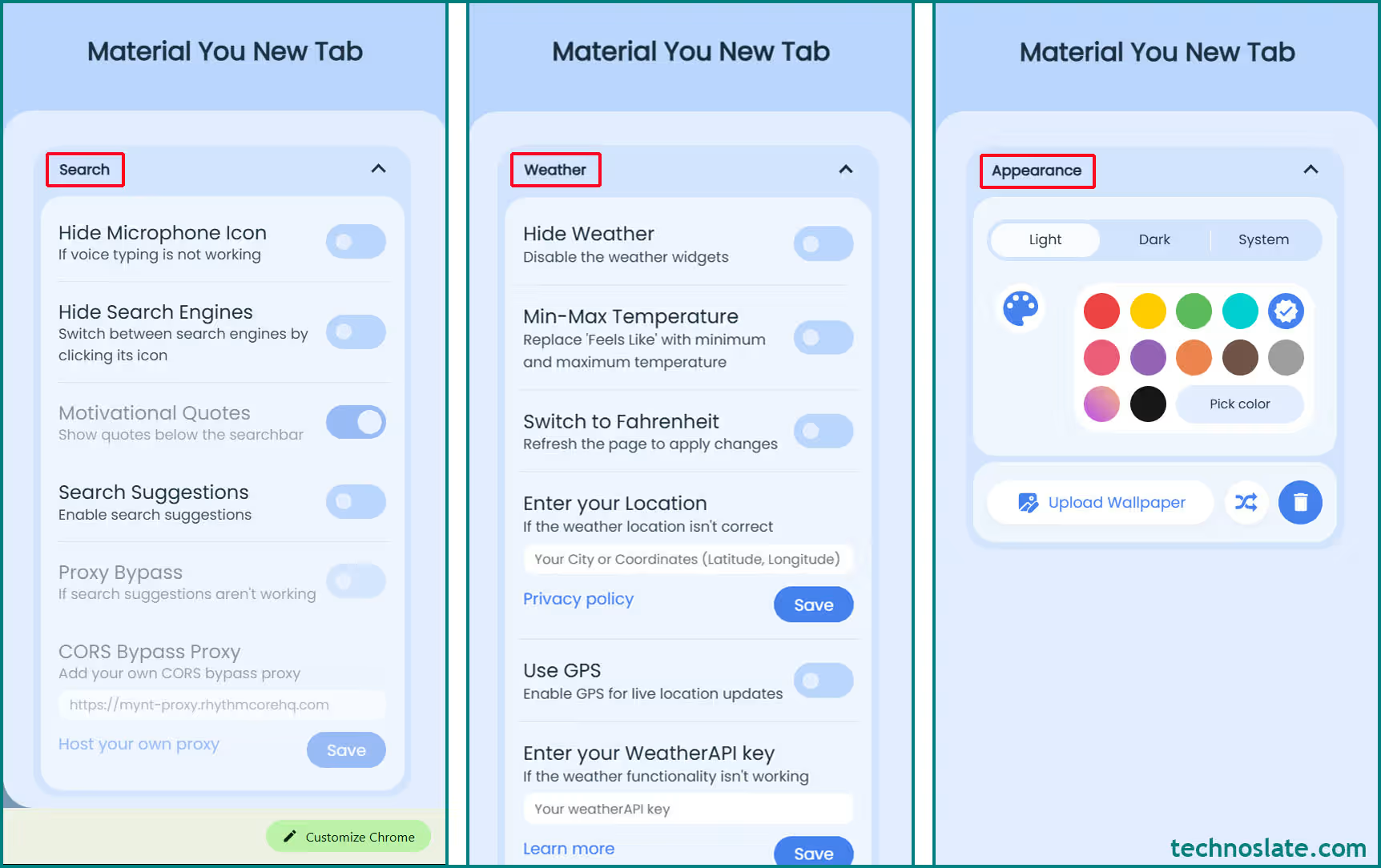
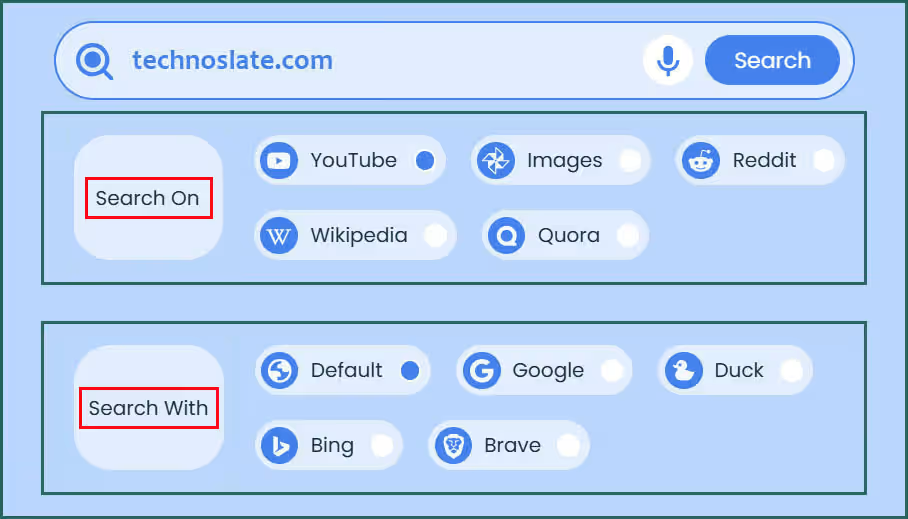
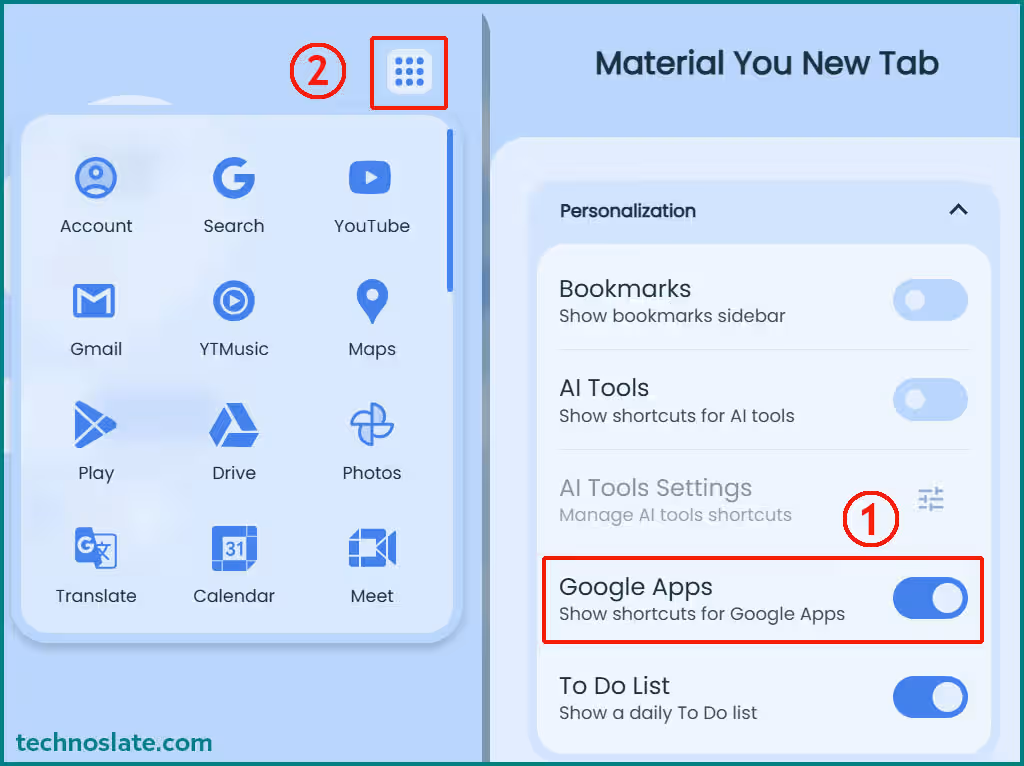
Individually, these features might seem small. But together, they change how your browser feels. Instead of opening a new tab and immediately closing it or ignoring it, you actually pause for a moment. You check the time, glance at the weather, maybe feel a bit more organized, and then move on. Actually, it’s not revolutionary. It’s just quietly making your daily routine a little different, a little nicer.
Installation & Setup Guide
To use MYNT, you do not need to go through a long and difficult learning process, nor do you need to be tech savvy. It’s quick, straightforward, and honestly takes less time than making a cup of tea. If you’ve ever installed an extension before, this will feel familiar, and if you haven’t, it’s still very easy.
Just go to Chrome web store page and search for MYNT or Material You New Tab or simply click here. Then click on Add to Chrome and Confirm the installation. And that’s it. No extra downloads, no complicated setup screens. The moment it’s installed, it quietly replaces your default new tab page.
Understanding Permissions (Don’t Skip This)
Here’s something most people ignore, but shouldn’t. When you install any extension, it asks for certain permissions. MYNT does not require any specific access permissions at the time of writing this article, but this could change due to future upgrades. Now, this doesn’t automatically mean anything is wrong. But it’s always a good habit to pause and read what you’re allowing. Think of it like giving someone access to a small part of your workspace, you just want to know what they can and can’t touch.
First Time Experience
The first time you open a new tab after installing MYNT, you’ll notice the difference immediately. Instead of the usual plain screen, you’ll see a decent, styled layout. From there, you can:
- Pick or change your wallpaper
- Adjust theme colors
- Add or remove shortcuts
- Tweak small settings to match your taste
It’s not overwhelming. You’re not forced to configure everything at once. You can slowly shape it over time as you use it.
Pros and Cons
No tool is perfect, and honestly, that’s a good thing to acknowledge. MYNT does a lot of things right, but it also has a few limitations depending on what you expect from it. Let’s look at both sides in a real, honest way.
What Works Really Well (Pros)
- Clean and calming design
- The biggest strength of MYNT is, it doesn’t overwhelm you with too many elements. The layout is simple, the colors are easy on the eyes, and everything feels intentional. It’s the kind of interface you don’t get tired of looking at, even after opening dozens of tabs a day.
- Personalization without complexity
- You can tweak wallpapers, colors, and shortcuts, but it never feels like a chore. Some tools give you too many options and end up confusing you. MYNT keeps it balanced. You have control, but you’re not buried in settings.
- Fits naturally into your routine
- It simply blends into your existing habits. Open tab → search → visit site. The difference is, now that experience just feels more pleasant.
- Lightweight and smooth
- It doesn’t slow things down or feel heavy. That’s a big win, because a lot of extensions look good but hurt performance. MYNT manages to stay visually appealing without getting in your way.
Where It Might Fall Short (Cons)
- 1. Limited advanced features
- It focuses more on experience than power features. If you’re someone who wants deep productivity tools, like task managers, note taking systems, or complex widgets, you might find MYNT a bit too minimal.
- 2. Not for everyone’s taste
- Minimal design sounds great, but some users prefer more information on screen, like news feeds, analytics, or multiple widgets. For them, MYNT might feel a little “too simple.”
- 3. Privacy awareness is still important
- Like any extension, it requires certain permissions. Even if everything seems fine, it’s always on you as a user to:
- Install from trusted sources
- Review permissions
- Stay aware of what you’re allowing
- Like any extension, it requires certain permissions. Even if everything seems fine, it’s always on you as a user to:
This isn’t a flaw specific to MYNT, but it’s something worth mentioning honestly.
Is It Safe?
Whenever you install something in your browser, especially an extension, it’s natural to wonder: “Is this actually safe?” And that’s a good instinct to have. Actually, It depends on how you install it, what permissions it asks for, and how aware you are as a user. What does “safe” even mean here? In this context, safety mostly comes down to two things:
- What data the extension can access
- How responsibly that access is used
Since MYNT replaces your new tab page, it may ask for permissions related to your browsing experience, like controlling the new tab or basic interaction with your browser. That’s fairly normal for this type of extension. Currently, MYNT has a rating of 4.8 on the Chrome Web Store, which is excellent. Additionally, it does not require access to the camera, microphone, or any other special permissions.
From Where you install it matters
This is probably the most important part. If you’re installing MYNT from official stores like the Chrome Web Store (for Google Chrome) or the add ons store for Microsoft Edge, the risk is generally lower. These platforms have review systems and basic checks in place. But if you download it from random third party websites, you’re taking a bigger risk, because you don’t really know what you’re getting.
Permissions: Don’t just click “Accept”
Most people install extensions in a hurry, clicking “Add” without reading anything. There’s no such thing as “zero risk” when it comes to extensions. Even good tools require a bit of trust. The goal isn’t to avoid everything, it’s to be aware and intentional about what you install.
Who Should Use It?
Not every tool is made for everyone, and MYNT is a great example of that. It shines for certain types of users, while others might feel it’s not enough for their needs. So instead of asking “Is MYNT good?”, a better question is: “Is MYNT good for you?” Let’s break that down in a more real, human way.
Students
If you’re a student, your browser is probably where most of your day happens, research and assignments, But has it ever happened to you that, while taking a 15 minute break from studying, you ended up spending an hour on YouTube? If so, I’ve shared a very nice solution for this right here – Unhook Chrome Extension. MYNT gives you a polished, distraction free space when you open a new tab. It won’t suddenly make you more disciplined, but it does remove unnecessary clutter and gives you a calmer starting point. Sometimes, that’s all you need.
Professionals & Daily Users
If you spend hours on your browser for work, small things start to matter more. Your shortcuts are neatly placed, your space looks organized, and everything feels a little more intentional. It’s not about productivity hacks, it’s about making your workflow feel better. If having too many open tabs while working in the browser bothers you, OneTab Chrome Extension will help you manage them in a very nice way.
People who care about aesthetics
Some people genuinely enjoy a well designed interface. They notice colors, spacing, and overall vibe. If you’re one of them, MYNT will likely click with you. It doesn’t scream for attention, but it has that quiet, polished look that makes you think, “Yeah, this feels right.”
It’s for those who appreciate small improvements in everyday moments. Not dramatic changes, just subtle upgrades that make your routine engaging. And if that sounds like you, there’s a good chance MYNT will quietly become something you don’t want to go without.
Final Verdict
After looking at everything, features, design, experience, and even its limitations, it becomes clear that MYNT isn’t trying to compete by being the most powerful tool out there. It’s trying to do something simpler… and in many ways, smarter. If you’re expecting a feature packed productivity system, you might walk away a little underwhelmed. But if you’re someone who:
- Appreciates simple design – Looks good
- Likes a bit of personalization – Feels organized
- Wants a calmer, more pleasant browsing experience – Works without effort
Then yes, MYNT is absolutely worth trying. It doesn’t try to manage your life. And honestly, that’s part of its strength. It stays in its lane and does its job quietly, without adding noise or complexity.
Frequently Asked Questions (FAQ)
- Does MYNT slow down the browser?
- In my personal use, MYNT feels relatively lightweight compared to many feature heavy dashboard extensions. Since it focuses more on minimal design than complex productivity systems, performance impact is usually limited. However, actual performance can still depend on your device, browser version and number of installed extensions.
- Does MYNT improve productivity?
- Not directly. MYNT doesn’t include advanced task management or workflow systems. Instead, it improves the browsing experience by reducing visual clutter and making frequently used shortcuts easier to access. For some users, that cleaner setup may help them stay more organized while browsing.
- Is MYNT free to use?
- Yes. but, availability and pricing can change over time depending on the developer’s model. Users should check the official extension listing for the latest information regarding free features, premium options, or subscription details.
- How can I switch back to the default browser tab later?
- You can disable or remove it at any time through the browser’s extension settings. Once removed, the browser usually returns to the default new tab experience automatically.
- Does MYNT collect user data?
- No. Currently, it does not collect any kind of user data.
- Does MYNT require an account to use?
- No. However, certain syncing features may vary depending on future updates or feature additions.
- Does MYNT work offline?
- Yes. Basic features like wallpapers, shortcuts, and layout customization should continue working offline. Some features that rely on live internet access, such as weather updates or online search integration, may not function properly without an internet connection.
Most tools try to impress you immediately. but MYNT is different. At first, it might just feel like a visual upgrade. But after a few days, you start noticing how it makes your routine little bit interesting and just a bit more enjoyable. And when you switch back to a regular new tab… it feels oddly empty. MYNT is not a must have for everyone, but for the right user, it’s one of those small upgrades that quietly makes a big difference.
I hope you loved this article about MYNT – Material You New Tab. If this post helped you then please share it with your friends and family to know about it. If you have any questions then feel free to ask in comment section. We will try our best to help you. You can read more such interesting articles here.