Have you ever bought something on Amazon and found out a few days later that the price dropped? Ever wondered if Amazon’s ‘big discounts’ are actually worth it? What if you could check a product’s price history before buying and know whether you’re actually getting a good deal?
The Keepa Chrome Extension is one of the most useful tools for Amazon shoppers who want to buy products at the right price instead of relying on discounts or sale labels. It shows a product’s price history, helping you understand whether the current price is actually a good deal or if it’s worth waiting for a better one.
Beyond price tracking, Keepa also lets you set price drop alerts and view helpful product data that can make shopping decisions easier. The extension is simple enough for everyday users, yet powerful enough to offer insights that many shoppers overlook. In this guide, you’ll learn what the Keepa Chrome Extension is, how to use it, how to understand its price history graph, and which features can help you make smarter purchases on Amazon.
What Is Keepa Chrome Extension?
The Keepa Chrome Extension is a browser tool that adds useful pricing information directly to Amazon product pages. Instead of showing only the current price, it helps you see how that price has changed over time. This makes it easier to decide whether a product is worth buying now or if waiting could save you money.
Once installed, the extension automatically displays a price history graph below the product details on supported Amazon listings. You don’t need to open a separate website or search for the product again. Everything appears on the same page, making it convenient to compare past and current prices before making a purchase. One of the reasons many people prefer Keepa is its simplicity. You don’t need to understand complex data to benefit from it. Even if you’re using it for the first time, the information is presented in a way that helps you answer a simple question: Is this a good time to buy?
The extension supports multiple Amazon marketplaces, including Amazon US, UK, India, Canada, Germany, Japan, and several others. If you shop from more than one Amazon region, you can use the same extension across supported marketplaces without installing anything extra.
Key Features of Keepa Chrome Extension
The Keepa Chrome Extension offers several features that make Amazon shopping more informed and less dependent on guesswork. Here are the features that matter most.
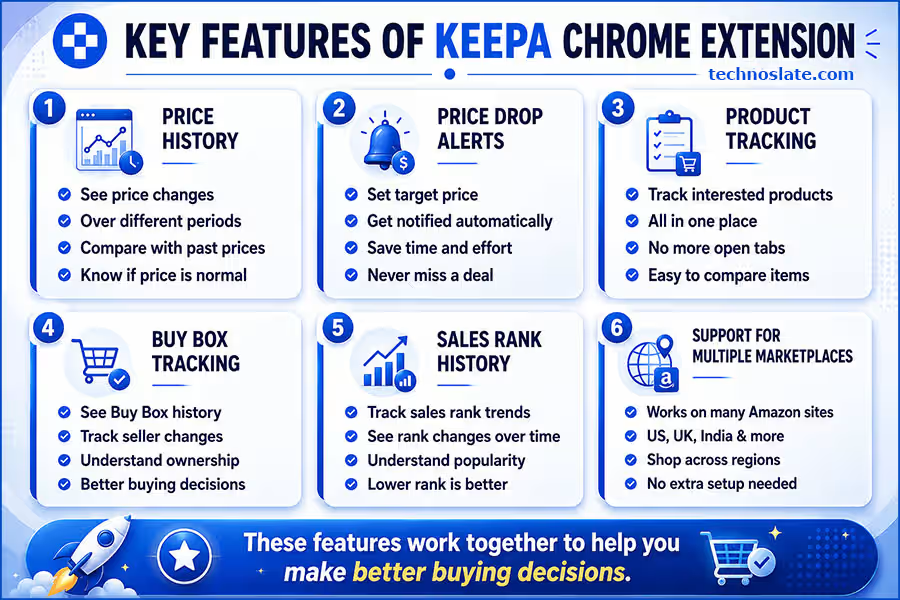
- Price History
- This is the feature most people use. It displays a graph showing how a product’s price has changed over different periods, making it easy to compare today’s price with its previous prices. A quick look at the graph can tell you whether the current price is normal, higher than usual, or close to one of its lower points.
- This is the feature most people use. It displays a graph showing how a product’s price has changed over different periods, making it easy to compare today’s price with its previous prices. A quick look at the graph can tell you whether the current price is normal, higher than usual, or close to one of its lower points.
- Price Drop Alerts
- If you’re not in a hurry to buy, you can set a target price for a product. When the price reaches that amount, Keepa sends you a notification, so you don’t have to check Amazon manually every day.
- Product Tracking
- You can keep track of products you’re interested in without saving multiple browser tabs or repeatedly searching for the same item. This is especially useful when you’re comparing several products before making a final decision.
- You can keep track of products you’re interested in without saving multiple browser tabs or repeatedly searching for the same item. This is especially useful when you’re comparing several products before making a final decision.
- Buy Box Tracking
- Some products are sold by multiple sellers, and the seller shown by default can change over time. Keepa lets you view this history, giving you a better understanding of how the product has been sold on Amazon.
- Sales Rank History
- This feature shows how a product’s sales rank has changed over time. While it doesn’t reveal the exact number of sales, it can help you understand whether a product has generally become more or less popular.
- Support for Multiple Amazon Marketplaces
- Keepa works with many Amazon regional websites, including the US, UK, India, Canada, Germany, Japan, and others. If you shop across different marketplaces, the same extension continues to work without any additional setup.
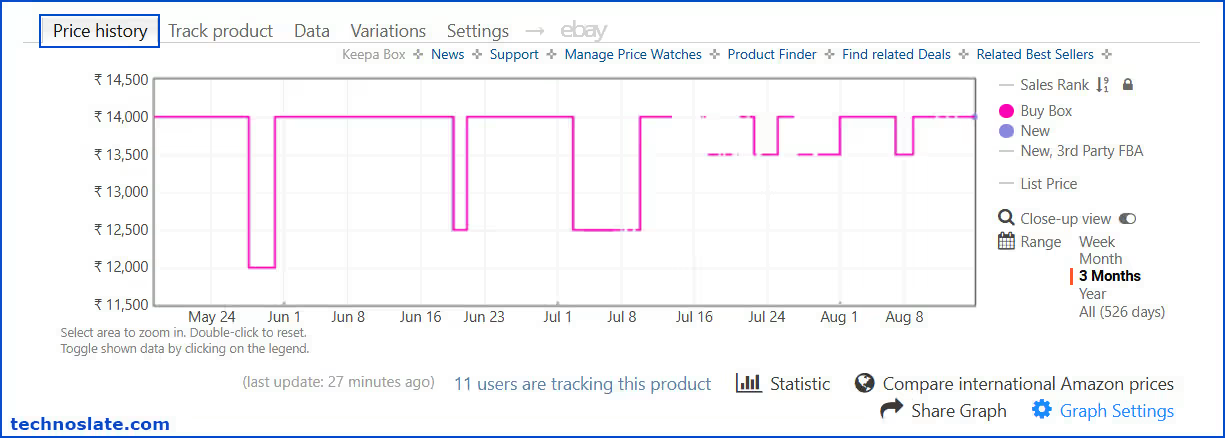
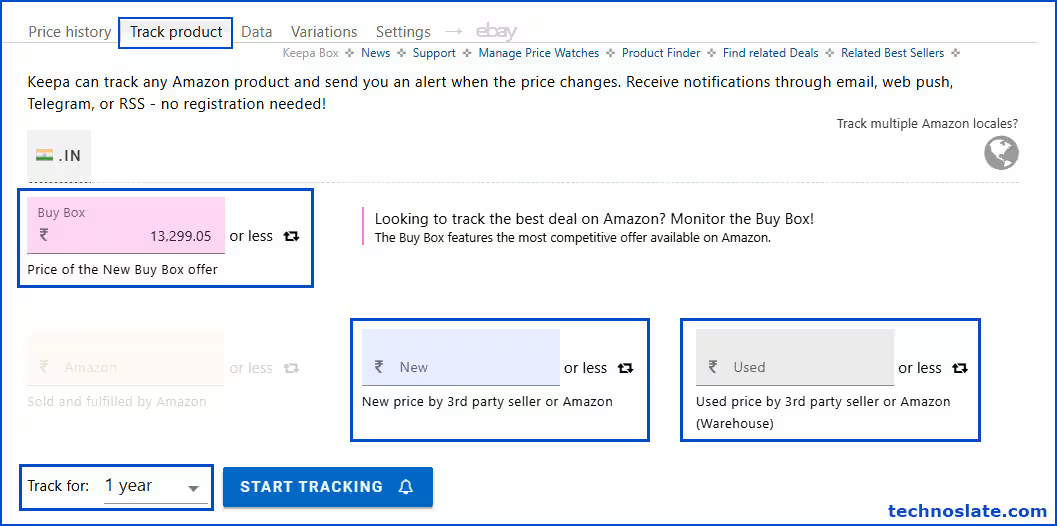
These features work together to help you make better buying decisions. In the next sections, we’ll see how to install the extension and use these features effectively.
How to Install Keepa Chrome Extension
Installing the Keepa Chrome Extension takes only a few minutes. Once it’s added to your browser, it automatically starts working on supported Amazon product pages without requiring any complicated setup. Follow these steps to install it:
- Open the Chrome Web Store and search for Keepa – Amazon Price Tracker. You can also get it from here.
- Open the extension page and click Add to Chrome.
- When Chrome asks for permission, click Add Extension. Wait a few seconds while the installation completes.
- Visit any supported Amazon product page. If the extension is installed correctly, you’ll see a Keepa price history graph below the product information.
If the graph doesn’t appear immediately, refresh the page once. In some cases, it may take a few moments to load the pricing data for the first time. Although the extension works without creating an account, signing in to a Keepa account is recommended if you want to save tracked products or receive price drop alerts by email. Regular price history and most core features remain available even if you don’t sign in.
Tip: If you use Chrome’s extension management features, consider pinning Keepa to your browser toolbar. It isn’t required for the extension to work, but it makes it easier to access its settings whenever you need them.
How to Use Keepa Chrome Extension
After installing Keepa, simply open any Amazon product page. The extension automatically displays a price history graph below the product details, allowing you to see how the price has changed over time. Instead of relying only on today’s price or a sale badge, you can quickly check whether the current price is a good deal.
If you’re not ready to buy, set a target price and Keepa will notify you when the product reaches it. As you become familiar with the extension, you can also explore features like Buy Box history and sales rank for additional insights. However, you don’t need to learn every feature right away, understanding the price history graph is enough to start making more informed shopping decisions.
Understanding the Keepa Price History Graph
The price history graph is the most valuable part of the Keepa Chrome Extension. It gives you a quick view of how a product’s price has changed over time, helping you decide whether the current price is worth paying or if waiting could save you money. At first glance, the graph may look complicated because it contains multiple colored lines. However, most shoppers only need to understand a few key elements.
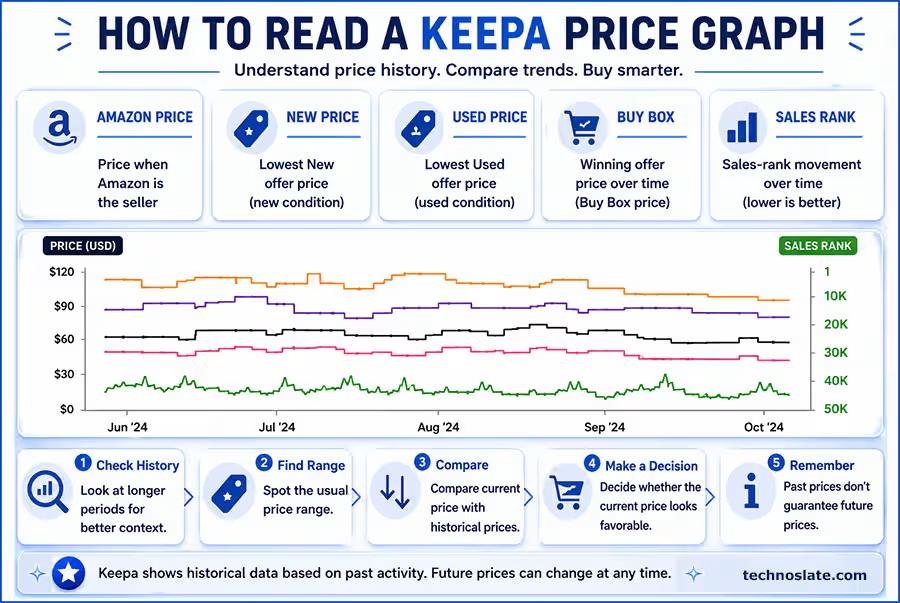
| Graph Element | What It Shows | Why It Matters |
|---|---|---|
| Amazon Price | The price when Amazon sold the product directly. | Helps you compare today’s price with Amazon’s previous prices. |
| New Price | Prices offered by third party sellers for a new product. | Useful for finding lower prices from other sellers. |
| Used Price | Prices for used or refurbished products, when available. | Helps you compare the cost of used and new items. |
| Buy Box | The seller featured in Amazon’s Buy Box over time. | Useful for understanding seller changes on a product listing. |
| Sales Rank | How the product’s popularity has changed over time. | Shows whether demand has generally increased or decreased. |
Another useful feature is the time range selector. You can switch between different periods, such as one month, three months, one year, or the product’s complete price history. Looking at a longer time range often gives a better understanding of normal price patterns than checking only recent changes.
Imagine a pair of headphones is currently priced at $89. After checking the Keepa graph, you notice that the same product stayed between $70 and $75 for most of the last three months. Instead of assuming the current price is a good deal, you now have enough information to wait for the price to return to its usual range. On the other hand, if the graph shows that the product has remained close to $89 for several months, the current price is likely normal, and waiting may not result in significant savings.
The graph is designed to help you understand pricing trends rather than predict future prices. Once you know how to read the basic information, it becomes much easier to decide whether to buy now or wait for a better opportunity.
Tips to Get the Most Out of Keepa
Keepa becomes much more useful when you look beyond the current price. A few simple habits and features can help you spot better deals and avoid buying at the wrong time.
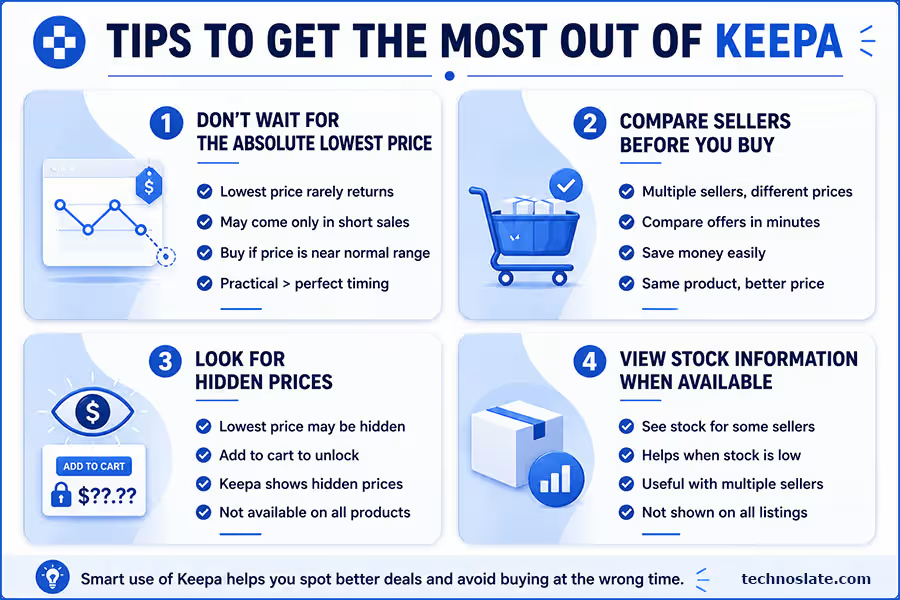
- Don’t Wait for the Absolute Lowest Price
- The lowest price on the graph isn’t always the best target. Some products hit that price only during short sales and may not return to it for months. If the current price is already close to its normal range, buying now can be the more practical choice.
- Compare Sellers Before You Buy
- The same product is often sold by multiple sellers at different prices. Spending a minute comparing available offers can help you save money without changing the item you want.
- Look for Hidden Prices
- Some products don’t display their lowest price until they’re added to the cart. On supported listings, Keepa can reveal these hidden prices, giving you a more accurate view of past discounts. Keep in mind that this feature isn’t available for every product.
- View Stock Information When Available
- On some listings, Keepa also shows stock information for supported third party sellers. While you won’t see this on every product, it can be helpful when availability is limited or multiple sellers are competing.
Myths About Keepa Chrome Extension
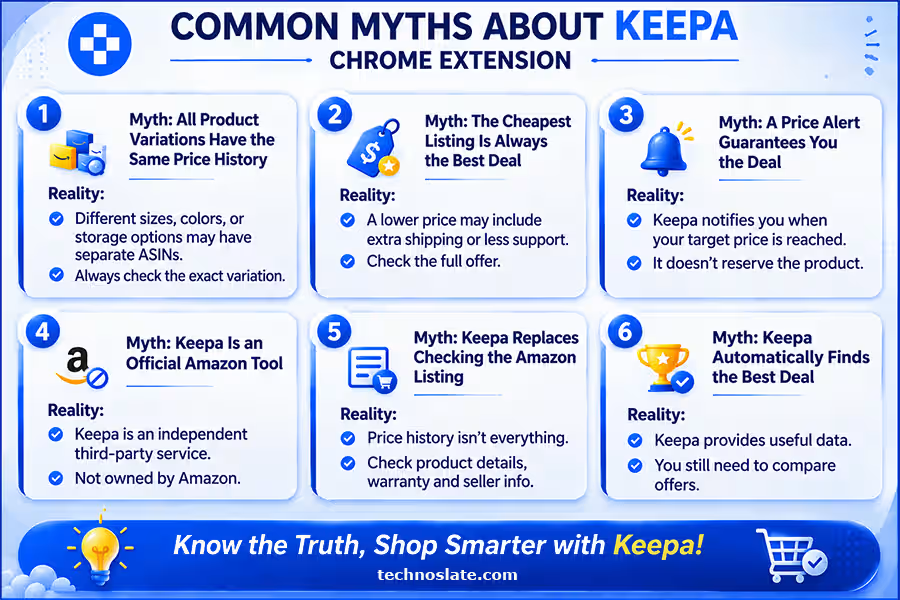
1. Myth: All Product Variations Have the Same Price History
Reality: Different sizes, colors, or storage options may have separate ASINs and price histories. Always check the exact variation before buying.
2. Myth: The Cheapest Listing Is Always the Best Deal
Reality: A lower price may come with extra shipping costs, a different product condition, or less reliable seller support. Check the full offer before purchasing.
3. Myth: A Price Alert Guarantees You the Deal
Reality: Keepa sends a notification when your target price is reached, but it doesn’t reserve the product or guarantee availability.
4. Myth: Keepa Is an Official Amazon Tool
Reality: Keepa is an independent third party service, not owned or developed by Amazon.
5. Myth: Keepa Replaces Checking the Amazon Listing
Reality: Price history doesn’t tell the whole story. Check product specifications, accessories, warranty, seller details, and return policy before buying.
6. Myth: Keepa Automatically Finds the Best Deal
Reality: Keepa provides useful pricing data, but you still need to compare offers and decide whether a deal suits your needs.
Keepa Free vs Paid: Which Version Should You Choose?
One of the biggest advantages of Keepa is that you can start using it without paying anything. For most Amazon shoppers, the free version offers everything needed to track price history and make smarter buying decisions. The paid plan is mainly designed for users who need advanced research tools or work with Amazon products more professionally.
| Feature | Free Version | Paid Version |
|---|---|---|
| Price history graphs | ✔ | ✔ |
| Price drop alerts | ✔ | ✔ |
| Product tracking | ✔ | ✔ |
| Basic shopping features | ✔ | ✔ |
| Advanced product finder | ✘ | ✔ |
| API access | ✘ | ✔ |
| Advanced seller research tools | ✘ | ✔ |
If you mainly use Amazon to shop for personal items, the free version is usually enough. It covers the features that most buyers use regularly, including price history and alerts. The paid version makes more sense if you frequently research products, analyze large numbers of listings, or use Keepa as part of your Amazon selling workflow. Those extra tools aren’t necessary for casual shopping, but they can save time for users who rely on product data every day.
For most readers of this guide, starting with the free version is the best choice. You can always upgrade later if your needs change, so there’s no reason to pay for features you may never use.
Frequently Asked Questions
- Is the Keepa Chrome Extension safe to use?
- Yes. Keepa is a well known browser extension trusted by millions of Amazon shoppers. To stay safe, always download it from the official Chrome Web Store instead of third party websites.
- Why isn’t the Keepa graph showing on some Amazon product pages?
- There are a few possible reasons. The product may be newly listed, the page may not have loaded completely, or Keepa may not have collected enough price history yet. In many cases, simply refreshing the page solves the problem.
- How often does Keepa update its price history?
- Keepa updates product data regularly, but price changes don’t always appear instantly. The update speed can vary depending on the product and how frequently its price changes on Amazon.
- Why is the current Amazon price different from the Keepa graph?
- Amazon prices can change at any time, so there may be a short delay before the latest price appears in Keepa. You might also notice differences when a product has coupons, limited time promotions, or seller specific discounts that aren’t reflected in the price history.
- Does the Keepa Chrome Extension work on mobile devices?
- The Chrome extension is designed for desktop browsers. If you’re shopping on a phone or tablet, you can still view price history by visiting the Keepa website, but the extension itself isn’t available for the mobile version of Chrome.
- Does Keepa slow down Chrome?
- For most people, Keepa has little to no noticeable impact on browser performance. Since it loads additional pricing information on Amazon product pages, the graph may take a moment to appear, but it generally doesn’t affect the overall browsing experience.
Conclusion
The Keepa Chrome Extension is a simple yet powerful tool for anyone who shops on Amazon regularly. Instead of relying on discounts, sale banners, or guesswork, it helps you understand a product’s pricing history so you can make more confident buying decisions.
If your needs grow over time, you can always explore the paid features without changing the way you already use the extension. Whether you’re purchasing an expensive gadget or an everyday household item, checking the price history takes only a few seconds but can help you avoid overpaying. Once you get into the habit of using the Keepa Chrome Extension, it becomes a natural part of smarter Amazon shopping rather than just another browser extension.
Found this article useful? Share it with your friends and colleagues. If you have any questions or need further guidance, leave a comment below – we’d love to hear from you. Explore our website for more helpful articles and updates.