You tap “delete” and feel relieved, thinking your information is gone forever. But what happens to data after deleting apps might surprise you, because your digital traces often continue to exist in places you cannot see.
In today’s digitally modern world, apps are a major part of our daily lives. From social media to banking and shopping, we rely heavily on them. But very few people truly understand what happens to data after deleting apps. Many assume that uninstalling an app completely erases their presence, but the reality is far more complicated. The truth about your deleted data is something every internet user should know. Your personal information, browsing habits, and preferences often continue to live on even after the app is gone from your phone.
What Kind of Data Apps Actually Collect
Most apps collect far more data than users realize. This includes basic details like your name, email, and phone number, but it also extends to location data, browsing behavior, device information, and even interaction patterns. Some apps track how long you stay on a page or what you click on. Understanding what happens to data after deleting apps starts here, because everything collected becomes part of your digital identity. Even permissions like camera, contacts, or microphone access can contribute to this data pool. The truth is, data privacy after deleting apps is not as simple as just tapping the delete button. The more you use an app, the deeper the data collection becomes, often without you noticing.
Why Reinstalling an App Feels Like Nothing Was Deleted
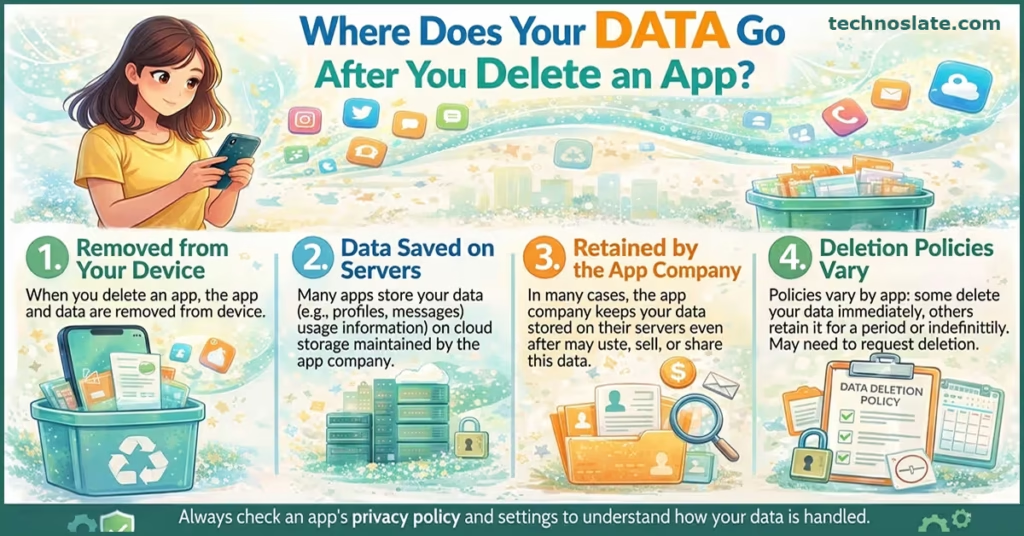
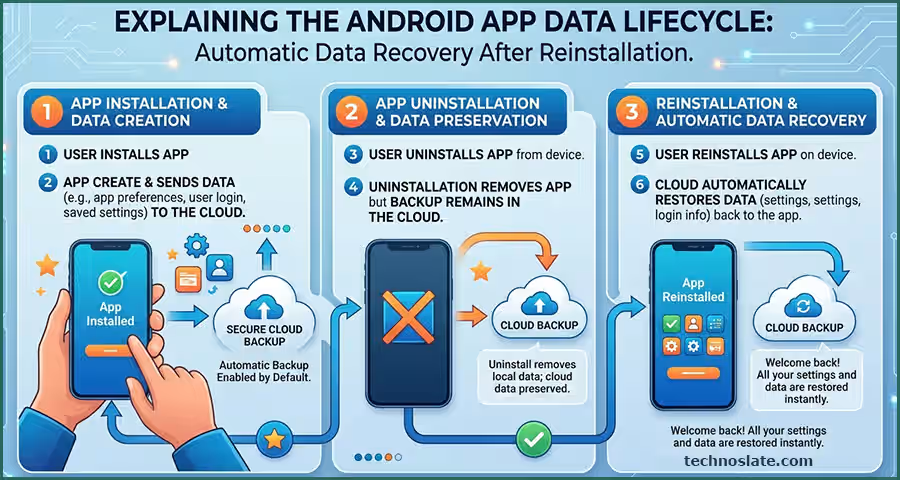
To truly understand what happens to data after deleting apps, you need to know where your data lives. Have you ever reinstalled an app and found everything exactly as you left it? The app may disappear from your device, but your digital presence continues seamlessly. Your phone may be clean, but your data still exists elsewhere. That is because of how data is stored in the cloud. Your account remains active on the server. When you log back in, the app simply retrieves your saved data. Your data is typically stored in remote databases, backup systems, and analytics platforms. Companies collect and store vast amounts of user information for improving services and business growth.
Deleting an app does not mean deleting your account. This is one of the most misunderstood aspects of what happens to data after deleting apps. Your account, along with all associated data, continues to exist on the company’s servers. The reality is, companies don’t always delete everything, Unless you manually delete your account, your information remains stored indefinitely. This includes your profile, activity history, and personal preferences. Many users overlook this step, assuming uninstalling is enough. In reality, your account is the key to your data, and as long as it exists, so does your digital footprint within that platform. If you care about your personal information, you should definitely understand data privacy after deleting apps.
You must realize that local data deletion does not affect server-side storage. This creates a false sense of privacy, where users believe everything is gone. This creates the illusion that nothing was ever deleted. It is convenient, but it also highlights how little control users have over their stored information. Your data continues to exist in these systems even if you are no longer actively using the app. In some cases, your data may also be shared with third-party partners. In reality, only the visible layer disappears while the deeper data remains stored remotely.
Advertising Networks Remember More Than You Think
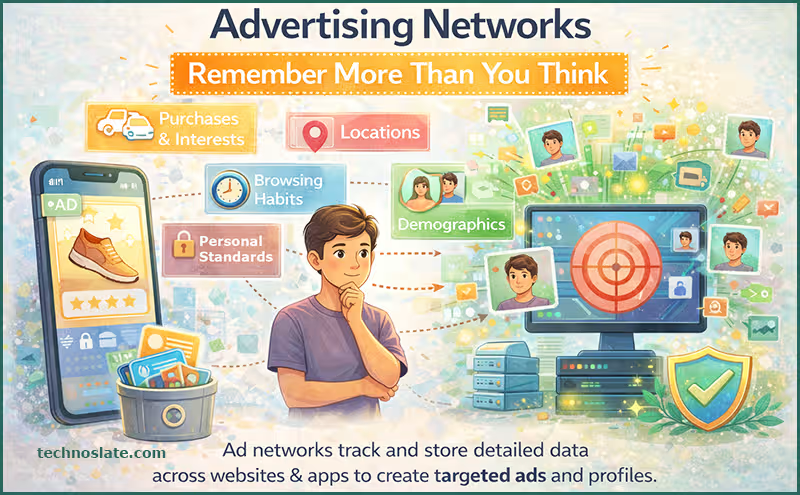
Apps constantly collect analytics data to understand user behavior. This includes how you interact with features, how often you use the app, and what actions you take. A critical part of what happens to data after deleting apps is that this tracking data often stays even longer than personal information. Companies use it to improve performance, design better features, and make business decisions. This means your actions continue to influence systems, even if your identity is no longer directly attached.
These systems track your interests, preferences, and behavior across multiple apps and websites. Even if you delete one app, anonymized analytics data may still remain and the advertising profile built around you does not disappear. Your data may have already been shared with third-party advertisers. This is why you still see relevant ads after uninstalling an app. These networks rely on long-term data tracking, which means your digital footprint extends beyond a single platform and continues to shape your online experience.
Cloud Backups Can Bring Data Back
If your device automatically backs up data, app-related information may still be stored in backup systems. When you restore your phone or reinstall the app, this data can reappear. This can include settings, preferences, and sometimes even user-generated content. While backups are useful for recovery, they also make it harder to completely erase your data. Many users are unaware that their information is still stored in backup systems, waiting to be restored at any time.
Apps today rely heavily on remote servers to store user information. This means your photos, messages, preferences, and activity logs are saved outside your device. When you uninstall the app, this cloud data does not automatically get deleted. It stays linked to your account unless you take extra steps. This is why you can log back in and find everything intact. Cloud storage ensures continuity, but it also means your data continues to exist even when the app is gone.
If you have sent messages, photos, or files to other users, those copies remain on their devices or accounts. In many cases, platforms also store communication data for security or legal reasons. It might sound surprising, but your data privacy after deleting apps can still be influenced by backups and shared data. This means your digital interactions are not entirely under your control. Once something is shared online, it can be very difficult to remove it completely from all locations.
Why “Clear Data” Is Not a Complete Solution
Many users believe that clearing app data is enough to remove their information. However, this only affects local storage. To truly understand what happens to data after deleting apps, you need to recognize that clearing data does not impact server-side records. Your account details, activity logs, and preferences remain stored remotely. This makes “clear data” a partial solution at best. While it can help reset the app on your device, it does not eliminate your digital footprint. For complete removal, additional steps like account deletion are necessary.
The most important step is deleting your account from within the app or through its website. You should also review app permissions and revoke access to your data. Checking privacy settings can give you more control over what happens to data after deleting apps. In some regions, laws allow you to request complete data deletion. Using these rights ensures that your data is handled in accordance with your privacy expectations.
When you uninstall an app, you are only removing it from your device. This means the app files, temporary data, and local storage are deleted. However, this does not fully answer what happens to data after deleting apps. This removes local files but usually does not affect server-side data unless the app is designed to sync deletions. True deletion usually requires account deletion combined with explicit confirmation from the service provider.
Companies have policies that allow them to retain user data. This may be due to legal requirements, fraud prevention, or service improvements. Instead of deleting everything, companies often anonymize your data. This means your identity is removed, but your usage patterns remain. So, it is not always complete deletion but sometimes transformation into anonymous datasets.
The Hidden Risks vs Benefits of Data Retention
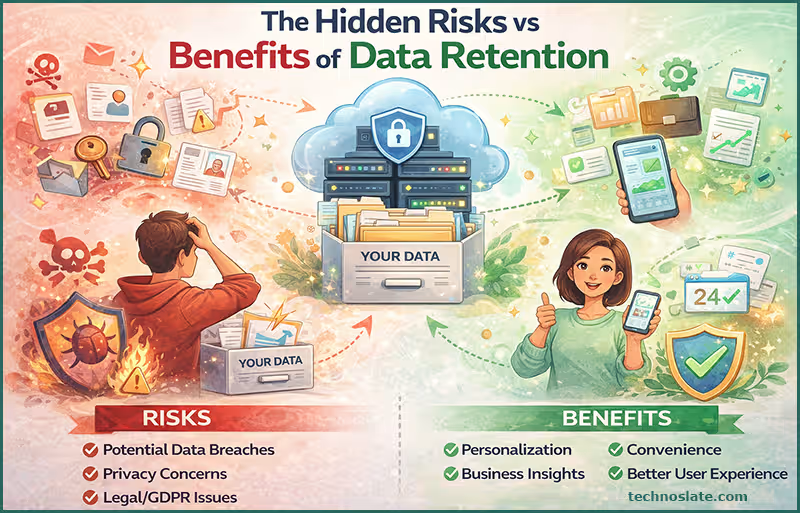
One of the biggest concerns is data breaches. Even if you stop using an app, your stored data can still be exposed if the company server is hacked. Another risk is targeted advertising. It often includes continued use of your past activity for ads targeting, which can feel intrusive. Additionally, data sharing practices mean your information might circulate across multiple platforms. So, it can involve more exposure than you expect. Ignoring data privacy after deleting apps can lead to unwanted tracking or data exposure.
Privacy concerns are the biggest issue, as users lose control over their personal information. There is also a lack of transparency. Many users do not clearly understand it because companies do not always explain their policies in simple terms. Over time, this can lead to a massive accumulation of unused data, increasing the risk of misuse or exposure.
While it may sound concerning, there are some advantages. For example, retaining data allows companies to improve their services and fix bugs more efficiently. It also helps in account recovery. If you reinstall an app, your previous data can be restored easily. So, it can sometimes work in your favor by providing continuity and convenience. Another benefit is personalization. Even after deletion, some systems remember your preferences, making future interactions smoother.
Tips to Protect Your Digital Privacy
- To avoid risk, it is important to adopt smart habits. Always read privacy policies before installing apps and avoid giving unnecessary permissions.
- Use strong passwords and enable two-factor authentication. Regularly review and delete unused accounts to minimize the risk.
- Regularly review and remove apps you no longer use to minimize your digital exposure. Being proactive is the best way to stay safe in a world where data is constantly being collected.
- Revoke third-party access connected to your accounts, especially through social logins.
- Keep your device updated with the latest security patches to protect stored information.
- Avoid giving unnecessary permissions like location, contacts, or microphone access unless absolutely required.
Conclusion
Your digital footprint is much larger than you think. It is built from every interaction, click, and activity across apps and platforms. Small steps like deleting accounts and managing permissions can make a big difference in protecting your privacy. The truth about it is that your footprint continues to exist in multiple layers, including servers, backups, and third-party systems. Even when you try to erase it, traces often remain. This does not mean privacy is impossible, but it does require awareness and action. Understanding this reality helps you make better decisions about the apps you use and the data you share.
FAQ (Frequently Asked Questions)
- Does deleting an app delete all my data?
- No. Deleting an app stops future data collection, but it does not erase the past. The internet is designed to remember, not to forget.
- Can companies still use my data after I uninstall an app?
- Yes, it often includes continued use for analytics, improvement, or advertising. This means deletion is often one-sided. Your view disappears, but the data itself continues to exist.
- How can I permanently delete my data?
- You need to delete your account and request data removal if necessary to control what happens to data after deleting apps.
- Is my data safe after deleting apps?
- Not always, because what happens to data after deleting apps may involve storage in systems that could be vulnerable to breaches.
- Will every company retain my data after I uninstall their application?
- No. Actually, it depends on the company’s data retention policy. For example, some companies will not save any of your data; some companies will retain your data, but if you request to have it deleted, they will delete it; and some companies will store your data permanently.
Now, you know very well about what happens to data after deleting apps. If this post helped you then please share it with your friends and family to know about it. If you have any questions then feel free to ask in comment section. We will try our best to help you. You can read more such interesting articles here.