This Unhook Chrome Extension blog starts with a simple question: have you ever opened YouTube to watch one specific video, only to find yourself scrolling through Shorts or jumping between recommended videos a few minutes later? For many people, the problem is not finding content.
The real challenge is avoiding everything that appears around the content they actually want to watch. YouTube is designed to keep viewers engaged, which is why Shorts, recommendations, autoplay, and other suggestions are placed throughout the platform. This is where Unhook comes in.
Unhook is a browser extension that lets you remove selected parts of the YouTube interface. Instead of changing the videos available on YouTube, it gives you more control over what you see while using the platform. Depending on your preferences, you can hide Shorts, remove recommended videos, disable autoplay, clean up the homepage, and reduce other distractions that often pull attention away from your original purpose.
What makes Unhook interesting is that it is not limited to blocking Shorts. Many users install it for that single feature, then discover that some of its other customization options can have an even bigger impact on how they use YouTube every day. In this review, we’ll look at what Unhook does, its most useful features, how to set it up, whether it is safe to use, and the limitations you should know before installing it.
What Is Unhook Chrome Extension?
Unhook is a browser extension designed to give users more control over the YouTube interface. Instead of adding new features to YouTube, it removes elements that many people find distracting.
The main purpose of the extension is to help users focus on the content they intentionally want to watch. After installing it, you can choose which parts of YouTube should remain visible and which should be hidden. For example, some users only want to remove Shorts, while others prefer a cleaner experience without recommendations, comments, autoplay, or suggested videos. Unhook allows these settings to be enabled or disabled individually, so you are not forced to use every feature.
One reason the extension has become popular is its flexibility. Rather than blocking access to YouTube, it lets people customize the platform according to their own viewing habits. This makes it useful for students, professionals, and anyone who regularly uses YouTube for learning or research.
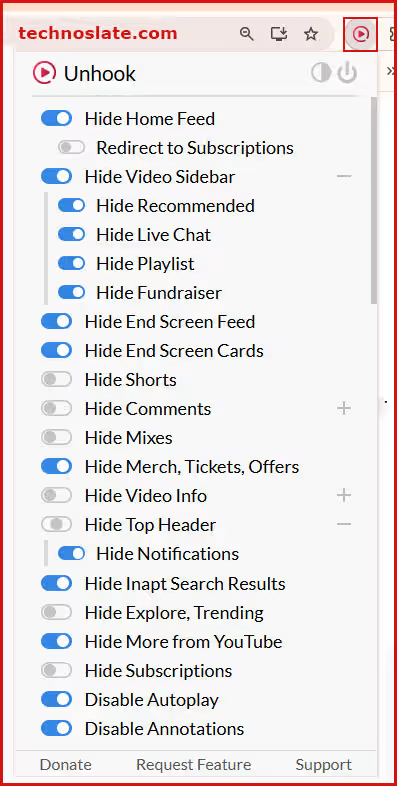
The extension works with major desktop browsers based on Chromium, including Chrome and Microsoft Edge. It is also available for Firefox. Once installed, its settings can be accessed directly from the browser toolbar, making it easy to adjust features whenever needed. At the time of writing, Unhook browser extension can be used free of charge, allowing users to access its core customization features without requiring a subscription. Below is the image of options available in Unhook.
Key Features of Unhook Browser Extension
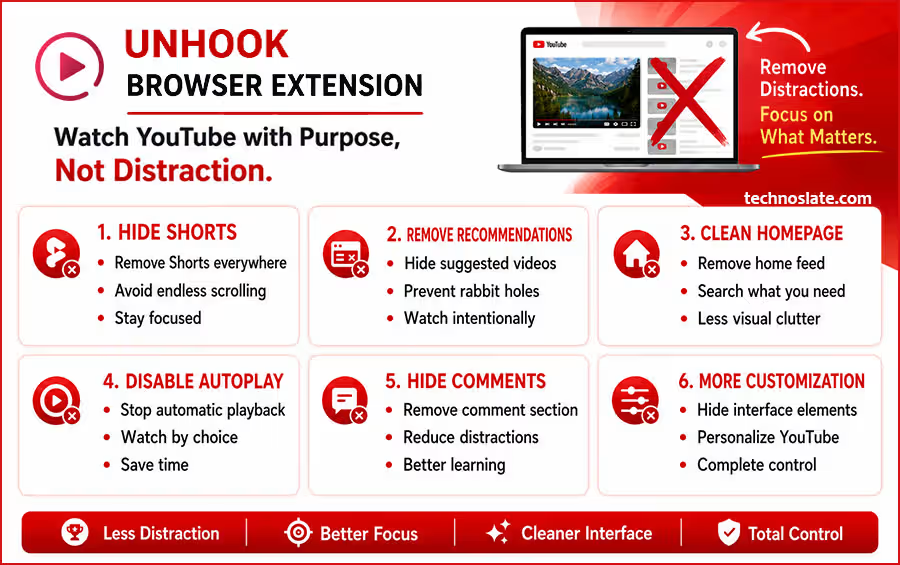
The biggest advantage of Unhook is that it does not force a single way of using YouTube. Instead, it allows you to choose which elements should remain visible and which should be removed. This level of control makes the experience feel less cluttered and more intentional.
- Hide YouTube Shorts
- For many users, Shorts are the primary reason for installing Unhook. The extension can remove Shorts from different areas of YouTube, reducing the chances of getting pulled into endless scrolling sessions when you originally opened the platform for something else.
- Remove Recommended Videos
- YouTube constantly suggests new content through the sidebar and other sections of the site. While recommendations can sometimes be useful, they can also make it easy to jump from one video to another without a clear purpose.
- Unhook gives you the option to hide these suggestions, helping you stay focused on the video you selected.
- Clean Up the Homepage
- The YouTube homepage is designed to encourage content discovery. As a result, it is often filled with videos chosen by YouTube rather than by the user.
- With Unhook browser extension, you can hide the homepage feed and create a much cleaner starting point. Instead of browsing recommendations, you can search directly for the content you want to watch.
- Disable Autoplay
- Autoplay automatically starts another video when the current one ends. This feature can be convenient, but it also makes it easier to spend more time on YouTube than intended. Disabling autoplay puts the decision back in your hands by requiring you to choose what to watch next.
- Hide Comments
- Comment sections can be informative, but they can also become a distraction when your goal is learning or research. Unhook allows you to hide comments entirely, creating a cleaner viewing environment.
- Remove End Screen Suggestions
- Many people focus on Shorts and recommendations but overlook the suggestions that appear during the final seconds of a video. These end screen recommendations are often the starting point for another viewing session. Removing them can help you finish a video and move on without additional distractions.
- Additional Customization Options
- Beyond its most popular features, Unhook offers several smaller controls that allow users to fine tune their YouTube experience. Depending on your preferences, you can hide various interface elements and create a setup that matches the way you use the platform.
- This flexibility is what separates Unhook from many simple Shorts blockers. Instead of solving a single problem, it provides a broader set of tools for reducing distractions across YouTube.
How to Install, Configure and Pin Unhook Chrome Extension?
Getting started with Unhook takes only a few minutes. The installation process is similar to most browser extensions and does not require any technical knowledge. To install the extension, open your browser’s extension store and search for Unhook. You can also get it from here.
Once you find it, click the install button and allow the required permissions. After installation, the Unhook icon will appear in your browser toolbar. When you open the extension for the first time, you will see a list of available customization options. This is where you can decide which parts of YouTube should be visible and which should be hidden. For most users, a good starting setup includes:
- Hiding YouTube Shorts
- Removing recommended videos
- Disabling autoplay
- Removing end screen suggestions
These settings reduce the most common sources of distraction without changing the core YouTube experience. One of the best things about Unhook is that you do not need to configure everything at once. You can start with a few options and adjust them later based on your preferences.
How to Pin the Unhook Extension in Google Chrome
- Open Google Chrome. Make sure the Unhook extension is already installed.
- Click the Extensions (puzzle icon) icon in the top right corner of Chrome.
- Find Unhook in the list of installed extensions. Click the Pin (📌) icon next to Unhook. The Unhook icon will now appear permanently in the Chrome toolbar for quick access.
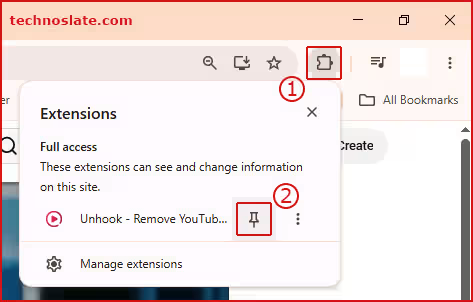
Tip: If you don’t see the extension after installing it, refresh Chrome or reopen the browser once.
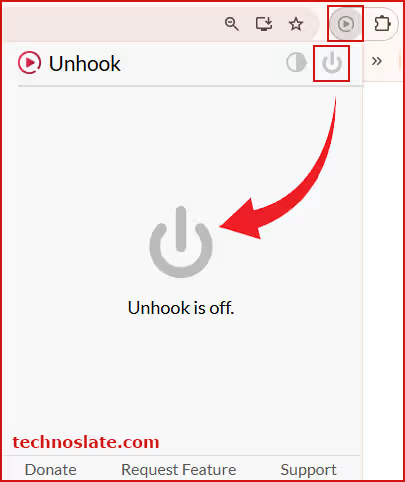
If you find that a particular feature is useful, you can keep it enabled. If not, you can switch it off with a single click. This flexibility allows users to create a viewing experience that matches their own habits rather than forcing a fixed set of restrictions.
Is Unhook Browser Extension Safe to Use?
Safety is one of the first concerns people have before installing any browser extension. Since extensions can interact with websites you visit, it is always worth understanding what they can and cannot access. In the case of Unhook, the extension works by modifying the way YouTube appears in your browser. It hides selected interface elements based on the settings you choose. This means its primary function is visual customization rather than managing your account or personal information.
Another point that many users appreciate is that Unhook does not require you to create an account. You can install the extension, adjust its settings, and start using it without signing up for a separate service. Many people also wonder whether using Unhook could affect their YouTube account.
The extension does not upload videos, post comments, send messages, or perform actions on your behalf. Its purpose is to change what is displayed on your screen while you browse YouTube. That said, it is still a good practice to review the permissions of any extension before installing it. Browser stores provide information about permissions, developer details, and user reviews, which can help you make an informed decision.
For most users, the biggest consideration is not account security but trust. Before installing any extension, it is worth downloading it from the official browser store and checking that it is the correct version from the intended developer. Overall, Unhook chrome extension is designed as a customization tool rather than a service that manages user accounts, which makes its purpose relatively straightforward compared with many browser extensions.
Why Most Users Install Unhook for Shorts but Stay for Other Features
Most people discover Unhook chrome extension, because they want to hide YouTube Shorts. Since Shorts are highly visible across the platform, they are often the first thing users notice and the first feature they want to remove. However, many users find that Shorts are only one part of the distraction problem.
After spending some time with the extension, they often start experimenting with other settings and realize that recommendations, autoplay, and homepage suggestions can have an even greater impact on how they use YouTube. For example, imagine opening YouTube to watch a programming tutorial. Even if Shorts are hidden, the homepage can still present dozens of videos competing for your attention before you even start searching.
Similarly, recommended videos can encourage you to continue watching long after you have finished the content you originally came for. This is where Unhook chrome extension becomes more than a simple Shorts blocker. By allowing users to remove multiple distraction sources, the extension can change the overall browsing experience. Instead of being guided by suggestions, users make more intentional choices about what they watch.
One reason this matters is that not every distraction on YouTube looks the same. Some distractions appear as short videos, while others appear as recommendations, autoplay queues, or end screen suggestions. Focusing on only one of these areas may solve part of the problem, but it does not necessarily create a cleaner viewing experience.
This is why many long term users continue using Unhook even after the novelty of hiding Shorts wears off. The broader set of customization options often becomes more valuable than the feature that originally convinced them to install the extension.
Important Thing – Unhook Does Not Change YouTube’s Algorithm
A common misconception is that hiding Shorts or recommendations automatically changes the way YouTube recommends content. That is not how Unhook chrome extension works. The extension changes what you see on the screen, but it does not control how YouTube selects videos behind the scenes. For example, if you hide recommended videos, YouTube may still generate recommendations for your account.
The difference is that those suggestions are no longer displayed in the areas you have chosen to hide. This distinction is important because it helps set realistic expectations. Some users install Unhook expecting it to completely reshape their YouTube recommendations. In reality, its main purpose is to give you a cleaner interface and reduce visual distractions. The extension focuses on the viewing experience rather than the recommendation system itself.
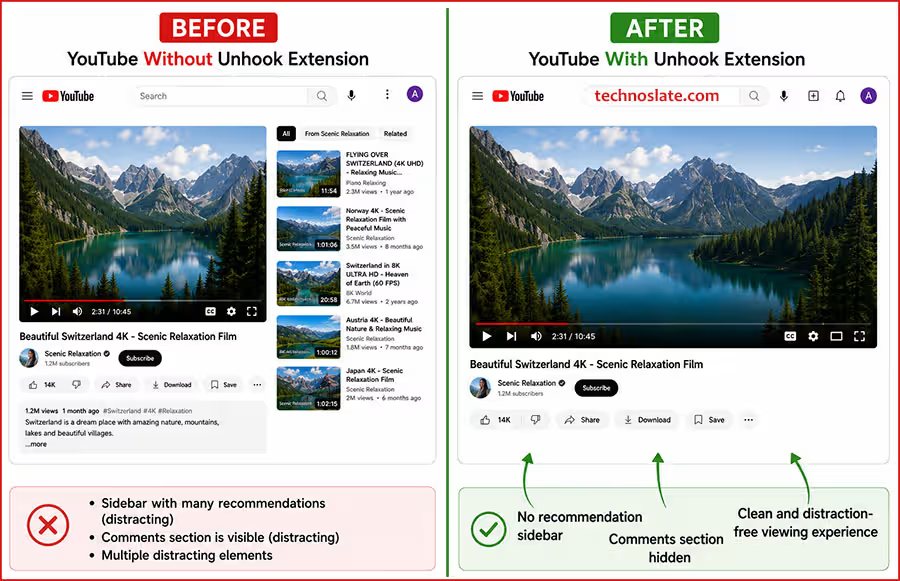
This is not necessarily a limitation. For many people, the biggest challenge is not how recommendations are created but how often they are shown. By removing constant prompts to watch something else, Unhook can make YouTube feel more focused without requiring any changes to your account settings.
Understanding this difference also explains why the extension is easy to use. It does not need to manage your watch history, alter your subscriptions, or make decisions on your behalf. Instead, it simply gives you more control over the layout and elements that appear while you browse YouTube.
Limitations of the Unhook Chrome Extension
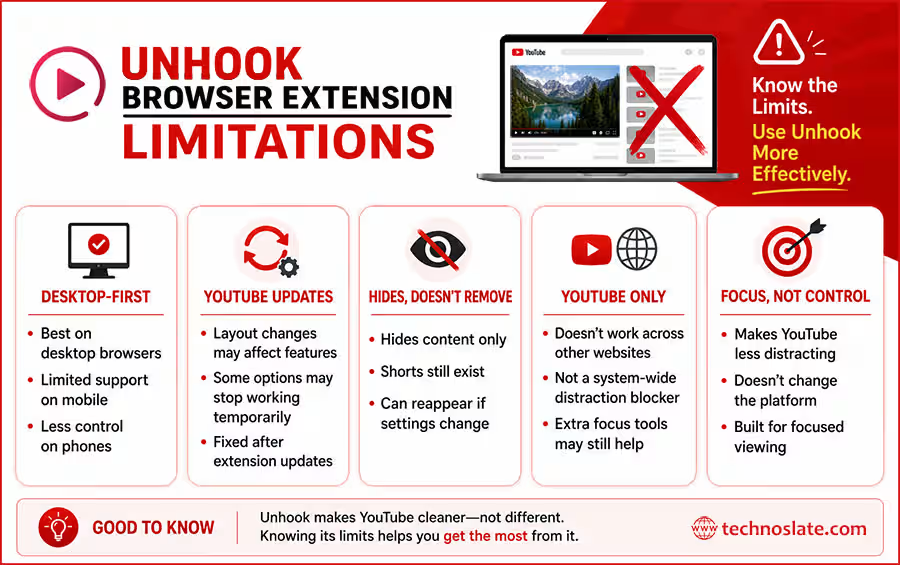
Designed to improve focus, not change YouTube: These limitations do not make Unhook any less useful. They simply reflect what the extension is built to do. It helps you stay focused while using YouTube, but it does not change how the platform itself works.
Desktop first experience: Unhook works best on desktop browsers. On mobile devices, the experience is different because most mobile browsers do not support extensions the same way. So as a result, you do not get the same level of control over YouTube on your phone.
May stop working after YouTube updates: YouTube frequently updates its interface. When the layout changes, some of the elements that Unhook hides may also change. This can cause certain features to stop working temporarily until the extension is updated.
Hides content instead of removing it: Actually, Unhook does not remove content from YouTube. It simply hides selected elements from your screen. Shorts, recommendations, and other suggested content still exist in the background and may reappear if you change or disable the extension’s settings.
Works only on YouTube: The extension is designed specifically for YouTube. It does not block distractions across other websites or apps. If you want a system wide focus solution, you will need to use additional productivity tools.
Final Verdict
Unhook chrome extension is best understood as a tool that simplifies YouTube rather than changing it. It does not add new features or alter how videos are recommended. Instead, it removes visual elements that often interrupt focus while watching content. For users who struggle with Shorts, autoplay, and constant recommendations, this extension can make YouTube feel more controlled and less distracting. The change is not in what YouTube offers, but in what you choose to see.
At the same time, it is not a complete solution for productivity. It works only inside YouTube and does not address distractions outside the platform. It also does not modify how YouTube generates content suggestions in the background.
Because of this, its value depends on how you use YouTube. If your main goal is learning, research, or focused viewing, the extension can create a cleaner environment that supports that purpose. If your usage depends on discovering new content through recommendations, the experience may feel restrictive. Overall, this Unhook Chrome Extension blog shows that the tool is most effective when used as a simple interface cleaner rather than a full distraction control system.
I hope you enjoyed this post about Unhook chrome extension. If you found this post helpful, please share this post with your friends and family. If you have any question in your mind or you are facing any problem then feel free to ask your question in the comment section. We will try our best to help you. You can read more such interesting articles here.
- MYNT Material You New Tab – Should You Install It in Chrome?
- Buyhatke – Save Thousands in Big Billion Days
- OneTab Chrome Extension : 5 Surprising Benefits Every Chrome User Should Know
- Consent-O-Matic Chrome Extension Explained: 9 Powerful Things You Should Know Before Using It
- SponsorBlock Chrome Extension: 7 Smart Reasons Millions of Users Love It