If you spend a lot of time on YouTube, there’s a good chance you’ve come across videos that pause the main content for a sponsor message. This is one of the reasons why SponsorBlock Chrome Extension has gained attention among regular viewers. Instead of focusing on ads across the platform, it helps users move past specific sections of a video that they may not be interested in watching.
YouTube has become one of the most popular platforms for tutorials, reviews, podcasts, interviews, and entertainment content. At the same time, sponsorships have become a common way for creators to support their channels. While many viewers don’t mind them, others prefer getting directly to the part of the video they came to watch.
This is where SponsorBlock offers a different approach. Rather than changing the video itself, it helps streamline the viewing experience by handling selected segments automatically. As a result, users can spend more time on the content they care about without manually skipping through the timeline. In this review, we’ll examine what SponsorBlock does, the features it offers, how it works, its limitations, and whether it’s worth adding to your browser.
What Is SponsorBlock Chrome Extension?
SponsorBlock is a free browser extension designed for YouTube users who want more control over their viewing experience. Rather than focusing on advertisements served by YouTube, it targets specific parts of a video that many viewers choose to skip manually.
The extension works with a community driven system. When supported videos contain predefined segments, SponsorBlock can automatically move past them without requiring any action from the viewer. This creates a smoother experience, especially when watching long form content such as podcasts, interviews, tutorials, and product reviews.
One reason for its growing popularity is that it addresses a type of interruption that many other tools do not focus on. As a result, it has become a common addition for users who spend a significant amount of time watching YouTube on their desktop browsers. Unlike paid subscriptions or platform specific features, SponsorBlock is available as an extension that can be added directly to a compatible browser and customized according to individual preferences.
What Can SponsorBlock Skip?
One of the biggest reasons people install SponsorBlock is that it can handle more than just sponsored messages. Depending on your preferences, the extension can recognize several types of segments that commonly appear in YouTube videos. These include:
- Sponsor Messages – Paid promotions where creators talk about a product, service, or brand during a video.
- Intros – Opening sequences that play before the main topic begins.
- Outros – Closing sections that appear after the core content has ended.
- Self Promotion – Moments where creators promote their own products, courses, websites, newsletters, or merchandise.
- Subscribe Reminders – Requests asking viewers to like the video, subscribe to the channel, or enable notifications.
- Recaps and Previews – Segments that revisit earlier content or tease what is coming next.
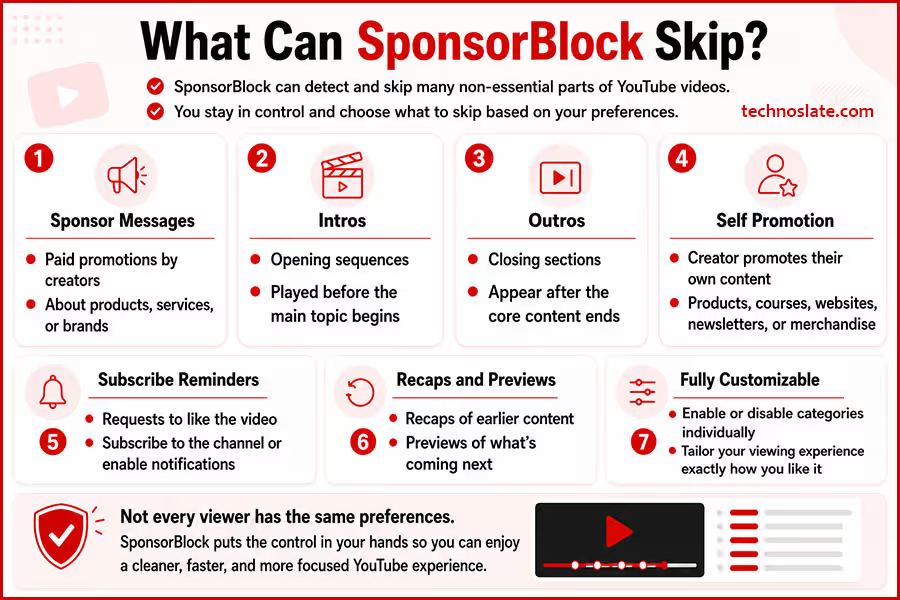
Not every viewer has the same preferences, which is why these categories can be treated separately. Some people may want to skip only sponsor messages, while others prefer a more streamlined viewing experience. The flexibility to choose makes SponsorBlock useful for different viewing styles rather than forcing a one size fits all approach.
How Does SponsorBlock Work?
One of the most interesting things about SponsorBlock is that it doesn’t try to guess which parts of a video should be skipped. Instead, it relies on people who use the extension. SponsorBlock works with its default settings, but you can customize it to match your viewing preferences. Some of the most useful settings include:
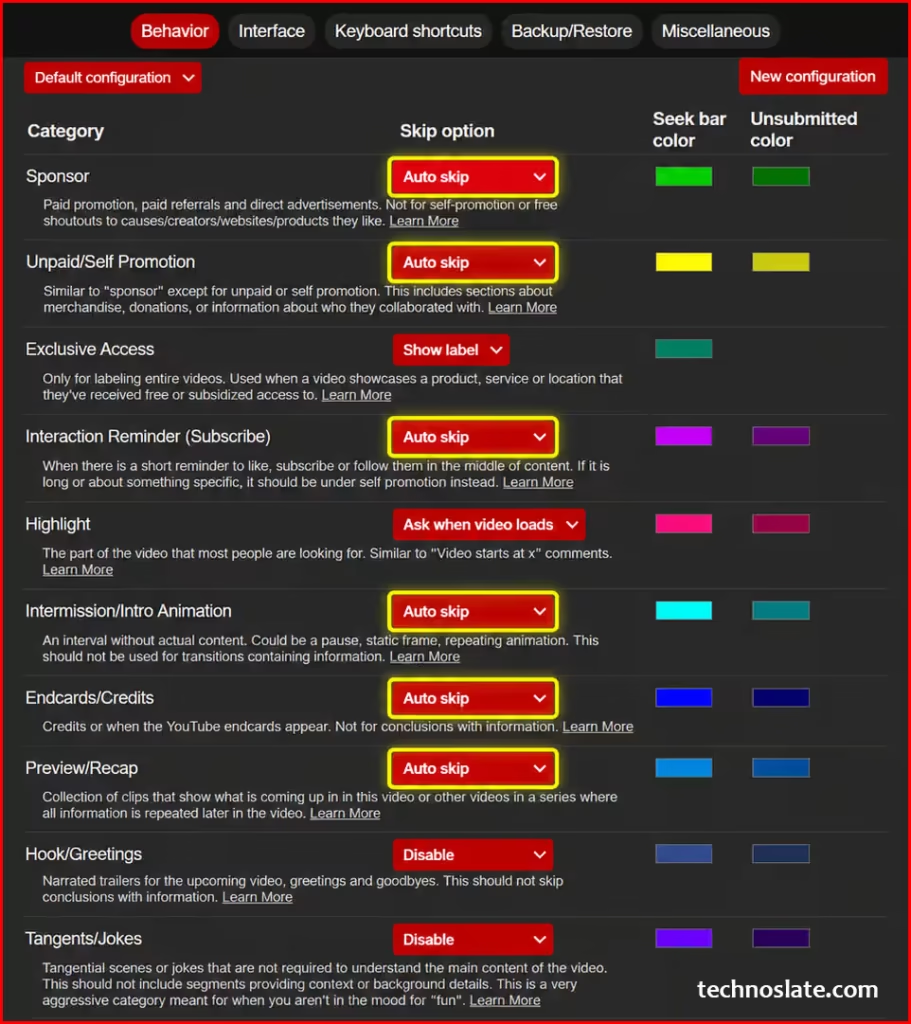
- Interface Options – Adjust how SponsorBlock appears on YouTube, including the visibility of certain buttons and notifications.
- Category Controls – Choose which types of segments you want SponsorBlock to handle, such as sponsor messages, intros, or outros.
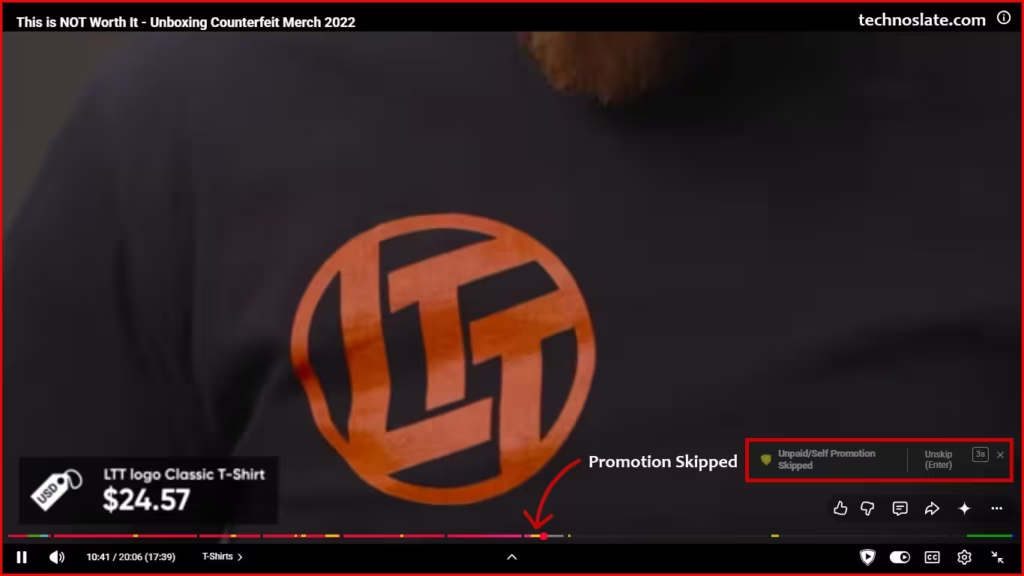
- Skip Action – Decide whether supported segments should be skipped automatically or whether you want a button to appear so you can skip them manually.
- Visual Markers – Show or hide colored markers on the YouTube progress bar that indicate different segment types.
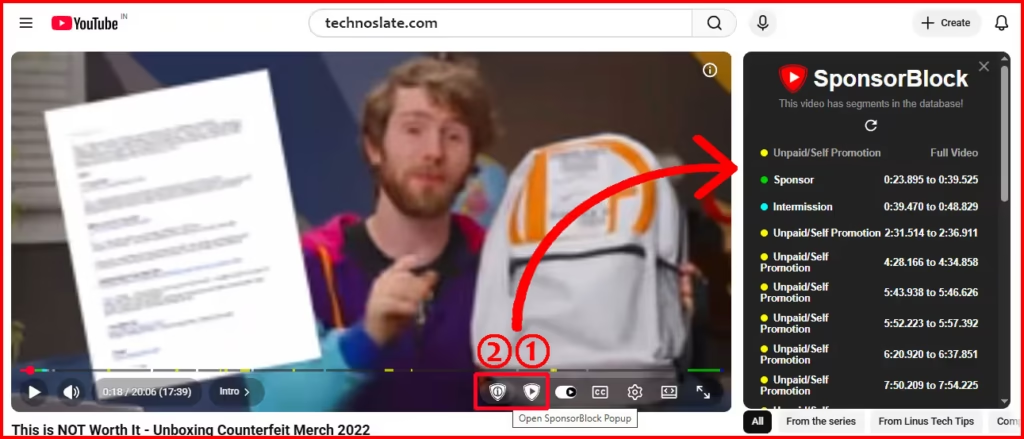
When a viewer comes across a section that fits one of the supported categories, they can mark where that segment starts and ends. Those timestamps are then made available to other users who watch the same video. As a result, someone watching the video later doesn’t have to identify those sections manually. SponsorBlock already knows where they are and can respond based on the user’s settings.
As shown in the image, hover your cursor over the SponsorBlock icon on the YouTube video player. An additional icon will appear on its left side. Click that icon to view the segments SponsorBlock has identified for the current video. If you want to contribute by marking a new segment, click the button labeled 1 in the image. This opens the submission tool, where you can mark the start and end of a segment that should be skipped for other SponsorBlock users.
This approach works particularly well because people can usually recognize these segments more accurately than an automated system. A sponsored message, for example, can appear in different styles depending on the creator. What looks obvious to a viewer may not be easy for software to detect consistently.
The system also improves over time as more people interact with videos. Popular content often receives attention from a larger number of users, which helps maintain accuracy and coverage. From a viewer’s perspective, the process remains simple. Once the extension is set up, everything happens in the background while you focus on watching the video.
Useful Features of SponsorBlock Chrome Extension
Several features help SponsorBlock Chrome Extension feel more flexible than a basic browser add-on. Beyond its core purpose, SponsorBlock includes a few thoughtful features that make everyday use more convenient. None of these features are essential on their own. However, together they make SponsorBlock feel more refined and practical, especially for people who watch YouTube regularly. Some of the most useful ones are:
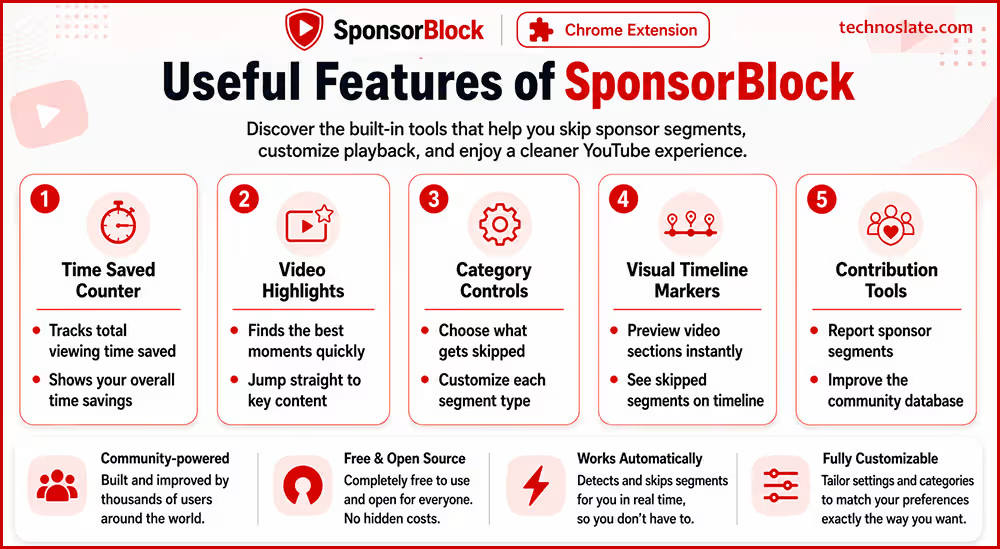
- Time Saved Counter – Keeps track of how much viewing time has been avoided over the course of using the extension. It provides a simple way to see the cumulative impact of your usage.
- Video Highlights – On supported videos, SponsorBlock can point viewers toward a notable moment in the content. This can be helpful when a video contains one section that attracts the most interest.
- Category Controls – Different types of segments can be managed individually, allowing users to tailor the experience to their own preferences instead of relying on a fixed setup.
- Visual Timeline Markers – Supported segments can appear directly on the YouTube progress bar. This gives viewers a clearer picture of a video’s structure before reaching those sections.
- Contribution Tools – Users who want to participate can help improve coverage by marking relevant segments when they encounter them.
Is SponsorBlock Safe to Use?
Many users consider SponsorBlock Chrome Extension trustworthy because its development process is publicly visible. Whenever people install a browser extension, one question usually comes up: can it be trusted?
In the case of SponsorBlock, one factor that gives many users confidence is its open source nature. This means the code behind the project is publicly available, allowing developers and security conscious users to examine how the extension operates. Projects that are open to public inspection tend to attract more scrutiny, which can help identify issues more quickly.
Another point worth noting is that SponsorBlock does not require users to create an account before using its core functionality. This keeps the setup process simple and removes the need to manage additional login credentials. That said, no browser extension should be installed without checking its source. The safest approach is to download SponsorBlock from an official extension store and review the permissions it requests before adding it to your browser. This is a good habit to follow with any extension, not just SponsorBlock.
For most users, the experience is straightforward. Once installed from a trusted source, SponsorBlock functions in the background without requiring constant attention or ongoing maintenance.
How to Install SponsorBlock Chrome Extension
Installing SponsorBlock is straightforward:
- Open the Chrome Web Store.
- Search for SponsorBlock. You can also get it from here.
- Open the official extension listing.
- Click Add to Chrome.
- Confirm the installation when prompted.
Once installed, open YouTube and play a video. If supported segment information is available, SponsorBlock will begin working automatically. You can also open the extension’s settings to adjust its behavior according to your preferences.
SponsorBlock vs YouTube Premium
At first glance, SponsorBlock and YouTube Premium may seem like solutions for the same problem. However, they are designed with different goals in mind. YouTube Premium is a subscription service offered by YouTube. Its primary focus is providing an ad free experience across the platform, along with additional benefits such as background playback and offline downloads.
SponsorBlock takes a different approach. Instead of changing how YouTube delivers content, it focuses on specific parts within videos. This makes it useful for viewers who want greater control over what portions of a video they spend time watching. The difference becomes easier to understand when looking at them side by side:
| Feature | SponsorBlock | YouTube Premium |
|---|---|---|
| Requires a monthly subscription | No | Yes |
| Removes YouTube ads | No | Yes |
| Works with selected video segments | Yes | No |
| Background playback | No | Yes |
| Offline downloads | No | Yes |
Because they serve different purposes, some users see them as complementary rather than competing options. The better choice depends on what matters most to you. If your goal is avoiding platform wide advertising, YouTube Premium offers clear advantages. If you care more about controlling certain parts of the videos you watch, SponsorBlock provides functionality that addresses a different need.
Limitations of SponsorBlock Chrome Extension
No tool is perfect, and SponsorBlock is no exception. Before installing it, there are a few practical limitations worth keeping in mind. These limitations are relatively minor for most people, but they highlight an important point: SponsorBlock works best as a convenience tool. The value you get from it largely depends on how you watch YouTube and the type of content you spend the most time watching.
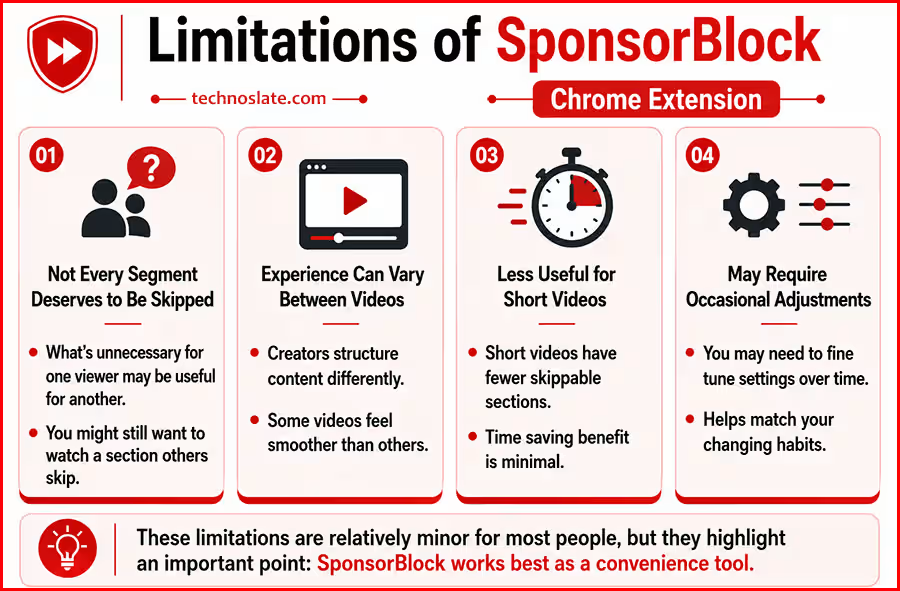
- Not Every Segment Deserves to Be Skipped – What feels unnecessary to one viewer may still be useful to someone else. In some cases, you might prefer watching a section that others choose to bypass.
- Experience Can Vary Between Videos – The way creators structure their content is not always the same. As a result, the overall experience may feel smoother on some videos than on others.
- Less Useful for Short Videos – When a video is only a few minutes long, the time saving benefit may not feel as significant as it does with longer content.
- May Require Occasional Adjustments – Some users like to fine tune how the extension behaves over time as their viewing habits change.
Does SponsorBlock Affect Content Creators?
Whenever a tool changes the way people consume content, it naturally raises questions about its impact on the people who create that content. For many YouTubers, sponsorships are an important source of income. Unlike platform generated revenue, sponsorship agreements are often arranged directly between creators and brands. Because of this, sponsored segments play a role in supporting the production of future videos.
At the same time, viewers have different expectations. Some prefer watching every part of a video as intended by the creator, while others want the freedom to focus only on the sections they find relevant. SponsorBlock exists because a portion of the audience values that level of control over their viewing experience. This difference in perspective is why opinions about SponsorBlock can vary.
Supporters often see it as a personal choice that helps them use their time more efficiently. Critics may argue that skipping sponsored messages reduces the visibility that brands expect when they work with creators. There is no single answer that satisfies everyone. The discussion ultimately comes down to how individuals balance viewer convenience with creator support. Understanding both sides of the conversation can help users make a more informed decision about whether the extension aligns with their own preferences.
Frequently Asked Questions
- Will SponsorBlock Slow Down YouTube?
- For most users, SponsorBlock runs quietly in the background without creating noticeable performance issues. The overall experience depends on your browser, device, and the number of extensions installed, but the extension itself is generally lightweight.
- Can SponsorBlock Be Customized?
- Yes. Users are not locked into a single setup. Different viewing preferences can be accommodated through the extension’s settings, allowing people to choose how they want certain supported segments to be handled.
- What Happens If No Segment Information Is Available for a Video?
- In that situation, the video simply plays normally. SponsorBlock does not interrupt playback or prevent you from watching content when no information is available.
- Is SponsorBlock Worth Using for Occasional YouTube Viewers?
- That depends on how often you use the platform. Someone who watches YouTube for a few minutes each week may notice little difference, while frequent viewers are more likely to appreciate the convenience it provides over time.
Final Verdict
Not everyone watches YouTube the same way. Some people don’t mind sitting through sponsor messages, while others would rather get straight to the part of the video they came to watch. That’s exactly where SponsorBlock fits in.
What makes it appealing is its simplicity. You install it, use it as you normally would, and it quietly works in the background without asking for much attention. At the same time, it gives you the freedom to decide how much control you want over your viewing experience. Of course, it isn’t perfect. There will be times when a video doesn’t have available segment information, and some viewers may prefer watching videos exactly as creators publish them. Whether those trade offs matter depends entirely on personal preference.
If you spend a lot of time watching tutorials, reviews, podcasts, interviews, or other long form content, SponsorBlock Chrome Extension is worth trying. It won’t completely change YouTube, but it can make everyday viewing feel a little smoother and more convenient.
We appreciate you taking the time to read this article. If you found the information helpful, share it with others who may benefit from it. Have a question or want to share your experience? Leave a comment below, and we’ll do our best to respond. Keep exploring our blog for more useful guides and insights. Browse more valuable resources and articles below.
- MYNT Material You New Tab – Should You Install It in Chrome?
- Buyhatke – Save Thousands in Big Billion Days
- OneTab Chrome Extension : 5 Surprising Benefits Every Chrome User Should Know
- Unhook Chrome Extension: 7 Powerful Features That Make YouTube Less Distracting
- Consent-O-Matic Chrome Extension Explained: 9 Powerful Things You Should Know Before Using It